
Now Live: Email Validations

Now Live: Email Validations

Email Verification with BigMailer

Feb 12, 2024 – Email Verification is LIVE

We are excited to announce that BigMailer customers can now verify their email lists automatically, saving time and money on using 3rd party tools outside BigMailer that cost x2-3 more than BigMailer verification service. BigMailer customers can verify their contacts during the list import step, via embedded webforms, and via API (add contact, upsert contact).

How Does Email Verification Work?

You can use BigMailer’s email verification in every way that you can add contacts into BigMailer – via manual list imports, embedded web forms, or APIs.

During the list import step, BigMailer users that have Administrator role will be given an option to verify the list they are importing, and automatically remove all invalid emails from the imported list. The invalid emails will be available for download as part of the error file that is shown on the Import page now, with appropriate validation result.
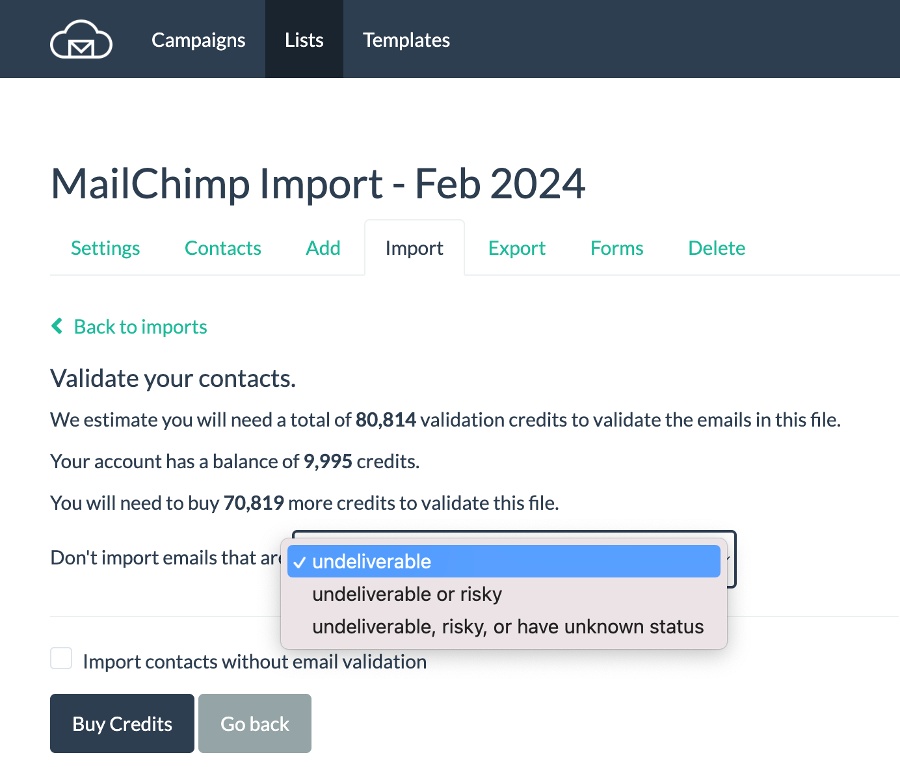
There are 3 options for automatic removal of emails from your imported list:

  1. Remove Undeliverable emails only – this option removes emails that can’t receive email. We recommend this for most customers.
  2. Remove Undeliverable and Risky emails – invalid emails, plus emails that are likely to hard of soft bounce. We recommend this for recently inactive lists.
  3. Remove Undeliverable, Risky, and Unknown emails – same as option above, plus unknown emails. Unknown emails are likely to soft-bounce for a variety of reasons: a) mailbox full b) email server is temporarily unavailable c) email server returns an error. We recommend this for lists older than 1 year.

Risky and unknown emails can bounce at 30% or higher rate and engage at very low rates, so it’s up to you to decide if you want to keep them on your list or prefer to not take a risk.

If you don’t want to miss out on any subscribers but want to protect your sender reputation, you can initially chose option 2 or 3 above, then download the error file and  re-import them with a #1 verification option into a separate list. You can then “pepper in” some of the risky emails slowly into your email activity over a long period of time to validate through sending. Avoid using Risky on your 1st campaign with a new provider or a sender domain with no recent sending history, to prevent damage to your sender reputation and negative impact on your future inboxing.

To validate emails added via API just pass a flag validate=true to either of these two api endpoints – create contact, upsert contact. When this flag is set, all emails added via API will be validated and any invalid emails will get discarded.

You can also turn on email validation on your embedded web forms with a simple checkbox:
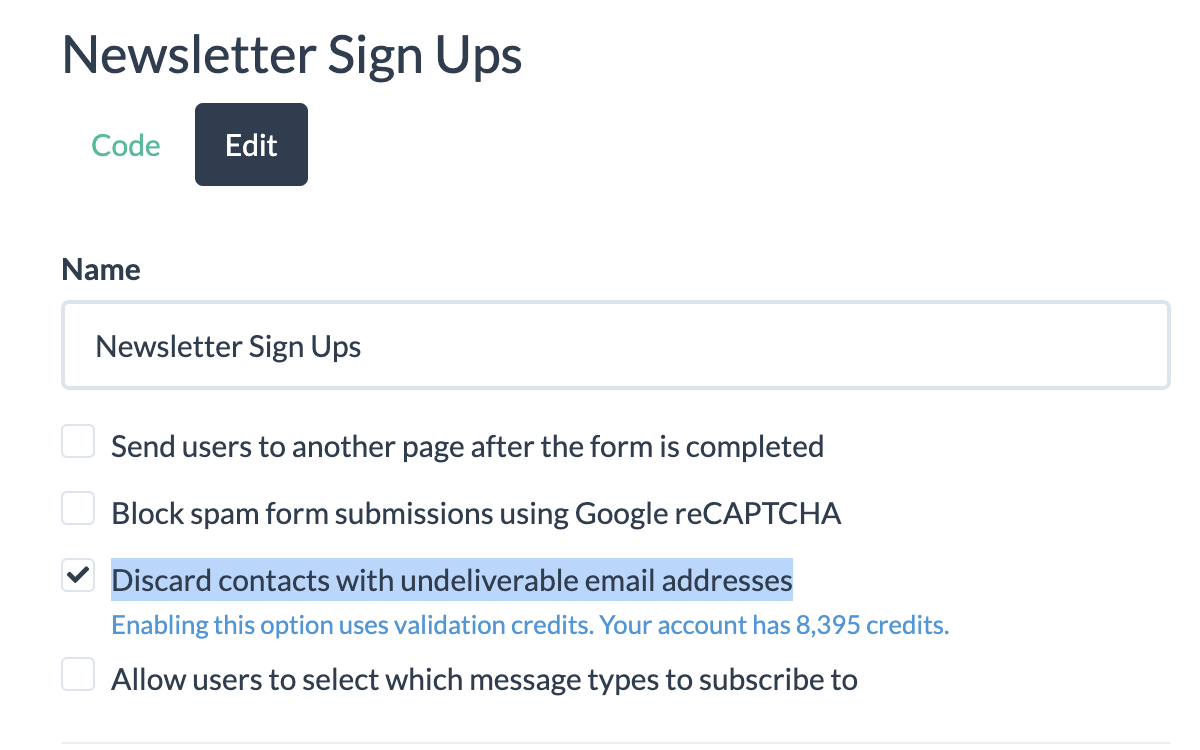
built-in email validation

Email Verification Results

Once you confirm verification options, BigMailer will import your list without the emails you chose to not import. The verification speed is very fast and will not cause you any major delays with importing your lists. Some example verification speed times:

  • <5,000 emails – under 1 min
  • 50,000 emails – under 10 min

The confirmation page will redirect you to the import archive page where all your import jobs and statuses are shown.
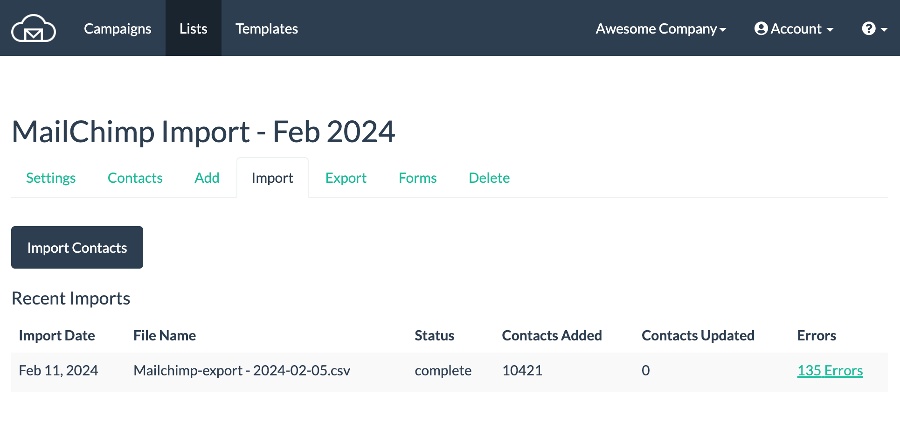
On the results page you will see a link to your error file. The most common result codes you would see in your error file, after an import is complete (with or without validation), are listed below. Only the last three are a result of verification with credits used. Invalid and duplicate emails don’t use validation credits.

Result Code Description
INVALID_EMAIL The column value is not a syntactically valid email address.
EMAIL_TOO_LONG The email is more than 100 characters.
DUPLICATE_EMAIL The email address was already encountered and imported from a previous row in the CSV file.
TOO_MANY_FIELDS The row had too many fields (more than 100).
FIELD_TOO_LONG The row had has a column value that is too long (more than 255 characters).
EMAIL_UNDELIVERABLE The email address is undeliverable.
EMAIL_RISKY The email address is risky and likely to bounce.
EMAIL_UNKNOWN The status of the email is unknown and likely to bounce.
TYPO The email address contains a typo, possibly a typo spam trap.


Cost of Email Verification

Email verification rate at the time of this announcement is $1.5 per 1k contacts and credits can be purchased in increments of 5k with a 10k minimum. Any unused credits will remain as a balance on your account. Volume discounts are available for purchasing 100k, 300k, 500k, and 1M validation credits. Please reach out to support via live chat to buy credits with a volume discount.

Credits Discount Cost
Up to 99,000 $1.5 per 1000 emails
100,000-299,999 10% $1.2 per 1000 emails
300,000-499,999 20% $1.05 per 1000 emails
500,000-999,999 30% $0.90 per 1000 emails
1M+ 40% $0.75 per 1000 emails


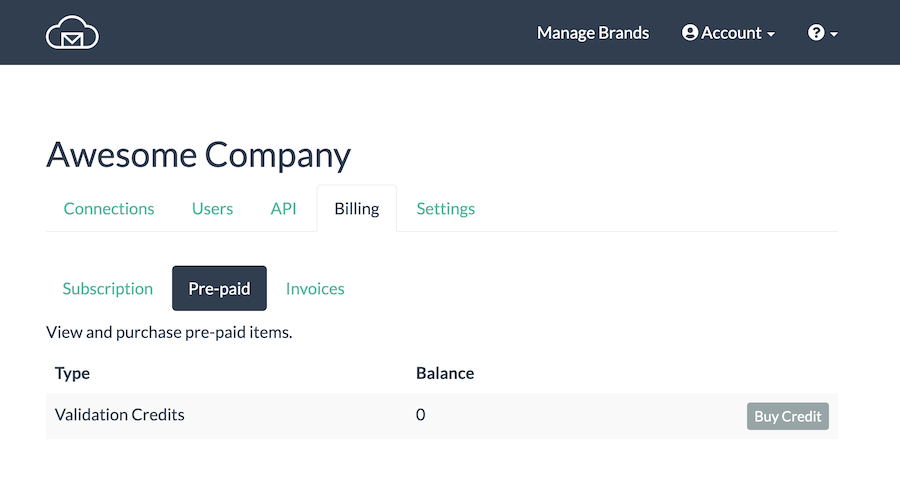
There are 2 payment options – use existing credit balance or buy more credits. Customers with Administrator role (only) can buy credits from their Billing page, under the Pre-Paid credits tab.
How Accurate Is BigMailer Validation?

BigMailer is using a combination of internal data and established 3rd party services for verifying your email list. While many providers will tell you their accuracy is 97-99% we think these type of claims are misleading. Not all emails can be verified, so the accuracy will depend on your list age and diversity of email domains, e.g. what % of your list is Yahoo for example. The older your list, and the more yahoo.com addresses you have,  the more invalid emails you will have. This is because providers like Yahoo (and very recently Gmail) suspend email accounts for inactivity, so those email addresses are still valid but not able to receive emails.

Bottom line, verifying with BigMailer will never result in high enough bounce rates to cause any issues with your sender reputation. If your list is older, consider removing both risky and unknown email addresses to lower your bounce rates.

Most senders will still have hard/soft bounces on their campaigns after using ANY email verification provider. But as long as your hard bounce rate is below 2%, which may indicate a natural list decay, your sender reputation and future inboxing will not suffer from low bounce rate.

Most email lists decay at 1-3% per month with B2B lists having a faster decay rates due to job switches. So if you have not sent to your email list for more than 1-2 months you should always re-verify it to keep hard bounce rates low.

Email Verification and Deliverability

List quality is only one of many factors influencing your deliverability. Typical email verification can help you remove invalid emails, but most providers are unable to identify spam traps you may have collected over the years. Spam traps are typically hiding in your inactives segment, so sending less frequently to inactives and having a sunset policy in place can help.

Please review our article on advanced deliverability tactics and implement as many strategies listed as possible, for best deliverability and inboxing. Need help with deliverability issues? Request your account audit via our chat support.
Pricing Changes

Pricing Changes

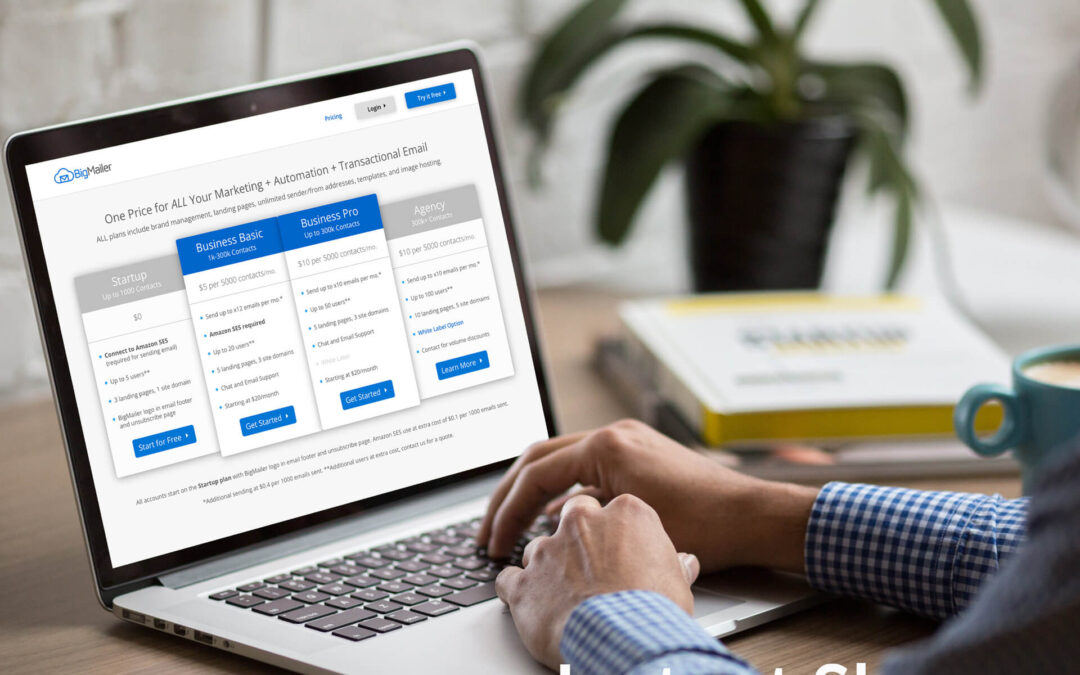
February 2025 updates – Premium Plans

We are updating the pricing for our customers on Premium plans, those including x30 sending credits per month, as follows:
Business Premium is now $30 per 5k, up 33% from $22.5 per 5k
Agency Premium is now $27 per 5k, up 20% from $22.5 per 5k
Both plans are still discounted relative to our Pro plan that includes x10 sending credits per month. Based on the Pro plan rate of $12.5 per 5k, the Premium plans offer 20-30% discount on high volume sending.

This change is in effect for new customers now, as of Feb 10, and will be in effect for existing customers on or after Mar 10h, 2025.

January 2025 updates – Business and Enterprise Plans

Announcement Date: Jan 15, 2025

We are updating the pricing for our Business plan, that requires a use of Amazon SES connection, from $5 per 5k contacts to $6 per 5k contacts, a 20% increase. This change is in effect for new customers now, as of Jan 15, and will be in effect for existing customers in 3 months, on or after April 15h, 2025.

Announcement Date: Jan 22, 2025

We are updating the pricing for our customers on our old Enterprise plan from $4 per 5k contacts to $5 per 5k contacts, a 20% increase. This change affects previously grandfathered customers and is in effect on Mar 15, 2025.

Why the change? We introduced these plans when we launched in 2017, and the prices for these plans remained the same for 6 years! In that time, we have made significant improvements to both the product and our infrastructure, all while experiencing increase in prices from our vendors.

Our pricing page and billing pages were already updated to reflect these changes for new customers.

October 2024 updates

Announcement Date: Oct 7, 2024

#1. We are updating the pricing for our Business Pro plan from $10 per 5k contacts to $12.5 per 5k contacts, a 25% increase. The lowest starting point is going up from $40/mo. to $50/mo. This change is in effect for new customers now, and will be in effect for existing customers on a billing period that starts after Jan 6th, 2025.

#2. We are increasing our overage fee from $0.4 to $0.5 per 1000 emails sent. This change is in effect immediately for all customers.

Our pricing page and billing pages were already updated to reflect these changes.

November 2023 updates

Announcement Date: Nov 20, 2023

#1. We are removing unlimited sending on Business, Agency, and Enterprise plans that require Amazon SES connection and replacing it with a monthly sending limit of x12 list size (approx. 3 emails per week to entire list). Sending above the monthly limit is subject to overage fee of $0.4 per 1000 emails sent.

#2. Delivery stats and Sent/Delivery notifications via webhook are subject to additional fees:

  • Sent notifications via webhook – $20 per 100,000 contacts per month
  • Delivery stats – $40 per 100,000 contacts per month

#3. We increased the starting billing level for Business plan to $20/month from $10/month. Existing active customers are not affected, as long as they keep their accounts in good standing. If a subscription gets canceled due to past due billing status it has to re-activate with all new pricing changes in affect.

#4. We are updating the pricing for our Enterprise plan from $4 per 5k contacts to $5 per 5k contacts, a 20% increase. This change is in effect for new customers only, effective immediately.

Our pricing page and billing pages were already updated and the changes are in immediate effect for new customers only. These changes will be in effect for existing customers on their billing period that starts on or after January 1st 2024.

Frequently Asked Questions

I only send 2-3 emails per week to my entire list, will my cost change?

No, if you send 3 times per week or less frequently there is no monthly/total cost change.

I am sending daily or more than once a day, can I get a discount on overage fees? 

If you are not storing a lot of images on BigMailer platform, or willing to switch to hosting images elsewhere (your store or website) you can request a custom volume discount. Please reach out via chat to discuss.

Do you offer volume discounts?

Not on plans that require use of Amazon SES, unless the sending is very infrequent (once a month or less often) and you are on Agency or Enterprise plans. We do have more flexibility with custom discounts for customers on our Pro (x10 monthly limit) and Premium (x30 monthly limit) plans that don’t require Amazon SES connection.

Would it cost me more to switch to send with BigMailer instead of Amazon SES?

It depends on your sending frequency. If you send x10 per month than the cost between Basic and Pro plans is comparable, almost identical. If you need to send daily, then switching to our Premium plan can save you money on the overages. Business/Agency Premium plans comes with x30 monthly limit and don’t require Amazon SES connection. The overage for sending above limit is still $0.5 per 1000 emails.

Are there more pricing changes coming?

We commit to not raising prices for the same plan/product for at least 12 months after a price change. We have never changed pricing for Business plan before, since we launched in 2017. We might add custom data storage policies to all plans sometime in 2025, but it will likely affect less than 10% of our customers.

Is there any way to lock into my current pricing?

You can lock your current price by switching from a monthly plan to an annual plan that also comes with a 15% discount.

Still have questions? Reach out to us via chat (once logged in) to discuss your account and current/future cost.

Dedicated IP for Email Marketing – Do You Need It?

Dedicated IP for Email Marketing – Do You Need It?

If you work with email marketing campaigns you no doubt heard about dedicated IP (internet protocol) addresses. Perhaps you have been wondering about who uses them and if you should use one yourself. In this article, we explain what they are for and who should use them.

What is an IP?

IP (internet protocol) address is a unique address that identifies a device (computer or server) on the Internet or a local network. When you start using a hosted transactional or bulk email marketing service, by default, your emails are being sent from a group of servers with different IP addresses, and that group of servers is shared by multiple senders like you. So your emails go out from a “shared IP pool” and the reputation of those shared IP addresses is shared as well. The IP reputation is one of the factors that influences email deliverability and inbox placement.

IP Reputation as an Email Deliverability Factor

Lets make one thing clear – deliverability is not the same thing as inbox placement – an email in Spam folder is considered to be delivered. A lot of ESPs (email service providers) claim to have high deliverability, but that just means they can avoid delivery blocking by ISPs based on volume of emails sent from a single server/IP. High delivery rate is nice, but you still need to place into subscriber’s inbox, which is much harder than getting your email delivered.

Most ESPs are responsible for managing (and protecting) the reputation of the IP addresses used by their platform. For that reason, many ESPs turn away customers if/when they determine that their use of the platform may negatively affect other customers. Some platforms (like Mailchimp) scan the email lists customers upload to automatically determine its quality and can suspend account or campaigns based on that data. Many providers have a manual account or campaign review step for all new customers, so it’s not even possible to send a bulk campaign as soon as you sign up. This type of customer filtering and platform protection by market leaders results in 2 things:

  1. Desired customer pool with high quality senders and good email sending practices
  2. Higher prices for the service, in return for better IP reputation

So when you use a market leader like MailChimp or CampaignMonitor, that cost up to x10 more than some of the lower cost providers, you pay for “good company” in addition to extra features (e.g. multivariate testing, email template variety, direct integrations).

Does it mean that low cost email providers have lower quality IP pools than market leaders? No, if they are large enough they have many IP pools and likely sender quality tiers. Will your emails go to Spam folder if you use a cheap provider? It’s more likely, but not if all other email deliverability factors signal quality and you are placed into an IP pool with other good senders. ESPs have a way of ranking senders and grouping similar senders into appropriate IP pools. It’s a typical practice they don’t typically disclose to their customers, or everyone would ask to be on a better IP pool.

Email Deliverability Factors

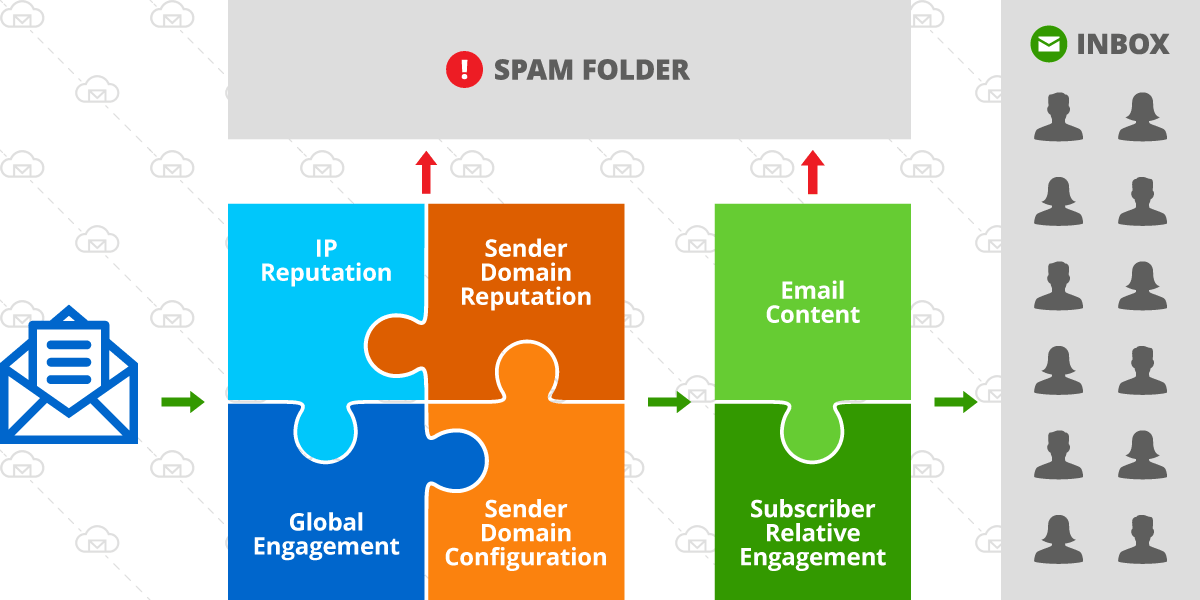
Lets review the factors that affect deliverability, they are:

  1. IP reputation
  2. Sender reputation (e.g. sender being your domain or exact email address the emails are sent from)
  3. Server and domain configuration (DKIM, SPF, tracking links, etc)
  4. Global engagement
  5. Content and format of the email (spam words in subject or message body, format – use of images, etc)
  6. Relative engagement for you (sender) versus other senders in the recipients inbox
email deliverability factors

Email deliverability factors

On the diagram above, the green box represents factors that vary and change more with each campaign sent and the square on the left with 4 factors are not subject to dramatic changes on a per campaign basis. So with IP address reputation being only 1 of several factors, it can be a deciding factor in inbox placement but it depends on the quality score of the other factors as well.

Who Benefits from a Dedicated IP?

If you are a sender with established good reputation and high engagement history, and especially if you are sending low volumes of emails (less than 10,000 per day), you have a low risk of being affected by a switch of an ESP from a market leader to a lower cost provider. However, getting a dedicated IP address can help ensure your ongoing high deliverability in the future, as your list grows and mailbox providers adjust their inbox placement algorithms.

If you are a high volume sender (send more than 50,000 emails per day) and perhaps have been experiencing deliverability issues with your current provider, switching ESP might not give you an instant improvement unless you change some of the factors as well – improve list quality by removing invalid or inactive addresses, properly configure your domain for sending emails (have DKIM in place), invest in testing your email content and optimal send times.

You can benefit from a dedicated IP address IF:

  • You are looking for a fresh start and looking to invest in building a strong email sender reputation with full control.
  • You have a small list now, but plan to grow it fast and monetize it
  • You have built up a sizable list (over 50,000 subscribers) and willing to invest in best practices and control your IP quality.
  • You are an agency offering email marketing services to your clients.

Unfortunately, low volume senders are limited in their options because most ESPs don’t offer an option to get a dedicated IP address on lower pricing tiers. And if you use an ESP that does offer access to a dedicated IP, it may come with a hefty price tag. If you use an ESP that runs on Amazon SES, like BigMailer, you can request a dedicated IP(s) from Amazon anytime, at a cost of $25 per IP per month. Check out our comparison of bulk email marketing services to see how different providers accommodate use of dedicated IP addresses.

How Many IPs Do You Need?

The need for IPs is determined by your list size and your practices. Most providers recommend 1 dedicated IP for every 50,000 (Amazon) to 100,000 emails you plan to send to at the same time (in a single campaign).

Examples:

  1. If your list size is 50,000 and you send newsletters to entire list you need 1-2 IP addresses
  2. If your list size is 1,000,000 but you typically send to a segment of about 200,000 you need 2-4 IPs
  3. If you are an agency with clients sending at different times, your IP needs need to cover the largest campaign you send at any given time. So you may have a dozen or more customers with millions of subscribers in total, but only need 2-3 IPs for all your clients.

Warmup Process – IPs and Senders

The warmup process applies to both new IPs and new sender domains. Most ESPs have automatic IP warming in place, and not something you need to worry about, but you should confirm this before a switch. During an automatic IP warmup your dedicated IP would be sending small number of emails with the rest of the volume being sent from a shared pool. It can take anywhere from 1 month to 6 months to warmup your IP address(es) to send 100% of your emails, depending on sending frequency.

When starting to use a new sender domain you need to warm it up by sending smaller volumes at the start and gradually increasing it. Typically, you would start sending to your most active or recently signed up subscribers to ensure good engagement and to help establish your sender domain reputation.

Example warmup schedule:

  • Day 1 – 500 emails
  • Day 2 – 800 emails
  • Day 3 – 1100 emails
  • Day 4 – 1500 emails

If your email list is very diverse and your list is large, because you are trying to move your existing activity to a new sender domain, you can start with 2000-3000 emails per day and add about 25-40% per campaign (smaller increments for daily campaigns and larger increments for x2/week or weekly campaigns. Typically, it’s better to send more frequently with smaller volume increments, but it requires a bit more effort from the sender.

There are many providers that can help you warmup your new sender domain, like WarmupInbox that is meant for warming up new sender domains, or InboxAlly that can also help improve your engagement and deliverability. What those providers do is give you a seed list (or just send on your behalf) of email addresses they control to interact with your emails, to help establish your sender reputation.

Final Thoughts

Have you recently switched ESP and experienced a big change in inbox placement? Share your experience with us via live chat. If you are a BigMailer customer we would love to use your story for a case study.

Happy email marketing!


AB testing is now LIVE

AB testing is now LIVE

Many of our customers have been waiting for AB testing and it’s finally live and can be used on our free plan. You can use subject line AB testing on Bulk/Marketing Campaign type only, not on automations or transactional campaigns.

What Is an A/B Test Campaign?

An A/B test campaign is a campaign with 2 or more versions being tested on one dimension – typically subject line or send time. A multi-variate test is a test with more than 1 dimension, for example if you are testing 2 different subject lines with 2 different versions of your message body you have 4 total versions and a multi-variate test, to determine the best combination of subject line and message body.

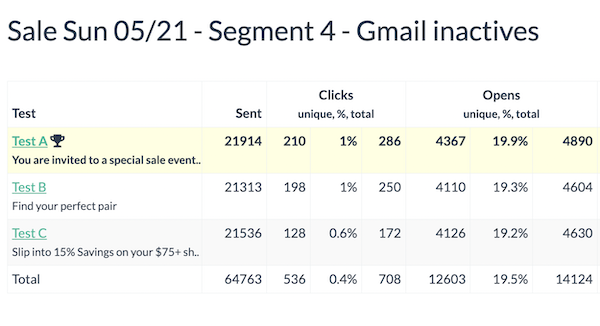
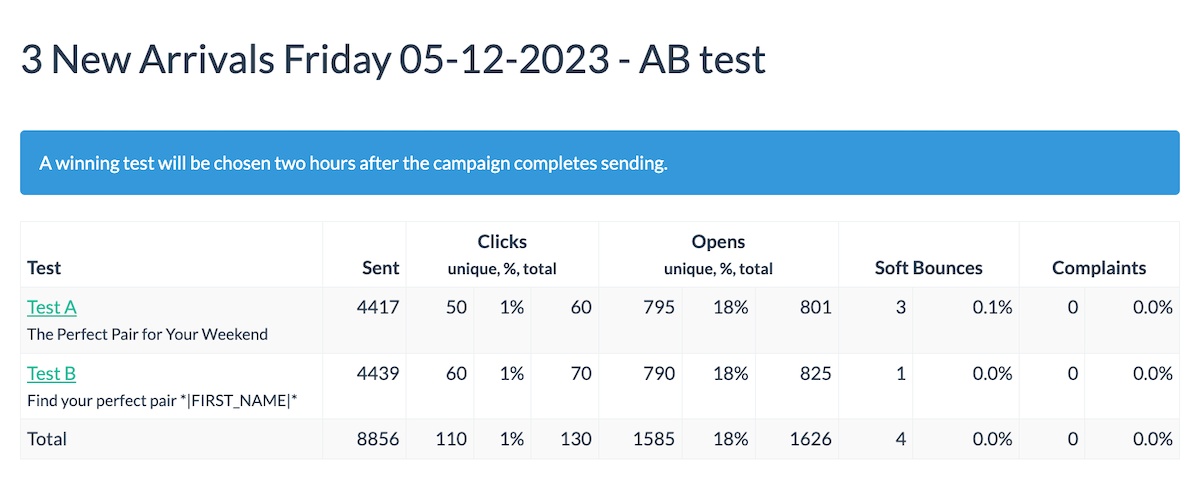
AB test results

Why Use AB Tests?

AB tests can help you optimize your campaign engagement, by determining best time or subject line to use. If you have a large list (over 50k) you can test a subject line on 20k and then use the best one on the rest of your list, improving your engagement overall.

You can setup AB test to determine:

  1. Ideal send time for your brand or list – test early on, then use that knowledge forever!
  2. Best subject line
  3. Best converting CTA in your email body

Besides producing better results (sales, conversions), higher engagement helps improve your future inboxing.

How to Setup an A/B or A/B/C Test on a Subject Line

Create your bulk/marketing campaign the same way you usually do, for example by copying and modifying your older campaign.

Determine how many variations do you want to test and click on the A/B Test button next to the subject line label:


AB testing is only available on bulk campaigns, not on transactional or automations. You can test up to 3 subject lines on a single campaign

TIP: You would need a good list size or high engagement to get statistically significant results.

A winner is selected at least 2 hours (or later) after campaign is sent, to allow for meaningful data collection, so you will only see raw data for the first 2 hours after a campaign is sent. 

AB test results

The winner is chosen based on open rate.

AB test results

That’s it. If you are a BigMailer customer you can reach out for assistance with this or anything else via chat 7 days a week.

If you want to AB test on send time, please refer to this article for detailed instructions.

Not a BigMailer customer? Why not try BigMailer for free, with no features locked? We are sure you will love it.

Landing pages are LIVE

Landing pages are LIVE

We are excited to announce that landing pages are now live. Many of our customers have been asking for an easier way to build landing pages with forms and it’s now possible!

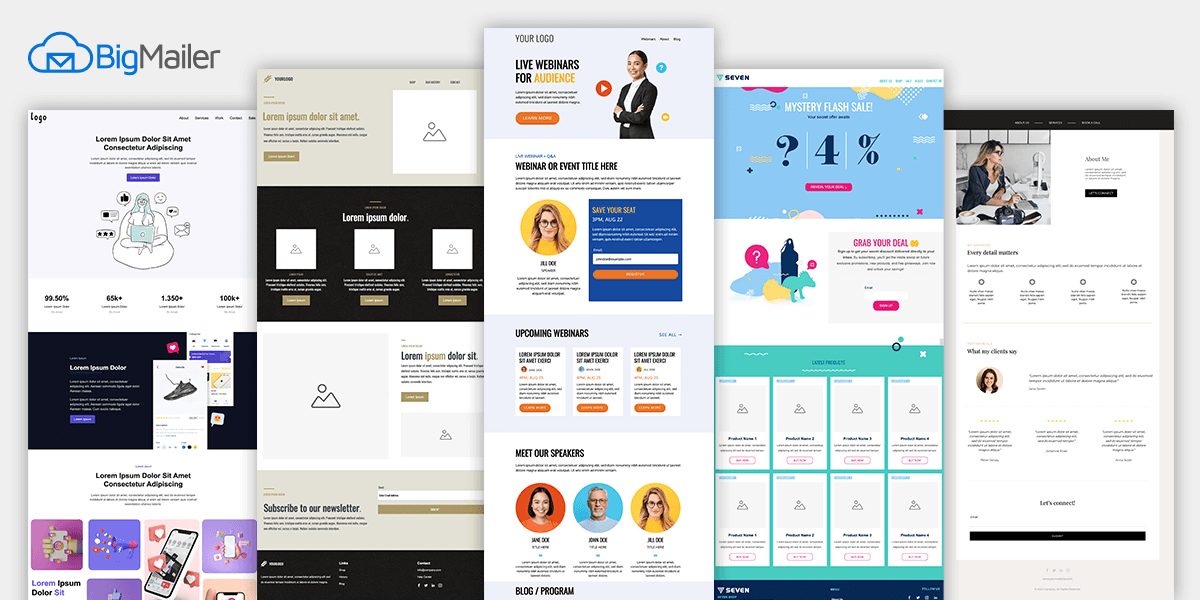
You can build your own landing pages from scratch, or use some of our library pages. We are starting with a few page templates in our library, but will be adding more in the coming weeks and months. Need something specific you don’t see? Reach out via chat and request a template.

So what can you do with BigMailer hosted landing pages?

Many things! Let’s review them all:

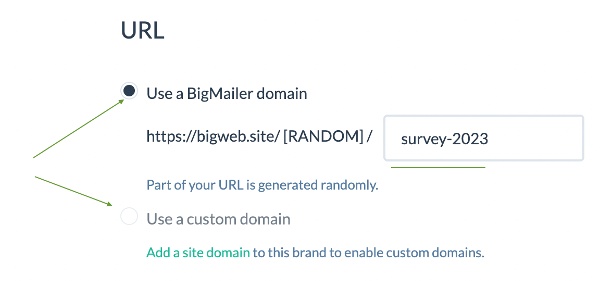
1. You can setup landing pages hosted either on a) BigMailer domain bigweb.site, or b) a custom site domain that you own.

2. Host 1 landing page in the root of your domain, e.g. host your homepage. So if you don’t have a website, you can set up a coming soon page to load as your homepage and host 1-2 other pages for a mini-site, even on our free plan! On paid plans, you can have 5-20 pages, depending on the plan.

3. Use landing pages with or without email/data collection forms. Most of our library templates have a simple form, typically an email signup, but those are optional.

4. See landing pages stats – visits, clicks, form conversions. Landing pages are stored under Campaigns, so you will see aggregate stats in the campaign dashboard and detailed stats on campaign report, just like email campaigns.

5. Upload and use images hosted on BigMailer or use images from your website. This is no different from how you managed email templates. The advantage of calling images from your site is that anyone who already visited your site will have those images cached in their browser, so the landing page will load for them much faster. This is especially useful for heavy graphics or product images.

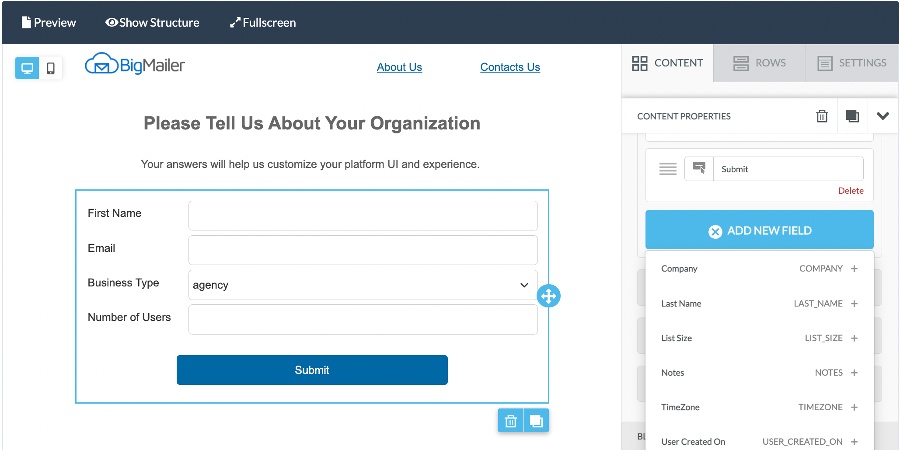
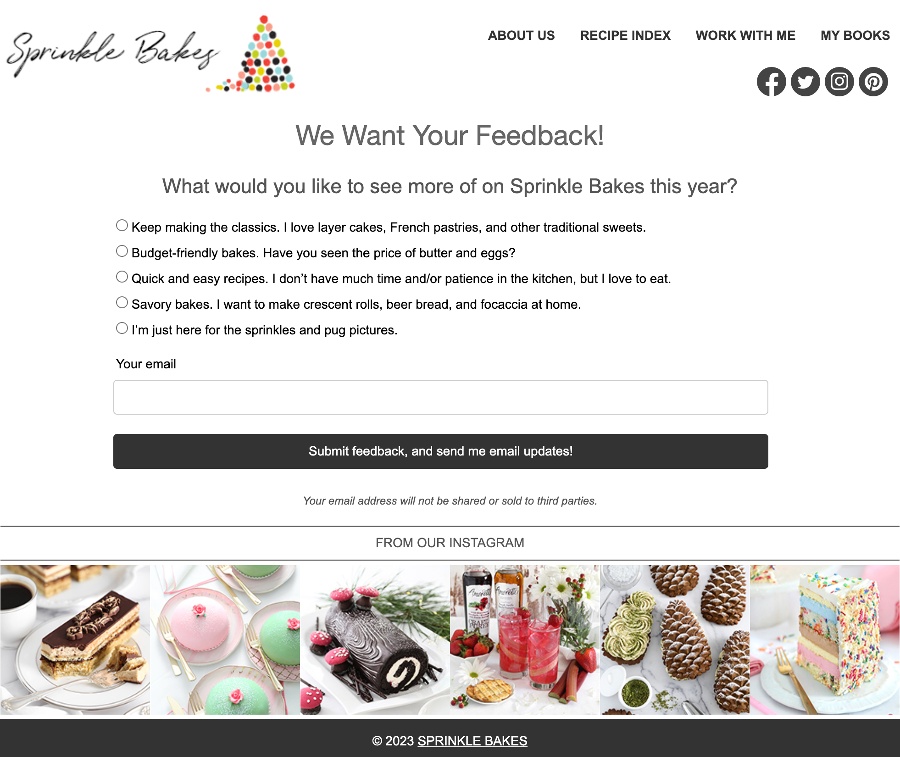
6. User forms to collect emails or other data. You can now run polls or surveys for your existing contacts or prospects and store their answers or preferences in your custom fields, which you can then use to segment and personalize your email campaigns. An email field is required on all forms.

Add new form field to LP

NOTE: To create a form with custom fields you need to create any new fields first, before you can add them to a form.

TIP: Use Full Screen mode to build, edit, and preview your pages at full width.

Landing Page in BigMailer

Can I use landing pages on a free plan?

You can host up to 3 landing pages for free, including a page in the root of your domain. You can host landing pages on BigMailer domain or your own.

What about pre-made page templates?

Yes! We added some page templates into the library – agency page, webinar/event signup, promo page, personal page, and more. We plan to keep adding more on ongoing basis and welcome your feedback and requests.

Page templates


How to Create a New Landing Page

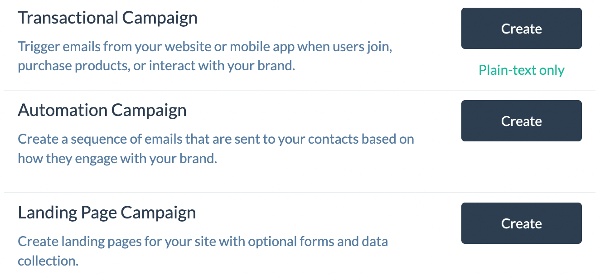
To create a landing page, go to Campaigns tab in the top navigation, then click Create and select Landing Pages campaign type.

BigMailer Create a Campaign

Once you have pages under your campaigns, you can copy them to create new ones, just like with email campaigns.

To get started, please refer to this help article for managing landing pages, it has more detailed instructions with screenshots and video.

Got feedback or need to make a request? Reach out to us via chat, we would love to hear from you.

Not a BigMailer customer yet? Get started for free.