by Chris | Aug 11, 2026 | Email Marketing
One of the most common mistakes in email marketing is using an ESP’s “Send Test” feature to evaluate inbox placement.
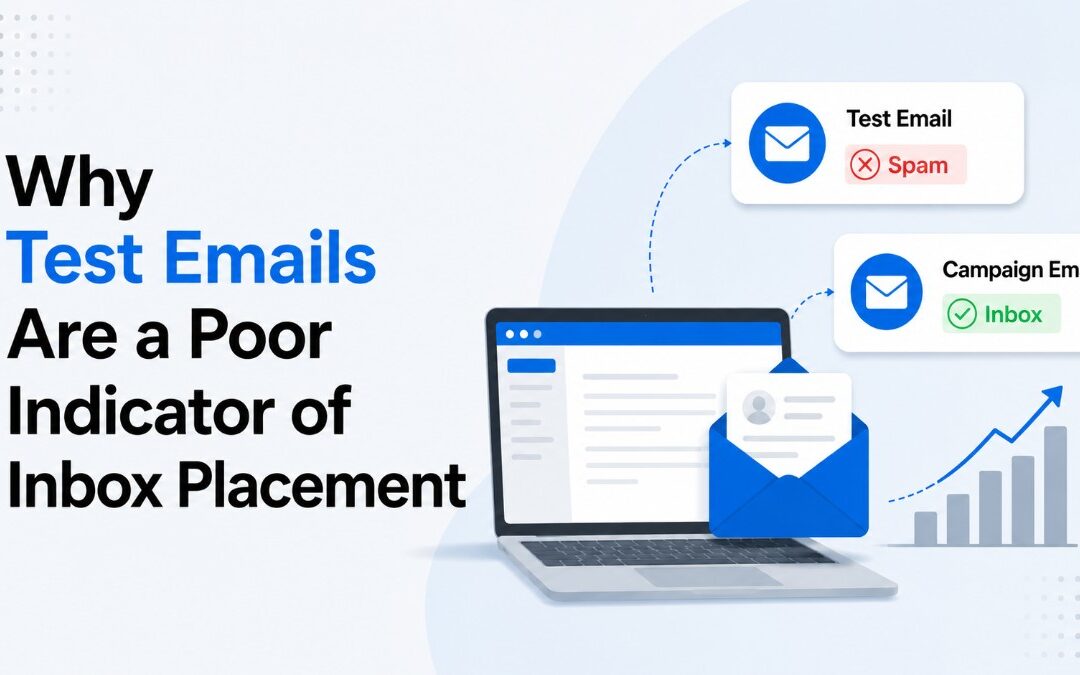
If your test email to your own Gmail or work account lands in Spam, it’s tempting to assume your campaign will too. In reality, a test email is often not the same message your subscribers receive, making it a poor indicator of real-world deliverability.
Depending on your ESP, a test email typically:
- Does NOT have open and click tracking
- Omit campaign-specific metadata (in the headers)
- Lack recipient-specific unsubscribe links (so the link is basically fake)
- Not include a functional one-click unsubscribe mechanism
- Be generated outside the normal campaign sending pipeline
While these differences may seem minor and not noticeable, mailbox providers evaluate much more than the visible content of an email. They consider message headers, links, unsubscribe mechanisms, authentication, and other characteristics that help distinguish legitimate bulk mail from suspicious messages.
Production campaigns include signals that are often missing from test emails, such as proper List-Unsubscribe headers and recipient-specific unsubscribe links. Without these elements, a test email may not accurately represent the message that mailbox providers evaluate during a real campaign.
That’s why it’s not uncommon for a test email to land in Spam while the actual campaign reaches the Inbox just fine.
So what’s the right approach?
Use “Send Test” for what it’s designed to do:
- Verify rendering and formatting
- Review appearance in the inbox (subject line and preview)
- Check personalization
- Validate links and images
If you want to evaluate inbox placement, send a real campaign to your test list instead. This ensures the email is generated through the same production pipeline as your subscriber campaigns, including tracking, campaign metadata, and unsubscribe functionality.
The closer your test resembles a real production email, the more meaningful your inbox placement results will be.
In short, test emails are a (mostly visual) QA tool—not a deliverability testing tool.
You might also like:
by Chris | May 28, 2026 | Email Marketing
Why Email Engagement Tracking Is More Complicated Than Ever
For years, email marketers relied on a simple formula: opens and clicks measured subscriber engagement. If someone opened your emails regularly, they were interested. If they clicked, even better.
That world no longer exists.
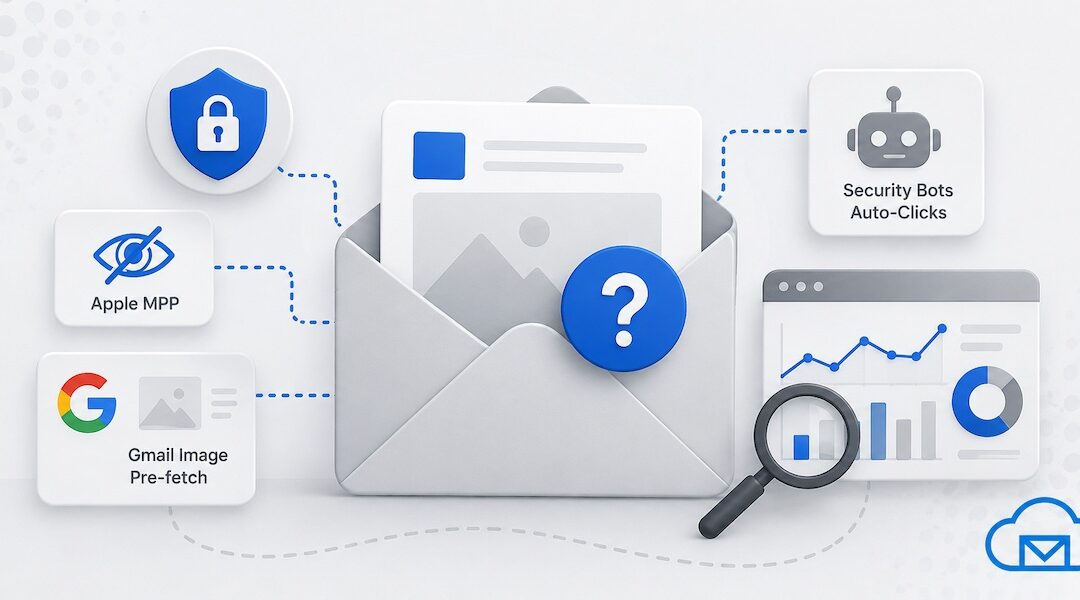
Today, engagement tracking is increasingly distorted by privacy protections, image caching, automated security systems, and inbox provider behavior that generate artificial opens and clicks. Metrics that once guided segmentation, deliverability decisions, and campaign optimization are now far less reliable than many marketers realize.
The problem is not limited to Apple Mail Privacy Protection (MPP). Gmail image pre-fetching, corporate email security scanners, and anti-phishing systems also contribute to inflated engagement metrics across nearly every major email platform.
Yet despite the known inaccuracies, most major ESPs (Email Service Providers) still report these events as opens and clicks.
Here’s why.
The Original Problem With Email Opens
Email opens were never a perfect metric.
An “open” is typically recorded when a hidden tracking pixel loads inside an email. But that only works if:
- Images are enabled
- The recipient’s email client loads remote content
- The request comes directly from the user’s device
Even before privacy changes, opens could be undercounted because some users blocked images. But marketers still treated opens as directionally useful because the errors were relatively consistent.
That changed dramatically with privacy-focused email clients and automated filtering systems.
Apple Mail Privacy Protection Changed Everything
In 2021, Apple introduced Mail Privacy Protection (MPP) as part of iOS 15 and macOS Monterey.
MPP works by preloading email images — including tracking pixels — through Apple proxy servers, often shortly after delivery rather than when the recipient actually reads the message.
As a result:
- Opens may be recorded even if the user never saw the email
- Open timestamps become unreliable
- Device and location tracking become obscured
- Engagement rates appear artificially inflated
For marketers, this created immediate reporting problems.
A recipient who ignored every campaign could suddenly appear “highly engaged” simply because Apple automatically loaded the tracking pixel.
This especially impacted:
- Engagement-based segmentation
- Re-engagement campaigns
- Sunset policies
- Deliverability optimization
- Send-time optimization algorithms
Many marketers initially assumed Apple MPP was the primary source of fake opens. It’s a major factor, but it’s not the only one.
Gmail and Google Image Pre-Fetching Also Affect Open Tracking
Google and Gmail have long used image caching and proxying systems that interfere with traditional tracking methods.
When Gmail receives an email, images are often fetched through Google proxy servers instead of directly from the recipient’s device.
This improves:
- Security
- Performance
- Privacy
- Malware filtering
But it also creates ambiguity in engagement data.
In some cases, Gmail image pre-fetching or proxy behavior can:
- Trigger opens before human interaction
- Mask recipient IP addresses
- Obscure device data
- Consolidate multiple opens into a single cached request
Google’s systems behave differently from Apple MPP, but the end result is similar: open tracking becomes less trustworthy.
And that’s before security software enters the picture.
Security Bots Create Fake Clicks Too
If inflated open rates were the only issue, marketers could simply rely more heavily on clicks.
Unfortunately, clicks are increasingly affected by automated security scanners.
Corporate email systems, enterprise firewalls, and security products frequently inspect links before a human user interacts with the email. These systems are designed to detect phishing attacks, malware, and malicious redirects.
Common examples include:
- Microsoft Defender Safe Links
- Proofpoint
- Mimecast
- Barracuda
- Cisco Secure Email
- Corporate gateway filters
These tools may automatically:
- Open links
- Scan redirects
- Visit landing pages
- Trigger click tracking URLs
As a result, marketers see clicks that never came from a real person.
Typical indicators of bot clicks include:
- Clicks occurring seconds after delivery
- Multiple links clicked instantly
- Impossible geographic patterns
- Clicks without corresponding human behavior
- Extremely short session durations
This is increasingly common in B2B email marketing, where enterprise security layers are aggressive.
Why ESPs Don’t Simply Filter Out Bot Opens and Clicks
Marketers often ask a reasonable question:
“If these are obviously fake interactions, why don’t ESPs just remove them?”
The answer is more complicated than it appears.
1. There Is No Universal Definition of a Bot Event
Not every automated event is clearly identifiable.
Some opens come from:
- Apple proxies
- Gmail caching systems
- Security scanners
- Privacy-focused browsers
- VPNs
- Corporate proxies
- Real users behind network filtering layers
The same IP ranges or user agents can sometimes represent legitimate user activity.
Aggressive filtering risks removing genuine engagement data.
2. Inbox Providers Continuously Change Their Behavior
Apple, Google, Microsoft, and enterprise security vendors regularly modify their systems.
Detection rules that work today may fail tomorrow.
Maintaining accurate filtering requires:
- Continuous infrastructure updates
- Large-scale behavioral analysis
- Constant monitoring of proxy and bot patterns
Even large ESPs struggle to keep pace.
3. False Positives Create Serious Customer Problems
If an ESP incorrectly suppresses legitimate opens or clicks:
- Automations may fail
- Segmentation becomes inaccurate
- Revenue attribution breaks
- A/B testing data becomes distorted
Many ESPs prefer reporting all measurable events rather than risk removing real interactions.
In other words, overcounting is often viewed as less dangerous than undercounting.
4. “Open Rates” Are Still a Widely Expected Metric
Despite their flaws, open rates remain deeply embedded in email marketing.
Customers expect to see:
- Open percentages
- Unique opens
- Click-to-open rates
- Engagement dashboards
Completely removing questionable activity would significantly lower reported metrics, often causing confusion or customer dissatisfaction.
Some ESPs therefore choose disclosure over aggressive filtering.
5. Bot Detection Is Expensive at Scale
Advanced bot filtering requires:
- Massive behavioral datasets
- Machine learning models
- Real-time pattern analysis
- Constant infrastructure tuning
For high-volume ESPs processing billions of events daily, this becomes technically and financially expensive.
Many providers implement partial filtering instead of attempting perfect accuracy.
What Marketers Should Do Instead
Modern email measurement requires a shift in mindset.
Instead of relying heavily on opens alone, marketers should prioritize:
- Click quality
- Website behavior
- Conversions
- Purchases
- Replies
- Session depth
- First-party engagement signals
It’s also important to analyze engagement patterns holistically rather than trusting a single metric.
For example:
- An “open” without any downstream activity may be meaningless
- A click occurring one second after delivery may be automated
- Repeated site visits and conversions matter far more than pixel loads
The future of email analytics is increasingly focused on intent signals rather than raw engagement counts.
The Bottom Line
Major ESPs are not ignoring the issue. The reality is that filtering fake engagement perfectly is technically difficult, operationally risky, and often impossible with complete certainty.
For marketers, the key takeaway is simple:
Treat opens and clicks as directional signals — not absolute truth. Be cautious about using email engagement events for automations.
The most valuable engagement metrics now happen after the email itself:
- Website activity
- Product usage
- Purchases
- Replies
- Lead quality
- Customer retention
That’s where real intent lives.
Related Reading:
by Chris | Apr 23, 2026 | Announcements
Q3 Updates
Email Campaign Report – One-time or Recurring
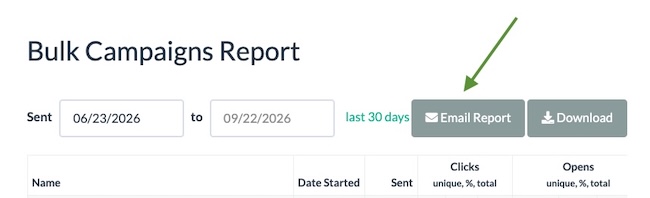
You can now send bulk campaign report to any email address – client, agent, etc. From the Campaigns dashboard page choose the desired date range for your report then click on Report button to see the new option. The new default data range for the report loaded on page visit is 90 days, but you can change it to any date range using the calendar widget.
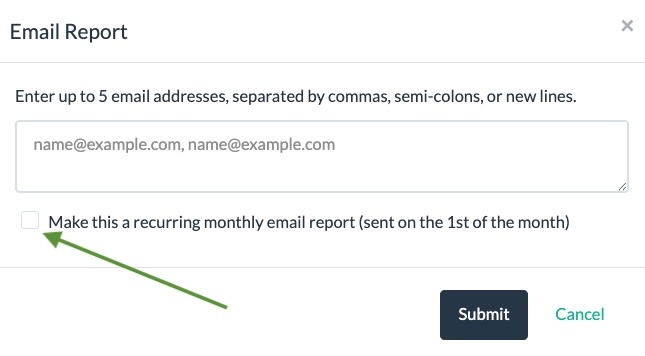
Once you click on the Email Report button, you will see an option to also setup a recurring monthly report.
The email message sent will not show the entire report, but it will have a link to a standalone report page, with a complete data set, that doesn’t require a BigMailer login. This standalone report page can be used for analysis by your AI agent of choice.
Timezone by brand
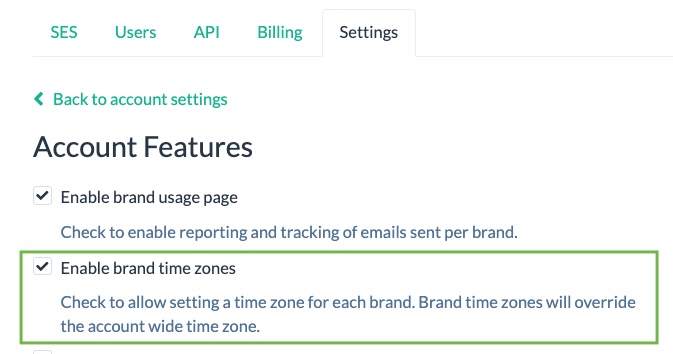
Customers can now enable brand specific timezones in their account settings. Once enabled, the timezone can be updated on the brand settings page.
Many small features and UX improvements
- Sep: new SES region added for South Africa
- We now auto detect DNS provider on the Sender Domains page, to help you add DNS records in the right place with the right format.
- You can now add a timestamp as a parameter for your RSS feed, to bust cache and retrieve the latest version.
- We added the user info on the import log page, for auditing purposes.
- Downloadable CSV report for the campaigns now includes start and end time, as well as subject line. You can use this raw data to analyze your engagement rates against day, time, and subject line by an LLM. We plan to add AI recommendations into BigMailer UI, if the data set is sufficient and recommendations are statistically significant.
- We pre-load a library template when a new campaign is created, to improve workflows.
Q2 Updates
We released the following platform updates in May:
Hourly scheduling option for RSS campaigns.
This option is useful for organizations that want to send more than just daily news updates to their subscribers.
Read-only User Roles
Campaign Viewer is a great option for agencies that want to give clients access to review, but not manage or edit anything.
New Formatting Merge Tags
- Display number in US dollars format, e.g. converts integer 1000 and text 1000.00 into $1,000
- Option to slice text to display X number of words. This can be especially useful with RSS title field on automatic RSS campaigns. In the example shown below the subject line gets first 4 words and the rest of the RSS title continues in the Preview field.
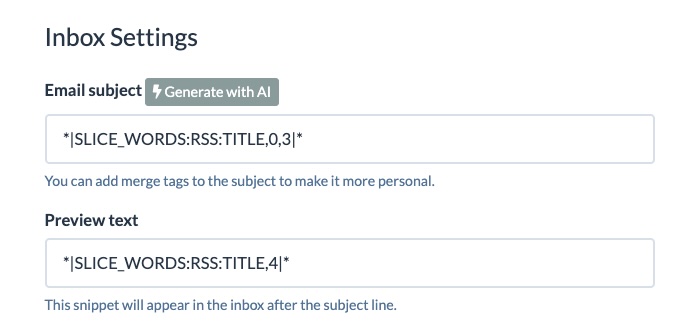
For more formatting options explore all merge tags here.
Q1 Updates
AI-generated subject lines, validation credits auto-refill, and and birthday/anniversary automation options are top features released in Q1.
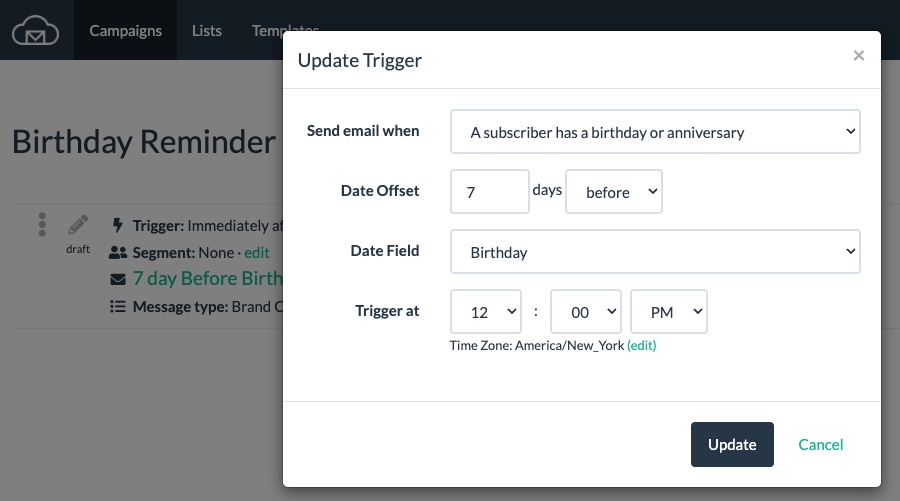
Birthday and Anniversary Emails
We introduced a new automation type for sending recurring reminders about upcoming even, like a birthday or anniversary.
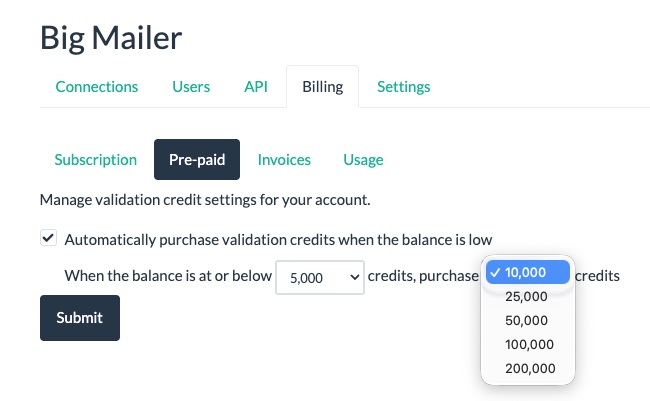
Auto-refill for Email Validation Credits
You can now choose your low balance threshold and the amount of credits to auto-purchase.
AI-generated Subject Lines
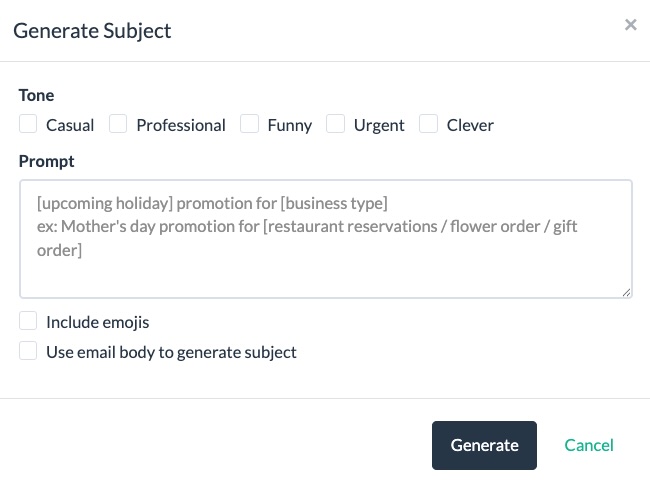
In April we introduced our first AI feature – AI-generated subject lines. After providing a prompt and specifying a desired tone you get 9 options to choose from for a single subject line or an AB test. Give it a try!
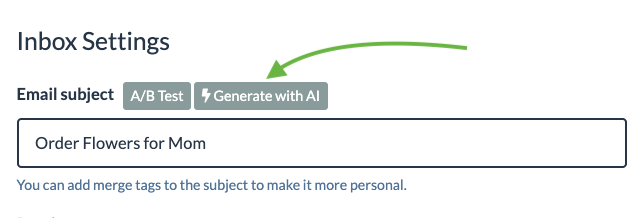
After you click on the “Generate with AI” button you will see a widget where you can add a prompt and choose settings.
New APIs
We have added a number of APIs for managing account, campaigns, and templates, for customers embedding BigMailer into their platform. For example, APIs for creating email templates, pre-defined segments, and message types.
UX Optimizations
We have expanded scheduling options on bulk campaigns to be every 5 min from 15 min increments, but we removed the option for scheduling a bulk campaign for top of the hour, when deliverability is at its worst for some mailbox providers. We saw higher rejection rates at the top of the hour, especially in the morning between 7am and 11am EST.
For Customers Using Amazon SES
We enabled ability to manage and assign tenants to your Amazon SES connections. Read more about Amazon SES tenants here.
What’s Next?
We are exploring other ways to embed AI into BigMailer platform, possibly generating email content for the body of the message or performance insights. Got ideas? Reach out via live chat. We would love to hear from you.
by Chris | Mar 30, 2026 | Email Marketing, Guides
CREDIT: Content for this post is based on a report generously shared by Sprout24 and provides a detailed analysis of incidents using publicly available data, historical trends and logical estimation.
Email remains the digital channel with the widest reach. Statista reports that there were 4.6 billion email users in 2025, projected to reach 4.89 billion by 2027.
Performance benchmarks are shifting under the weight of privacy protections and engagement filtering. A consolidated research dataset from VerifiedEmail (January 2026) notes that open rates declined from 48.69 % in 2022 to 26.9 % in 2025 due to Apple Mail Privacy Protection (MPP). Average click‑through rates (CTR) across industries sit around 2.0–3.2 %, with click‑to‑open rate (CTOR) near 5.6 %.
Deliverability now requires more than technical configuration. It has become a cross‑functional discipline spanning marketing, engineering, product and legal. Major mailbox providers now evaluate engagement, consent, and user experience across the entire customer lifecycle.
Outlook Rate‑Limiting Crisis 2026
This year, Microsoft consumer email infrastructure malfunctioned, exposing the fragility of email delivery at scale. Starting around 23 February 2026, thousands of operators across senders, hosting providers and marketing platforms began receiving temporary 451/421 errors. Most common message (451 4.7.650 S775) cited IP‑reputation issues even for long‑standing, authenticated IPs. Within hours, reports of deferred mail flooded Mailop mailing list, Email Geeks Slack, Reddit and Microsoft own forums. This outage affected outlook.com, hotmail.com and related consumer domains but not Microsoft 365 enterprise tenants. Microsoft acknowledged the issue only after senders documented the wave and by 25 February queues began draining. Despite the fix, marketers continue to encounter “421 rate‑limit” responses after 1 March 2026.
Deliverability professionals observed lingering 421 rate‑limit responses, especially following volume spikes or changes in sending patterns. Microsoft guidance on 451 4.7.500–699 error codes indicates that these temporary failures occur when a source IP suddenly sends a much higher volume than its historical baseline. This filtering technique (greylisting) treats new or irregular senders with suspicion; as normal patterns resume, the throttling should lift. In early March 2026, however, even domains sending fewer than 2 000 emails per day experienced deferrals, suggesting that Microsoft algorithm had become more sensitive to even small volume deviations. The lack of transparency in Outlook feedback loop leaves legitimate senders without a direct path to resolution-one support ticket simply referred an ESP back to its certification provider.
Causes and contributing factors
- Adaptive filtering and IP reputation – Microsoft IP‑level greylisting triggers when a sender volume deviates from established patterns. The February incident appears to have mis-calibrated the Protocol Filter Agent, causing false positives on trusted IPs. Once corrected, these filter remains sensitive; even small spikes from domains with low baselines (<2 k mails/day) can prompt temporary 421 deferrals.
- New deliverability standards – Enforcement of the 2024–2026 Gmail/Yahoo/Microsoft rules means that mail lacking SPF, DKIM, DMARC alignment, one‑click unsubscribe or low complaint rates now faces immediate throttling. Senders who are not fully compliant may have been disproportionately affected.
- User experience signals – Providers evaluate engagement, unsubscribe behavior and complaint trends. High bounce rates, spam complaints or poor list hygiene can degrade reputation, making accounts susceptible to rate limiting even at low volumes.
- Infrastructure instability – The February event coincided with a period of broader mail‑infrastructure stress across major providers. Industry commentary notes simultaneous glitches at Gmail and Yahoo. Microsoft decision to cancel its rigid 2 000‑recipient limit and adopt “smarter, more adaptive approaches” suggests that the company is tuning algorithms in production, which can inadvertently catch legitimate senders.
Niche considerations
B2C marketing: Consumer‑facing brands rely heavily on outlook.com and hotmail.com addresses. Rate limiting in February halted transactional notifications (password resets, purchase confirmations) and promotional campaigns. Industries with high seasonal spikes are especially vulnerable to greylisting. Mitigation involves smoothing send patterns and pre‑warming infrastructure ahead of peak periods.
B2B and SaaS: Most corporate recipients use M365, which was largely unaffected. However, B2B SaaS firms often send onboarding emails to consumer addresses. They must ensure compliance with bulk‑sender rules and consider alternative channels (SMS or push notifications) for critical messages.
Transactional vs promotional mail: Transactional emails often trigger small volume spikes. Outlook sensitivity to volume changes means even legitimate password resets or two‑factor codes can be deferred. Using separate domains/IPs for transactional and marketing traffic can help maintain consistent patterns.
Top Recommendations
1. Maintain technical compliance – Ensure SPF, DKIM and DMARC records are correctly configured and aligned with the visible “From” domain. BigMailer customers should also configure a custom tracking domain for extra optimization.
2. Warm up and smooth sending patterns – Microsoft greylisting triggers when volumes spike. Gradually increase sending volumes when launching campaigns or onboarding new IPs. Avoid large batch sends; instead, spread sends over a few hours. For seasonal promotions, begin sending lower‑volume messages several weeks in advance.
3. Optimize sending time – avoid sending too close to top of the hour, especially around 7am, 8am, 9am, 10am EST. Your campaigns should complete sending before top of the hour or start 5-10 after. Top of the hour and 5-10 min after the rejection rates and delays tend to be higher.
4. Maintain list quality – don’t skip email validation, avoid sending to invalid or inactive email addresses, typos, and spam traps.
5. Segmentation and micro‑targeting – Segmentation reduces complaint rates, improves click rates, and can help smooth out volume, mitigating rate‑limit triggers. See how to setup segments for active subscribers in BigMailer in this advanced deliverability optimization article.
NOTE: Complaint rates marketers see in their ESPs are not what ISPs (mailbox providers) see.
Conclusion
February 2026 Outlook crisis exposed the vulnerability of even well‑managed email programs to sudden infrastructure changes. Microsoft aggressive rate limiting ensnared large and small senders alike, demonstrating that adaptive filtering can misfire. Although the acute disruption resolved within days, persistent 421 deferrals since March signal that Outlook algorithms remain extremely sensitive. Navigating this environment requires technical compliance, behavioral consistency, and proactive monitoring.
by Chris | Mar 2, 2026 | Announcements
March 2026 updates
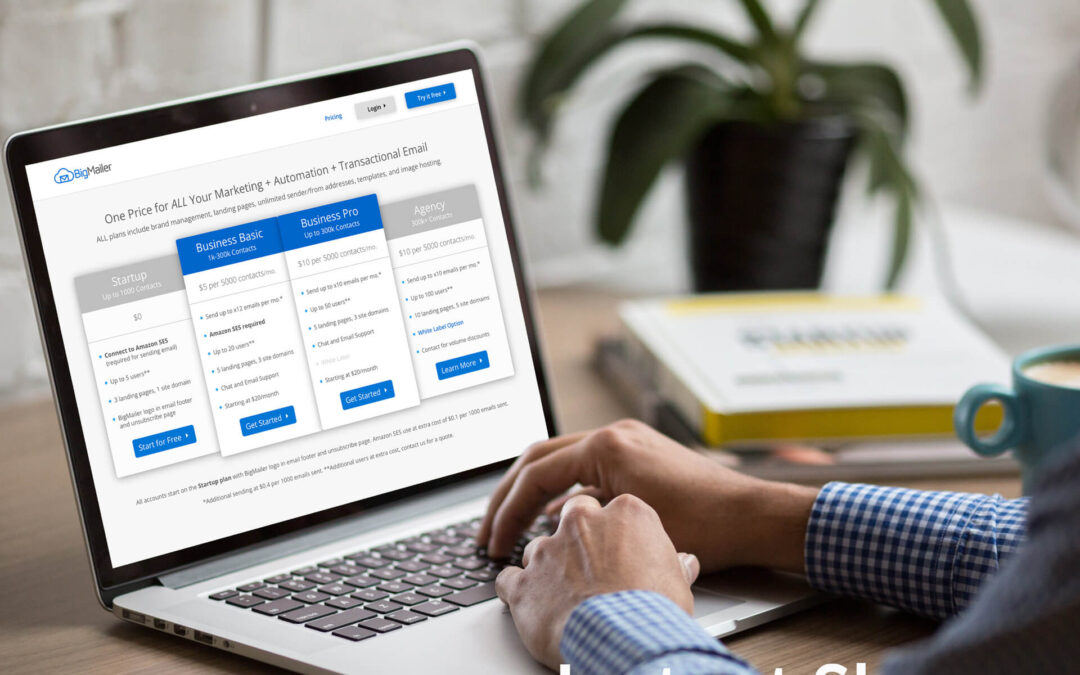
Over the past year, we’ve seen a steady rise in the costs required to maintain and improve our platform, especially infrastructure cost. We’ve worked hard to absorb these increases while continuing to invest in new features, performance improvements, and customer support. To ensure we can continue delivering a reliable, secure, and evolving solution, we will be implementing a pricing adjustment.
We are making several pricing updates that are in effect for new customers as of March 2, 2026.
#1. We are increasing pricing for our Business Pro, Business Premium, and Agency Pro plans by 20%. The lowest starting level is now $60/mo. on a Business Pro plan.
#2. There is a 25% increase for our Business plan (now Business Lite), that requires a use of Amazon SES connection, by 25%. The price for Agency plan is increased by 20%. We are also lowering the sending limits from x12 to x10 for Business, Agency, and Enterprise plans.
#3. We are increasing our overage fees from $0.5 to $0.75 per 1000 emails sent. This change is in effect immediately for all customers.
#4. The cost of dedicated IP is increased from $50 to $100 per month.
The plan changes will be in effect for existing customers on both Business plans, with a monthly subscription, on a billing period that starts after June 2nd, 2026. For Agency plans customers the pricing update will be in effect starting in October 2026. Customers who began their subscription in 2026 will not be affected by this price increase at this time. Customers on annual plans will see the price change on their next annual renewal.
Pricing updates don’t automatically apply to enterprise customers with custom annual contracts.
Any accounts with past due billing status will have to re-subscribe to plans with new pricing.
Our pricing page and billing pages were already updated to reflect these changes.
If you have any questions about these updates please reach out to discuss via live chat.