by Lilia | Feb 21, 2024 | Email Marketing, Provider Comparison
Email deliverability has been a hot topic for marketers for quite some time. With mailbox providers getting more aggressive about their spam blocking and filters, inbox placement has become a priority issue for many marketers to address. To protect their email deliverability, marketers need to implement email verification as part of the pre-campaign routine. In this article, we are comparing a few email verification service providers to help you find the one that will keep your email list clean.
Why Verify Your Email List?
Email deliverability is a complex topic, but it comes down to 3 things:
- Sender reputation, this includes sender email/domain as well as IP address it sends from.
- List and content quality.
So deliverability is strongly correlated to your sender reputation and hard bounce rate is one of the factors affecting it. With high hard bounce rates sender reputation takes a hit. If you don’t implement any actions to reduce your bounce rate it can negatively impact your inbox placement.
The older your list, the more invalid email addresses you will have and the higher the bounce rate. This is because all email lists decay naturally, with B2B lists having a faster decay rate due email deactivation after job switches. An average email list decays at a rate of 2% per month for B2C lists and 3% for B2B lists. So if an email list hasn’t been engaged in more than 3-4 months it can have more than a 10% bounce rate on the first bulk campaign.
Risk of Account Suspension with Your ESP
A bounce rate over 10% can result in getting an account suspended on many email platforms, in addition to causing long-term damage to your sender reputation. Amazon SES can auto-suspend your ability to send emails if a bounce rate is over 10% and your sending volume allows for statistical significance (at least 5k/day). This is especially true on new accounts, without a long history of healthy sending with any given provider.
BigMailer customers can use built-in email verification during the list import as of February 12, 2024.
About Catch_all and Accept_all emails
Email verification will also prevent you from sending your campaign to disposable (aka temporary) emails as well as emails that domains set up as catch_all. Disposable emails are often used by spammers and fraudsters. Once created they usually are valid for around 48hrs, and later become invalid emails that will generate hard bounce. Catch_all also known as Accept_all emails, is an address that is specified to receive all messages that are addressed to an incorrect email address for a domain. The risk with such emails is that it might seem to be valid, however, it could still generate a hard bounce. By using email verification you will be able to establish which of the addresses are set up as catch_all, but you won’t learn if it is deliverable or not. The decision to message such addresses should be based on the overall quality of your list.
Email Bounces and Cost
There is of course a budget factor – email verification can save you money. Sending your campaign to undeliverable or risky addresses via your ESP’s or marketing platform can generate extra costs, with no chance of generating any return on investment (ROI).
Verification Process and Results
In a typical verification process you upload a CSV file and once validation is complete you see stats on the results and options to download your verified list. Most verification services produce at least these 4 statuses:
- Deliverable – these emails are safe to send to
- Undeliverable – these addresses no longer exist and should not be sent to
- Risky – these emails are likely to result in a high bounce rate (often catch-all addresses)
- Unknown – these emails couldn’t be verified so may result in high bounce rate.
If your email verification provider allows it, you should download Deliverable, Risky, and Unknown as separate lists and upload them as separate lists into your email marketing platform. If you are starting fresh with a new service provider you should ONLY send your 1st campaign to Deliverable addresses only, to ensure the lowest possible bounce rate. This is because many providers move you onto a shared IP pool tier that correlates to your 1st campaign or campaigns sent in the first 1-2 days.
On average, email lists identified as Risky or Unknown by email verification providers result in 30% bounce rate, so they should be slowly added into large bulk campaigns overtime, to finalize verification through sending.
While bounce rate below 10% will not result in you getting banned from an email marketing platform your goal should be to keep bounce rate below 3% for best email deliverability.
Choosing an Email Verification Service
There are a lot of email verification services available, and it might be overwhelming when searching for the right one for the first time. There are several methods used by providers to verify emails so there is a small variation in results and accuracy. We find that the difference in accuracy is fairly small – around 2% – while the cost can vary x2-5.
For this comparison article, we are focusing more on affordable providers we have evaluated as potential partners. BigMailer is a very affordable email marketing platform, so it was important for us to continue to offer our customers great value when integrating a 3rd party email validation service.
Other factors that we considered besides cost are: security and GDRP compliance, availability of robust APIs to process large data sets, possibility to run a test prior to purchase, and finally the team behind the service and support.
Below are the services we had reviewed and ranking factors we have checked for this article:
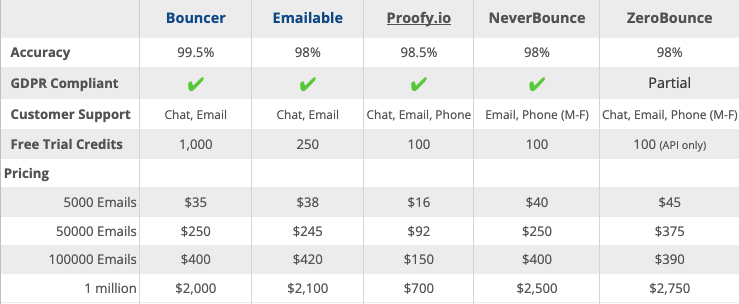
Last Updated: Nov 30 2025
As we were evaluating prospecting partners 2 services stood out (and we got you extra discount with both).
Bouncer
Bouncer has easy-to-use UI and very flexible data download options, making it our favorite. You even get options on what columns to keep or add to your final verification results, which can simplify your workflows post verification. These options are especially helpful for large list owners, since large data files can become a blocker for importing a list into an email marketing platform.
Bouncer offers you an option to run a free bounce rate estimate, which helps you decide if you need to verify your list. The estimate only takes a few min to generate and can be incredibly useful.
Bouncer team and servers are located in Europe so this can appeal to organizations in the EU region. Bouncer file upload limit is 500,000 emails or 30MB in file size. Get a 10% discount with this link.
Our favorite Bouncer feature is it’s toxicity check that’s included in the cost of email verification. We recommend considering any results with toxicity level 5 as unusable, that are likely to contain a high % of spam traps.
Emailable
Emailable offers good verification speed on large lists and 1500 free validation credits to BigMailer customers via this link only. Emailable file upload limit is 1 million emails and 100MB in file size, which can be useful for large list owners or lists with a lot of fields.
We also like Emailable Deliverability Monitor service – $149/month for up to 50 domains/IPs with 12-hr checks.
BigMailer
BigMailer customers can use built-in email verification with spam trap removal during bulk csv imports, enable on webforms or API calls. BigMailer email verification isn’t available as a standalone service (yet), it’s a benefit offered to BigMailer customers only at this time. The cost is lower than most providers we have reviewed and volume discounts are offered for purchasing 100k, 500k, and 1M credits.
About Spam Traps
Spam traps are used to identify and monitor spam email by Internet Service Providers (ISPs), anti-spam organizations, and blocklist operators. They are email addresses (also called honeypots) used to identify senders who aren’t following email best practices. If you either purchase your email lists or scrape email addresses from the web there is a good chance you have a lot of spam traps on your list. Even if your list is opted-in and verified you may still have typo spam traps.
If you are a BigMailer customer you can reach out to us to help you determine if spam traps are an issue for you. Not a BigMailer customer? Get started with a free account.
Happy email marketing!
by Lilia | Aug 27, 2023 | Email Marketing, Guides
If you work with email marketing campaigns you no doubt heard about dedicated IP (internet protocol) addresses. Perhaps you have been wondering about who uses them and if you should use one yourself. In this article, we explain what they are for and who should use them.
What is an IP?
IP (internet protocol) address is a unique address that identifies a device (computer or server) on the Internet or a local network. When you start using a hosted transactional or bulk email marketing service, by default, your emails are being sent from a group of servers with different IP addresses, and that group of servers is shared by multiple senders like you. So your emails go out from a “shared IP pool” and the reputation of those shared IP addresses is shared as well. The IP reputation is one of the factors that influences email deliverability and inbox placement.
IP Reputation as an Email Deliverability Factor
Lets make one thing clear – deliverability is not the same thing as inbox placement – an email in Spam folder is considered to be delivered. A lot of ESPs (email service providers) claim to have high deliverability, but that just means they can avoid delivery blocking by ISPs based on volume of emails sent from a single server/IP. High delivery rate is nice, but you still need to place into subscriber’s inbox, which is much harder than getting your email delivered.
Most ESPs are responsible for managing (and protecting) the reputation of the IP addresses used by their platform. For that reason, many ESPs turn away customers if/when they determine that their use of the platform may negatively affect other customers. Some platforms (like Mailchimp) scan the email lists customers upload to automatically determine its quality and can suspend account or campaigns based on that data. Many providers have a manual account or campaign review step for all new customers, so it’s not even possible to send a bulk campaign as soon as you sign up. This type of customer filtering and platform protection by market leaders results in 2 things:
- Desired customer pool with high quality senders and good email sending practices
- Higher prices for the service, in return for better IP reputation
So when you use a market leader like MailChimp or CampaignMonitor, that cost up to x10 more than some of the lower cost providers, you pay for “good company” in addition to extra features (e.g. multivariate testing, email template variety, direct integrations).
Does it mean that low cost email providers have lower quality IP pools than market leaders? No, if they are large enough they have many IP pools and likely sender quality tiers. Will your emails go to Spam folder if you use a cheap provider? It’s more likely, but not if all other email deliverability factors signal quality and you are placed into an IP pool with other good senders. ESPs have a way of ranking senders and grouping similar senders into appropriate IP pools. It’s a typical practice they don’t typically disclose to their customers, or everyone would ask to be on a better IP pool.
Email Deliverability Factors
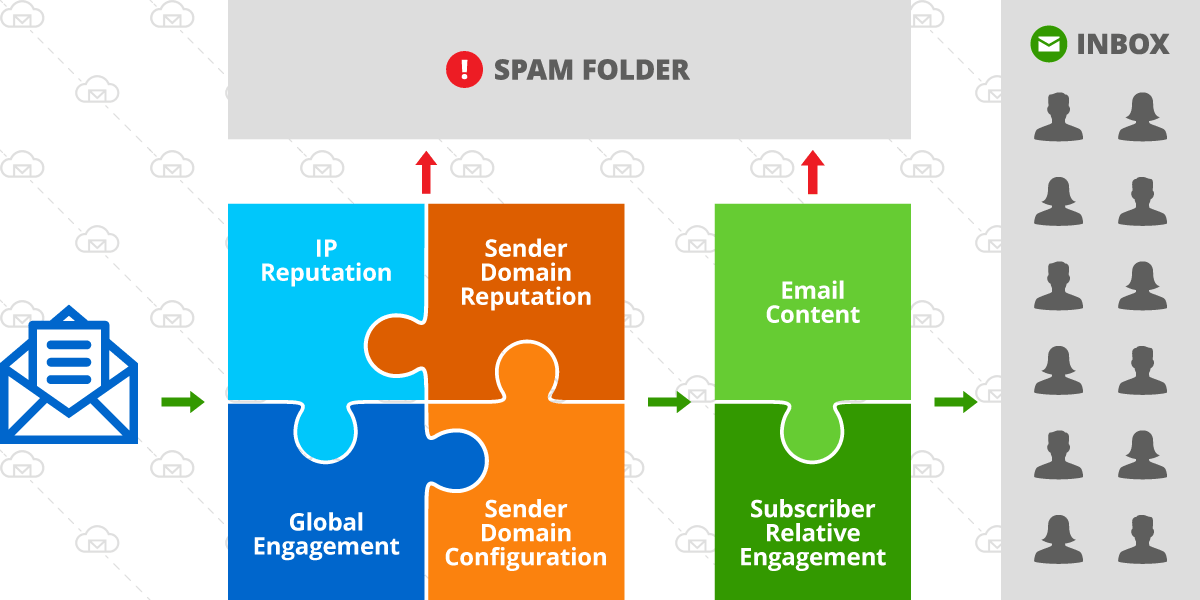
Lets review the factors that affect deliverability, they are:
- IP reputation
- Sender reputation (e.g. sender being your domain or exact email address the emails are sent from)
- Server and domain configuration (DKIM, SPF, tracking links, etc)
- Global engagement
- Content and format of the email (spam words in subject or message body, format – use of images, etc)
- Relative engagement for you (sender) versus other senders in the recipients inbox
Email deliverability factors
On the diagram above, the green box represents factors that vary and change more with each campaign sent and the square on the left with 4 factors are not subject to dramatic changes on a per campaign basis. So with IP address reputation being only 1 of several factors, it can be a deciding factor in inbox placement but it depends on the quality score of the other factors as well.
Who Benefits from a Dedicated IP?
If you are a sender with established good reputation and high engagement history, and especially if you are sending low volumes of emails (less than 10,000 per day), you have a low risk of being affected by a switch of an ESP from a market leader to a lower cost provider. However, getting a dedicated IP address can help ensure your ongoing high deliverability in the future, as your list grows and mailbox providers adjust their inbox placement algorithms.
If you are a high volume sender (send more than 50,000 emails per day) and perhaps have been experiencing deliverability issues with your current provider, switching ESP might not give you an instant improvement unless you change some of the factors as well – improve list quality by removing invalid or inactive addresses, properly configure your domain for sending emails (have DKIM in place), invest in testing your email content and optimal send times.
You can benefit from a dedicated IP address IF:
- You are looking for a fresh start and looking to invest in building a strong email sender reputation with full control.
- You have a small list now, but plan to grow it fast and monetize it
- You have built up a sizable list (over 50,000 subscribers) and willing to invest in best practices and control your IP quality.
- You are an agency offering email marketing services to your clients.
Unfortunately, low volume senders are limited in their options because most ESPs don’t offer an option to get a dedicated IP address on lower pricing tiers. And if you use an ESP that does offer access to a dedicated IP, it may come with a hefty price tag. If you use an ESP that runs on Amazon SES, like BigMailer, you can request a dedicated IP(s) from Amazon anytime, at a cost of $25 per IP per month. Check out our comparison of bulk email marketing services to see how different providers accommodate use of dedicated IP addresses.
How Many IPs Do You Need?
The need for IPs is determined by your list size and your practices. Most providers recommend 1 dedicated IP for every 50,000 (Amazon) to 100,000 emails you plan to send to at the same time (in a single campaign).
Examples:
- If your list size is 50,000 and you send newsletters to entire list you need 1-2 IP addresses
- If your list size is 1,000,000 but you typically send to a segment of about 200,000 you need 2-4 IPs
- If you are an agency with clients sending at different times, your IP needs need to cover the largest campaign you send at any given time. So you may have a dozen or more customers with millions of subscribers in total, but only need 2-3 IPs for all your clients.
Warmup Process – IPs and Senders
The warmup process applies to both new IPs and new sender domains. Most ESPs have automatic IP warming in place, and not something you need to worry about, but you should confirm this before a switch. During an automatic IP warmup your dedicated IP would be sending small number of emails with the rest of the volume being sent from a shared pool. It can take anywhere from 1 month to 6 months to warmup your IP address(es) to send 100% of your emails, depending on sending frequency.
When starting to use a new sender domain you need to warm it up by sending smaller volumes at the start and gradually increasing it. Typically, you would start sending to your most active or recently signed up subscribers to ensure good engagement and to help establish your sender domain reputation.
Example warmup schedule:
- Day 1 – 500 emails
- Day 2 – 800 emails
- Day 3 – 1100 emails
- Day 4 – 1500 emails
If your email list is very diverse and your list is large, because you are trying to move your existing activity to a new sender domain, you can start with 2000-3000 emails per day and add about 25-40% per campaign (smaller increments for daily campaigns and larger increments for x2/week or weekly campaigns. Typically, it’s better to send more frequently with smaller volume increments, but it requires a bit more effort from the sender.
There are many providers that can help you warmup your new sender domain, like WarmupInbox that is meant for warming up new sender domains, or InboxAlly that can also help improve your engagement and deliverability. What those providers do is give you a seed list (or just send on your behalf) of email addresses they control to interact with your emails, to help establish your sender reputation.
Final Thoughts
Have you recently switched ESP and experienced a big change in inbox placement? Share your experience with us via live chat. If you are a BigMailer customer we would love to use your story for a case study.
Happy email marketing!

by Lilia | May 12, 2023 | Announcements
Many of our customers have been waiting for AB testing and it’s finally live and can be used on our free plan. You can use subject line AB testing on Bulk/Marketing Campaign type only, not on automations or transactional campaigns.
What Is an A/B Test Campaign?
An A/B test campaign is a campaign with 2 or more versions being tested on one dimension – typically subject line or send time. A multi-variate test is a test with more than 1 dimension, for example if you are testing 2 different subject lines with 2 different versions of your message body you have 4 total versions and a multi-variate test, to determine the best combination of subject line and message body.
Why Use AB Tests?
AB tests can help you optimize your campaign engagement, by determining best time or subject line to use. If you have a large list (over 50k) you can test a subject line on 20k and then use the best one on the rest of your list, improving your engagement overall.
You can setup AB test to determine:
- Ideal send time for your brand or list – test early on, then use that knowledge forever!
- Best subject line
- Best converting CTA in your email body
Besides producing better results (sales, conversions), higher engagement helps improve your future inboxing.
How to Setup an A/B or A/B/C Test on a Subject Line
Create your bulk/marketing campaign the same way you usually do, for example by copying and modifying your older campaign.
Determine how many variations do you want to test and click on the A/B Test button next to the subject line label:
AB testing is only available on bulk campaigns, not on transactional or automations. You can test up to 3 subject lines on a single campaign
TIP: You would need a good list size or high engagement to get statistically significant results.
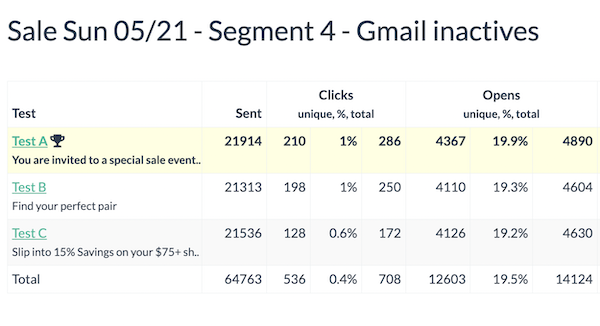
A winner is selected at least 2 hours (or later) after campaign is sent, to allow for meaningful data collection, so you will only see raw data for the first 2 hours after a campaign is sent.
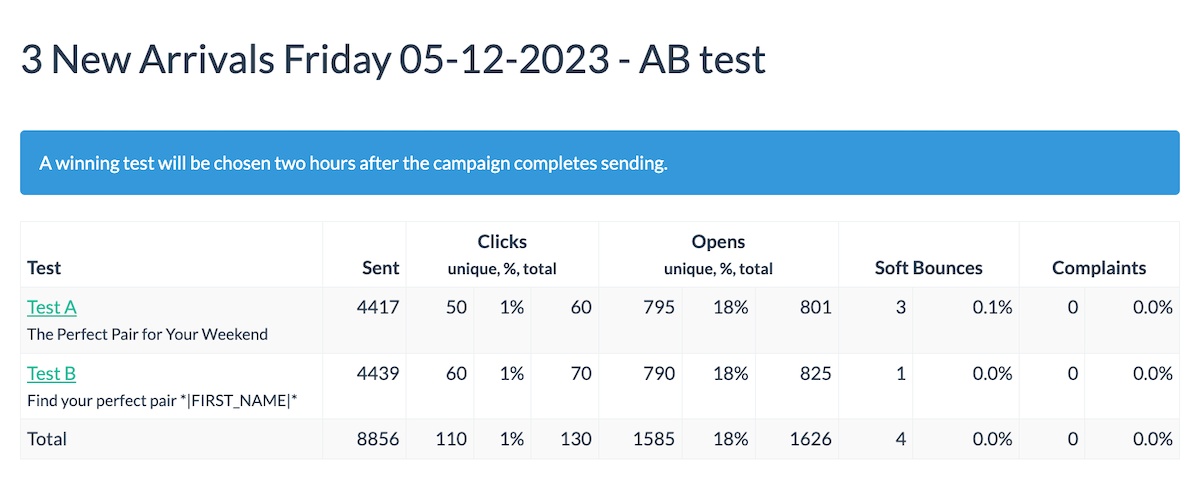
The winner is chosen based on open rate.
That’s it. If you are a BigMailer customer you can reach out for assistance with this or anything else via chat 7 days a week.
If you want to AB test on send time, please refer to this article for detailed instructions.
Not a BigMailer customer? Why not try BigMailer for free, with no features locked? We are sure you will love it.
by Lilia | Feb 12, 2023 | Email Marketing, Guides
UPDATE: Subject line AB testing is now live. You can use this article to set up other types of AB tests, such as on send time, best subject line, CTA, or a combination of all.
What Is an A/B Test Campaign?
An A/B test campaign is a campaign with 2 or more versions being tested on one dimension – typically subject line or send time. A multi-variate test is a test with more than 1 dimension, for example if you are testing 2 different subject lines with 2 different versions of your message body you have 4 total versions and a multi-variate test, to determine the best combination of subject line and message body.
Why Use AB Tests?
AB tests can help you optimize your campaign engagement, by determining best time or subject line to use. If you have a large list (over 50k) you can test a subject line on 20k and use the best one on the rest of your list, improving your engagement overall.
You can setup AB test to determine:
- Ideal send time for your brand or list – test early on, then use that knowledge forever!
- Best subject line
- Best converting CTA in your email body
- A combination or all of the above!
Besides producing better results (sales, conversions), higher engagement helps improve your future inboxing.
How to Setup an A/B or A/B/C Test
Step 1: Setup up your A/B or A/B/C segments
Determine how many variations do you want to test – that’s how many segments you need to split your list into. We suggest to define reusable segments using “starts with” condition on one of your custom fields, for example first name.
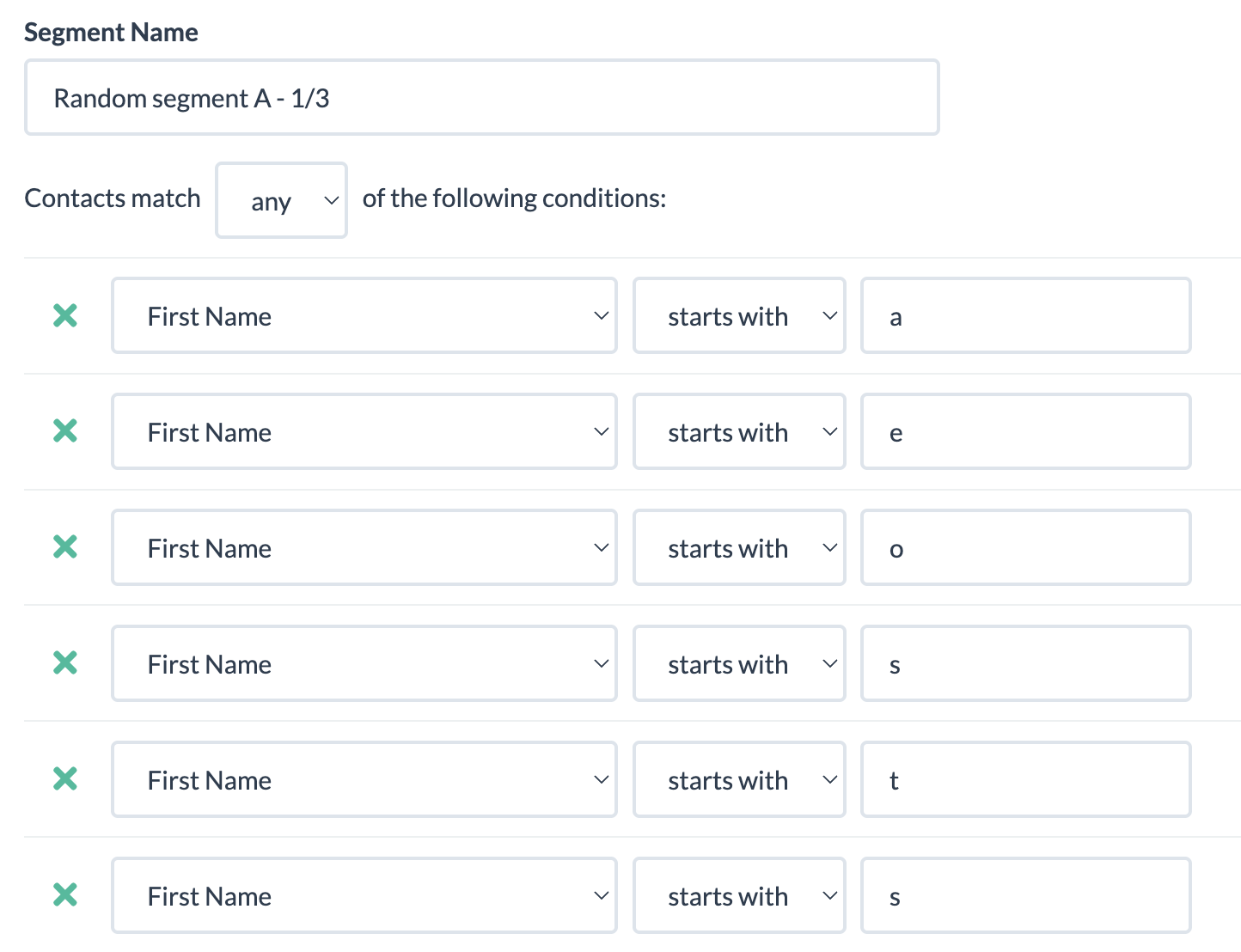
Then, create a segment that’s basically “not A” to ensure you don’t make a mistake with rule overlap. The example below shows a segment C that’s basically doesn’t match ether A or B, and segment B would be setup similar to A but with different rules.
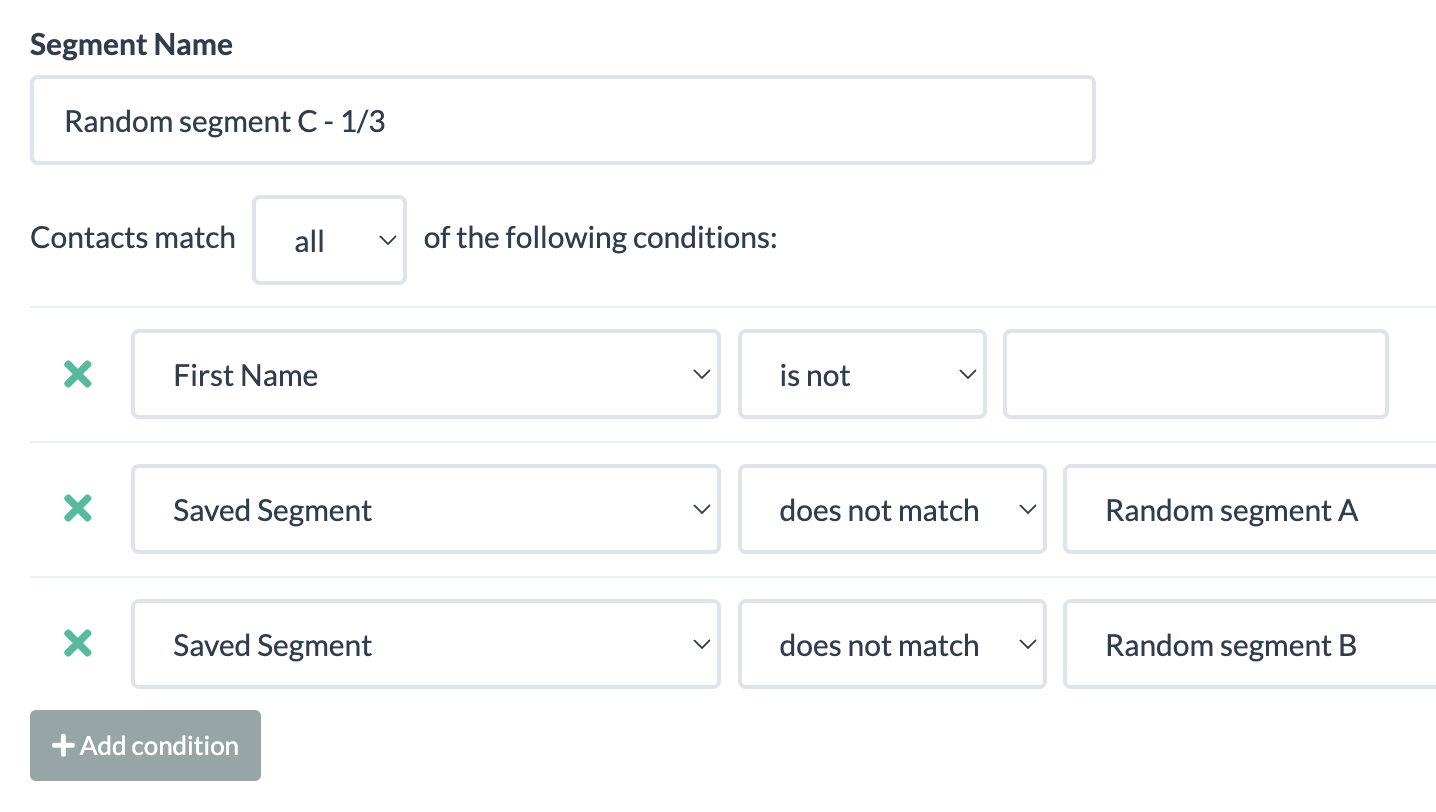
TIP: Make sure each segment has at least 10,000 contacts in it, so your experiment results are statistically significant.
Step 2: Setup your campaign variations.
Create your bulk/promo campaign, then create copies with your variation – subject line, preview, or message body. Assign a different segment to each campaign, see example in the screenshot below.
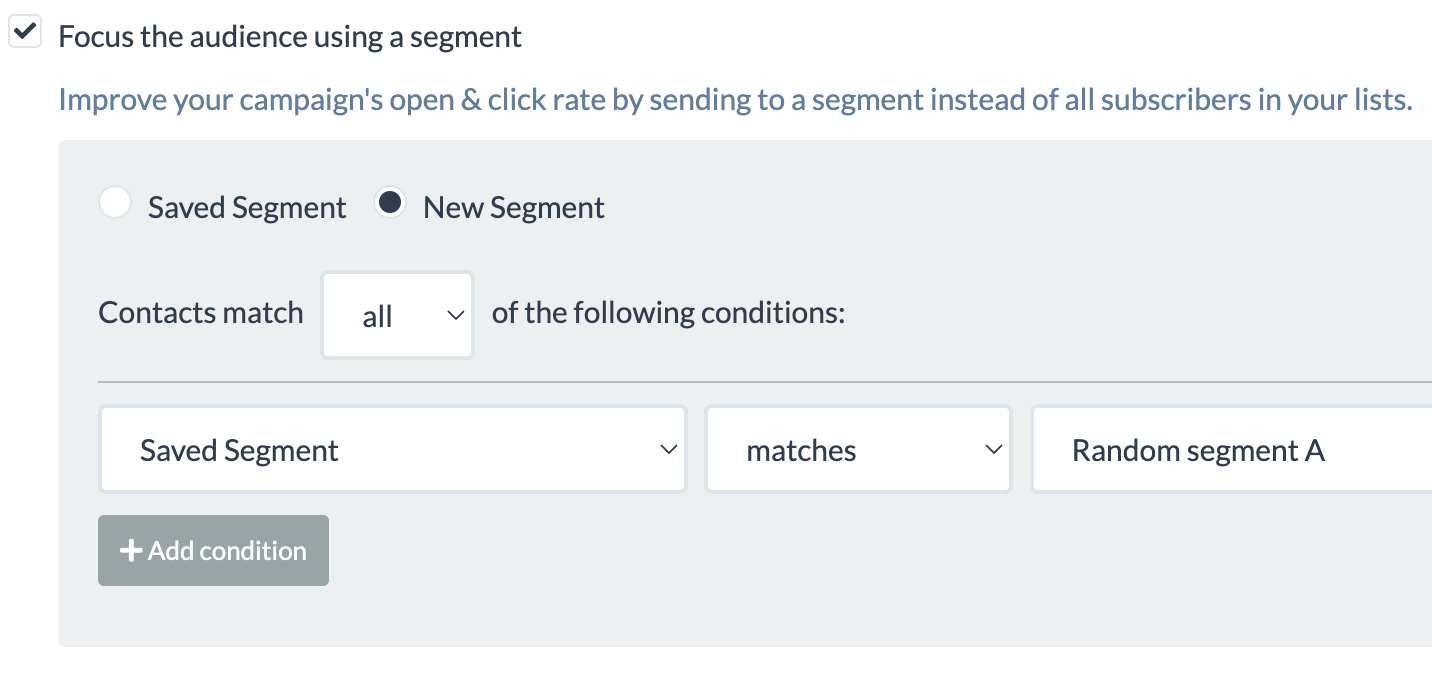
If you are testing on send time, then your campaigns will be identical, but will just be scheduled to send at different times.
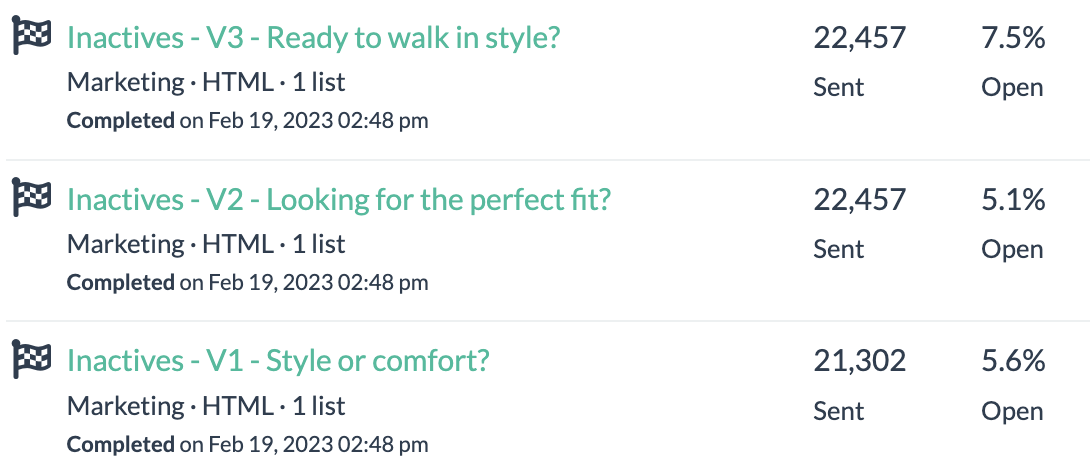
Note: The example above is for a B2C list that’s 60%+ Gmail, so those landed in Promotions tab.
TIP: You could create a test using small parts of a larger list, then use the results for the remainder of your list.
Step 3: Start Testing (almost)
Reach out via chat and request to update your account to allow you to send more than 1 campaign at a time, if you want to test on content and send your campaigns at the same time. By default, accounts have 1 queue and campaigns go out sequentially. If you are on an Agency plan, you already have ability to send concurrent campaigns.
That’s it. If you are a BigMailer customer you can reach out for assistance with this or anything else via chat 7 days a week.
Not a BigMailer customer? Why not try BigMailer for free, with no features locked? We are sure you will love it.

by Lilia | Jan 9, 2023 | Guides
Whether your organization sends email newsletters, transactional email, or on-boarding drip campaigns you probably heard of all the terms listed below. But, do you really understand what they all mean and how they can be helpful in analyzing success of your email campaigns? We break it all down and provide you with some links for additional reading.
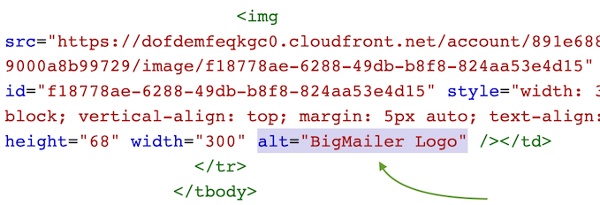 Alternate text or “alt text” refers to the attribute on the img tag used to load images that is used for storing a description of the image for those who can not see it. You typically see this text when the image loading is blocked by the email client. Adding descriptive alt text on every image in your email can lower your spam score and help with inboxing. (VIDEO: How to add ALT text to your HTML code.)
Blacklist – blacklists are lists of IP addresses or domains that have been reported and listed as “known” sources of spam. There are public and private blacklists. Public blacklists are published and made available to the public – many times as a free service, sometimes for a fee. There are hundreds of well-known public blacklists. If your email marketing platform account is on a shared IP with other customers and the IP gets on a blacklist, your emails can get blocked. This doesn’t mean you must have a dedicated IP, although it does help to avoid this particular problem, a good provider will rotate IPs and work on getting their IPs off blacklists. Many providers offer dedicated IPs at extra charge, although most will only allow it on higher tier plans.
Blocked – if email is blocked, the MBP filter has determined the message or sender is suspicious and has stopped the mail (and any other volume from the sender) from going through to the recipient. Blocked emails will likely be reported in your ESP as soft bounces.
Bounce rate in email marketing refers to the percentage of emails that were sent but not delivered. There are 2 types of bounces: 1) hard bounce, which occurs when the email doesn’t exist (possibly suspended for inactivity) 2) soft bounces, which are temporary in nature and happen for a variety of reasons – mailbox full, provider services is down, email is rejected by the mailbox provider, etc. Email service providers (ESPs) are expected to automatically suppress hard bounces from future emails.
Insight: High soft bounce rates over 20% per mailbox provider are likely to indicate emails are being rejected.
Brand Indicators for Message Identification (BIMI) is a new standard that makes it easier to get your logo displayed next to your message in the inbox. It is a way to verify information about your brand, similar to DKIM and SPF records. BIMI is designed to create trust, prevent fraudulent emails, and can aid deliverability.
Delivery Rate – a ratio of emails that didn’t bounce and weren’t blocked by email provider (MBP). Emails that land in Spam folder are considered to be delivered.
Double opt-in – a practice to ask email subscribers to verify their subscription by clicking on a link in a verification email automatically sent out once a user subscribes. Double opt-in can significantly limit marketing opportunities for a given list while slightly improving list quality. Single opt-in is considered a superior subscription process by many marketers because it maximizes list growth and overall performance by minimizing signup barriers and opportunities for errors. Chad White from Litmus on advantages of single opt-in.
Inbox Placement Rate – a ratio of emails that landed in the Inbox (didn’t go to Spam/Junk folders) to total emails sent. Inbox placement is something marketers can control by optimizing against inboxing factors like sender reputation, engagement, email content, and subject line.
Insight: Many email marketing services will claim high deliverability, while implying delivery, but inbox placement is what most marketers care about. ESPs can NOT track or measure inboxing rates for your email list, only for their own seed list they control.
MBP – MailBox Provider, often also referred to as ISP, any company that provides end users with an email account. The largest MBPs in North America are Gmail, Yahoo, Microsoft, AOL, and Comcast. It’s important to not forget corporate email providers with their custom setup and unique spam filters, which can make a big difference for some industries, e.g. banks or universities.
Open reach is the percentage of subscribers who opened at least ONE email during a set period of time. Open reach is a great indicator of list engagement and quality. Your list has good engagement if your open reach is in the 70-90% range after 3 months of sending. The longer a subscriber doesn’t open your emails the harder it will be to place into inbox, because mailbox providers like Hotmail and Gmail use relative engagement to determine if a subscriber is interested in a sender’s email. Higher open reach leads to better deliverability and inboxing. Read more about open reach.
TIP: If you use dedicated IPs, consider using a blacklist monitoring service to be notified if your IP gets blacklisted.
Preview text – the text that displays after the subject line in your inbox. It shows you a brief preview of the email you’re about to read. Unless a custom preview text is defined (typically hidden with code), it displays the text from the first line of the email. Most email marketing services allow you to define a custom Preview text.
Pre-header – the small text that appears within the body of your email, at the very top, above your main content. In a lot of email templates, and some email marketing platforms, it is a link to the browser version of the email. So if you don’t define preview text with a custom implementation, your preview text may read, “View this email in your browser.”

Examples of bad previews in the inbox view
Re-permissioning – a practice to reach out to existing list subscribers to obtain a confirmation of permission to send emails. This has been discussed a lot in recent years due to GDPR’s requirement to have an explicit consent from subscribers. From what we had seen and heard, few companies had engaged in this practice, especially for US-based subscribers since GDPR scope is limited to customers located in EU, although it is recommended by experts at ReturnPath.
Relative engagement – an email subscriber engagement with the email from your sending domain relative to all other sources of email in their inbox. This inbox placement factor is the reason why the same email may go to both Inbox and Spam folder for recipients on the same campaign. So a good sender reputation may not be enough to guarantee inbox placement. Read more on improving your email deliverability and inbox placement.
Spam traps are email addresses that monitor email communications to identify spammers and senders with incorrect contact management practices. Spam traps look like legitimate email addresses, but they aren’t operated by real users. These email addresses can end up on mailing lists that are harvested from web pages, purchased/rented, or simply not properly maintained (unengaged users are not removed from list on ongoing basis). Read more about how to identify and remove spam traps from your list.
View Time Optimization (VTO) is a new email marketing service offered by Verizon Media, that owns Yahoo and AOL, that automatically times emails from companies to arrive the moment a user is logging into their (Yahoo or AOL) email, so it sits at the very top as a new message. Verizon Media claims x4 improvement in open rates and x2 in click rates. Email senders have to be approved for using the service and have to pay for it.
Return-path is a hidden email header that indicates where and how bounced emails will be processed. This header, sometimes referred to as a bounce address or reverse path, is an SMTP address that is different from your original sending address, and is used for collecting and processing of bounced messages.
utm parameters – these are URL parameters that are used to help identify the source of traffic (e.g. social networks, email and display advertising campaigns) in Google Analytics with names that start with utm_ (e.g. utm_medium, utm_source, utm_campaign). Some email marketing software providers automatically add some utm_ parameters, like utm_medium=email and some providers allow defining additional parameters in a freeform field, either globally for an account or on a per campaign basis. Read more about email campaign tracking with Google Analytics.
Did you learn something new from reading this post? Are there any other terms you think we should add to this list? Please let us know by leaving a comment, we appreciate any feedback.