by Chris | Mar 30, 2026 | Email Marketing, Guides
CREDIT: Content for this post is based on a report generously shared by Sprout24 and provides a detailed analysis of incidents using publicly available data, historical trends and logical estimation.
Email remains the digital channel with the widest reach. Statista reports that there were 4.6 billion email users in 2025, projected to reach 4.89 billion by 2027.
Performance benchmarks are shifting under the weight of privacy protections and engagement filtering. A consolidated research dataset from VerifiedEmail (January 2026) notes that open rates declined from 48.69 % in 2022 to 26.9 % in 2025 due to Apple Mail Privacy Protection (MPP). Average click‑through rates (CTR) across industries sit around 2.0–3.2 %, with click‑to‑open rate (CTOR) near 5.6 %.
Deliverability now requires more than technical configuration. It has become a cross‑functional discipline spanning marketing, engineering, product and legal. Major mailbox providers now evaluate engagement, consent, and user experience across the entire customer lifecycle.
Outlook Rate‑Limiting Crisis 2026
This year, Microsoft consumer email infrastructure malfunctioned, exposing the fragility of email delivery at scale. Starting around 23 February 2026, thousands of operators across senders, hosting providers and marketing platforms began receiving temporary 451/421 errors. Most common message (451 4.7.650 S775) cited IP‑reputation issues even for long‑standing, authenticated IPs. Within hours, reports of deferred mail flooded Mailop mailing list, Email Geeks Slack, Reddit and Microsoft own forums. This outage affected outlook.com, hotmail.com and related consumer domains but not Microsoft 365 enterprise tenants. Microsoft acknowledged the issue only after senders documented the wave and by 25 February queues began draining. Despite the fix, marketers continue to encounter “421 rate‑limit” responses after 1 March 2026.
Deliverability professionals observed lingering 421 rate‑limit responses, especially following volume spikes or changes in sending patterns. Microsoft guidance on 451 4.7.500–699 error codes indicates that these temporary failures occur when a source IP suddenly sends a much higher volume than its historical baseline. This filtering technique (greylisting) treats new or irregular senders with suspicion; as normal patterns resume, the throttling should lift. In early March 2026, however, even domains sending fewer than 2 000 emails per day experienced deferrals, suggesting that Microsoft algorithm had become more sensitive to even small volume deviations. The lack of transparency in Outlook feedback loop leaves legitimate senders without a direct path to resolution-one support ticket simply referred an ESP back to its certification provider.
Causes and contributing factors
- Adaptive filtering and IP reputation – Microsoft IP‑level greylisting triggers when a sender volume deviates from established patterns. The February incident appears to have mis-calibrated the Protocol Filter Agent, causing false positives on trusted IPs. Once corrected, these filter remains sensitive; even small spikes from domains with low baselines (<2 k mails/day) can prompt temporary 421 deferrals.
- New deliverability standards – Enforcement of the 2024–2026 Gmail/Yahoo/Microsoft rules means that mail lacking SPF, DKIM, DMARC alignment, one‑click unsubscribe or low complaint rates now faces immediate throttling. Senders who are not fully compliant may have been disproportionately affected.
- User experience signals – Providers evaluate engagement, unsubscribe behavior and complaint trends. High bounce rates, spam complaints or poor list hygiene can degrade reputation, making accounts susceptible to rate limiting even at low volumes.
- Infrastructure instability – The February event coincided with a period of broader mail‑infrastructure stress across major providers. Industry commentary notes simultaneous glitches at Gmail and Yahoo. Microsoft decision to cancel its rigid 2 000‑recipient limit and adopt “smarter, more adaptive approaches” suggests that the company is tuning algorithms in production, which can inadvertently catch legitimate senders.
Niche considerations
B2C marketing: Consumer‑facing brands rely heavily on outlook.com and hotmail.com addresses. Rate limiting in February halted transactional notifications (password resets, purchase confirmations) and promotional campaigns. Industries with high seasonal spikes are especially vulnerable to greylisting. Mitigation involves smoothing send patterns and pre‑warming infrastructure ahead of peak periods.
B2B and SaaS: Most corporate recipients use M365, which was largely unaffected. However, B2B SaaS firms often send onboarding emails to consumer addresses. They must ensure compliance with bulk‑sender rules and consider alternative channels (SMS or push notifications) for critical messages.
Transactional vs promotional mail: Transactional emails often trigger small volume spikes. Outlook sensitivity to volume changes means even legitimate password resets or two‑factor codes can be deferred. Using separate domains/IPs for transactional and marketing traffic can help maintain consistent patterns.
Top Recommendations
1. Maintain technical compliance – Ensure SPF, DKIM and DMARC records are correctly configured and aligned with the visible “From” domain. BigMailer customers should also configure a custom tracking domain for extra optimization.
2. Warm up and smooth sending patterns – Microsoft greylisting triggers when volumes spike. Gradually increase sending volumes when launching campaigns or onboarding new IPs. Avoid large batch sends; instead, spread sends over a few hours. For seasonal promotions, begin sending lower‑volume messages several weeks in advance.
3. Optimize sending time – avoid sending too close to top of the hour, especially around 7am, 8am, 9am, 10am EST. Your campaigns should complete sending before top of the hour or start 5-10 after. Top of the hour and 5-10 min after the rejection rates and delays tend to be higher.
4. Maintain list quality – don’t skip email validation, avoid sending to invalid or inactive email addresses, typos, and spam traps.
5. Segmentation and micro‑targeting – Segmentation reduces complaint rates, improves click rates, and can help smooth out volume, mitigating rate‑limit triggers. See how to setup segments for active subscribers in BigMailer in this advanced deliverability optimization article.
NOTE: Complaint rates marketers see in their ESPs are not what ISPs (mailbox providers) see.
Conclusion
February 2026 Outlook crisis exposed the vulnerability of even well‑managed email programs to sudden infrastructure changes. Microsoft aggressive rate limiting ensnared large and small senders alike, demonstrating that adaptive filtering can misfire. Although the acute disruption resolved within days, persistent 421 deferrals since March signal that Outlook algorithms remain extremely sensitive. Navigating this environment requires technical compliance, behavioral consistency, and proactive monitoring.
by Lilia | Aug 27, 2023 | Email Marketing, Guides
If you work with email marketing campaigns you no doubt heard about dedicated IP (internet protocol) addresses. Perhaps you have been wondering about who uses them and if you should use one yourself. In this article, we explain what they are for and who should use them.
What is an IP?
IP (internet protocol) address is a unique address that identifies a device (computer or server) on the Internet or a local network. When you start using a hosted transactional or bulk email marketing service, by default, your emails are being sent from a group of servers with different IP addresses, and that group of servers is shared by multiple senders like you. So your emails go out from a “shared IP pool” and the reputation of those shared IP addresses is shared as well. The IP reputation is one of the factors that influences email deliverability and inbox placement.
IP Reputation as an Email Deliverability Factor
Lets make one thing clear – deliverability is not the same thing as inbox placement – an email in Spam folder is considered to be delivered. A lot of ESPs (email service providers) claim to have high deliverability, but that just means they can avoid delivery blocking by ISPs based on volume of emails sent from a single server/IP. High delivery rate is nice, but you still need to place into subscriber’s inbox, which is much harder than getting your email delivered.
Most ESPs are responsible for managing (and protecting) the reputation of the IP addresses used by their platform. For that reason, many ESPs turn away customers if/when they determine that their use of the platform may negatively affect other customers. Some platforms (like Mailchimp) scan the email lists customers upload to automatically determine its quality and can suspend account or campaigns based on that data. Many providers have a manual account or campaign review step for all new customers, so it’s not even possible to send a bulk campaign as soon as you sign up. This type of customer filtering and platform protection by market leaders results in 2 things:
- Desired customer pool with high quality senders and good email sending practices
- Higher prices for the service, in return for better IP reputation
So when you use a market leader like MailChimp or CampaignMonitor, that cost up to x10 more than some of the lower cost providers, you pay for “good company” in addition to extra features (e.g. multivariate testing, email template variety, direct integrations).
Does it mean that low cost email providers have lower quality IP pools than market leaders? No, if they are large enough they have many IP pools and likely sender quality tiers. Will your emails go to Spam folder if you use a cheap provider? It’s more likely, but not if all other email deliverability factors signal quality and you are placed into an IP pool with other good senders. ESPs have a way of ranking senders and grouping similar senders into appropriate IP pools. It’s a typical practice they don’t typically disclose to their customers, or everyone would ask to be on a better IP pool.
Email Deliverability Factors
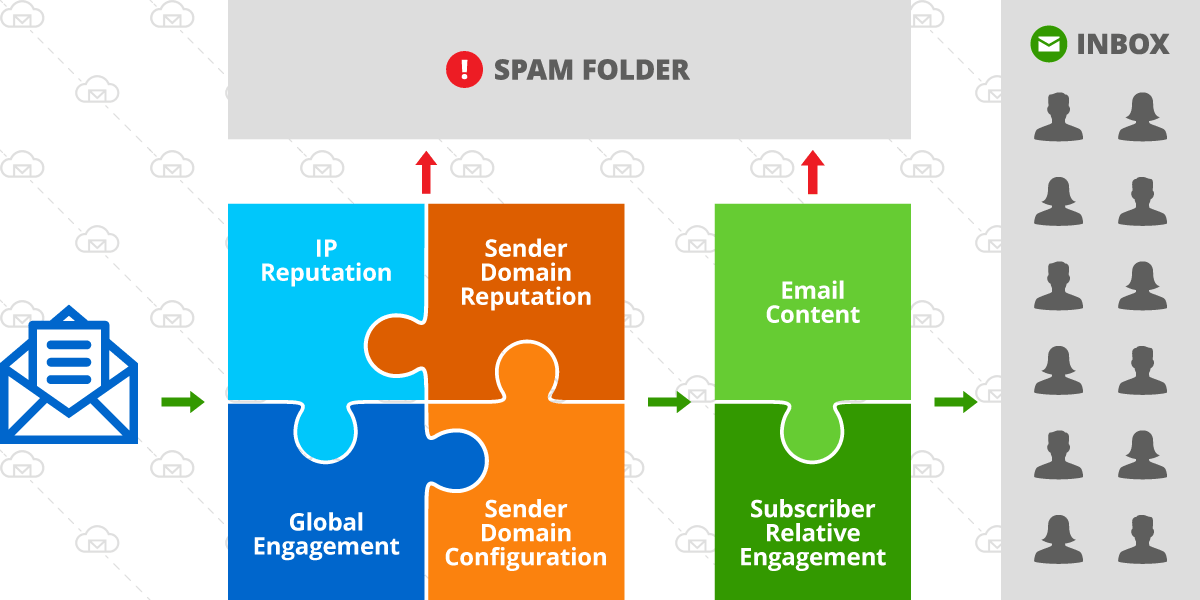
Lets review the factors that affect deliverability, they are:
- IP reputation
- Sender reputation (e.g. sender being your domain or exact email address the emails are sent from)
- Server and domain configuration (DKIM, SPF, tracking links, etc)
- Global engagement
- Content and format of the email (spam words in subject or message body, format – use of images, etc)
- Relative engagement for you (sender) versus other senders in the recipients inbox
Email deliverability factors
On the diagram above, the green box represents factors that vary and change more with each campaign sent and the square on the left with 4 factors are not subject to dramatic changes on a per campaign basis. So with IP address reputation being only 1 of several factors, it can be a deciding factor in inbox placement but it depends on the quality score of the other factors as well.
Who Benefits from a Dedicated IP?
If you are a sender with established good reputation and high engagement history, and especially if you are sending low volumes of emails (less than 10,000 per day), you have a low risk of being affected by a switch of an ESP from a market leader to a lower cost provider. However, getting a dedicated IP address can help ensure your ongoing high deliverability in the future, as your list grows and mailbox providers adjust their inbox placement algorithms.
If you are a high volume sender (send more than 50,000 emails per day) and perhaps have been experiencing deliverability issues with your current provider, switching ESP might not give you an instant improvement unless you change some of the factors as well – improve list quality by removing invalid or inactive addresses, properly configure your domain for sending emails (have DKIM in place), invest in testing your email content and optimal send times.
You can benefit from a dedicated IP address IF:
- You are looking for a fresh start and looking to invest in building a strong email sender reputation with full control.
- You have a small list now, but plan to grow it fast and monetize it
- You have built up a sizable list (over 50,000 subscribers) and willing to invest in best practices and control your IP quality.
- You are an agency offering email marketing services to your clients.
Unfortunately, low volume senders are limited in their options because most ESPs don’t offer an option to get a dedicated IP address on lower pricing tiers. And if you use an ESP that does offer access to a dedicated IP, it may come with a hefty price tag. If you use an ESP that runs on Amazon SES, like BigMailer, you can request a dedicated IP(s) from Amazon anytime, at a cost of $25 per IP per month. Check out our comparison of bulk email marketing services to see how different providers accommodate use of dedicated IP addresses.
How Many IPs Do You Need?
The need for IPs is determined by your list size and your practices. Most providers recommend 1 dedicated IP for every 50,000 (Amazon) to 100,000 emails you plan to send to at the same time (in a single campaign).
Examples:
- If your list size is 50,000 and you send newsletters to entire list you need 1-2 IP addresses
- If your list size is 1,000,000 but you typically send to a segment of about 200,000 you need 2-4 IPs
- If you are an agency with clients sending at different times, your IP needs need to cover the largest campaign you send at any given time. So you may have a dozen or more customers with millions of subscribers in total, but only need 2-3 IPs for all your clients.
Warmup Process – IPs and Senders
The warmup process applies to both new IPs and new sender domains. Most ESPs have automatic IP warming in place, and not something you need to worry about, but you should confirm this before a switch. During an automatic IP warmup your dedicated IP would be sending small number of emails with the rest of the volume being sent from a shared pool. It can take anywhere from 1 month to 6 months to warmup your IP address(es) to send 100% of your emails, depending on sending frequency.
When starting to use a new sender domain you need to warm it up by sending smaller volumes at the start and gradually increasing it. Typically, you would start sending to your most active or recently signed up subscribers to ensure good engagement and to help establish your sender domain reputation.
Example warmup schedule:
- Day 1 – 500 emails
- Day 2 – 800 emails
- Day 3 – 1100 emails
- Day 4 – 1500 emails
If your email list is very diverse and your list is large, because you are trying to move your existing activity to a new sender domain, you can start with 2000-3000 emails per day and add about 25-40% per campaign (smaller increments for daily campaigns and larger increments for x2/week or weekly campaigns. Typically, it’s better to send more frequently with smaller volume increments, but it requires a bit more effort from the sender.
There are many providers that can help you warmup your new sender domain, like WarmupInbox that is meant for warming up new sender domains, or InboxAlly that can also help improve your engagement and deliverability. What those providers do is give you a seed list (or just send on your behalf) of email addresses they control to interact with your emails, to help establish your sender reputation.
Final Thoughts
Have you recently switched ESP and experienced a big change in inbox placement? Share your experience with us via live chat. If you are a BigMailer customer we would love to use your story for a case study.
Happy email marketing!

by Lilia | Aug 28, 2019 | Help
Experienced marketers know that smart volume management is part of the sender reputation management, especially for high volume senders. If your list is smaller than 5000 emails, then this isn’t something you need to worry about and as long as you build your list overtime and increase sending volume gradually. Also, if you or your organization is a sender with an established reputation and a history of high volume sending, the volume isn’t as big of an issue as campaign engagement and future deliverability.
You need to carefully manage your sending volumes in order to build up your sender reputation if you are:
- Just starting out with bulk campaigns for yourself or a client, or
- Haven’t engaged your list of 5k+ subscribers in the recent months
- Switching your sender domain, email address, and/or provider, possibly due to a “burnt” reputation in the past.
Why not blast a single email campaign to your entire list? Because if this volume of sending isn’t typical for your sender identity it will look suspicious to a mailbox provider (aka ISPs) because big changes in sending volume may indicate that a list hasn’t been grown organically (naturally), bur rather rented, purchased, or harvested via other means, and this can have a negative impact on email deliverability and inbox placement. So what should you do? Start by sending low daily volumes and build up volume over time – the idea is to send less than 1k emails per day per provider when you are just starting out, and ideally start with high quality messaging and high engagement subscriber segments.
High engagement on your early bulk campaigns will aid your sender reputation score and improve inbox placement rates on future campaigns.
There are a many different ways you can break down your list:
- Segment your list based on a field like “Date Signed Up”, “Order Date”, or similar date or number based fields that indicate subscriber recency or loyalty, and start sending initial campaigns to your recently engaged or your most loyal customers.
- Based on demographics like age or gender, or a number-based field like “Member ID” with “greater/less than” condition.
- Based on past campaign engagement, e.g. anyone who “opened” any campaign in the last 14-21 days.
- Segment your list based on location. If you customize campaign send time based on subscriber local time you can get better engagement. The best time to send on week days is usually 6-10am local time.
- If bulk of the emails on your B2B list are not major providers, you can actually send a large campaign by simply segmenting out the top providers using an email domain check, e.g. if “domain is” or “domain is not”. See example in the screenshot below.
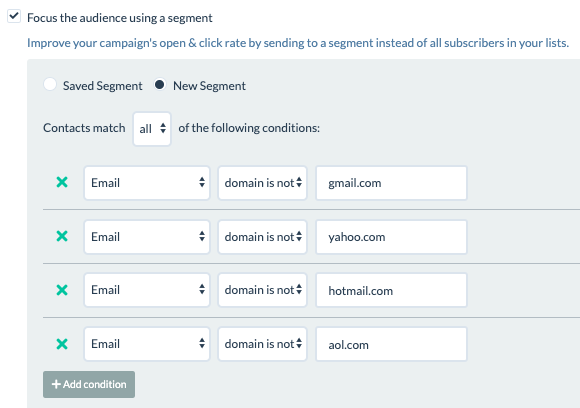
Segmenting based on email domain in BigMailer
Depending on your list size, you may choose to use and combine several of the methods listed above, and that’s perfectly fine. There is no one size fits all approach to building your domain reputation – you know your list best and can figure out the best strategy for yourself.
It may be frustrating to not be able to send to your entire list and put in all the extra effort, but the effort is worth it and will pay off via better long term deliverability, inbox placement, and most importantly your subscriber engagement with your email campaigns as a result.