
6 Best beehiiv Alternatives in 2026
Published on February 26, 2026
Beehiiv used to be the obvious choice for new newsletter creators because of its generous free tier, modern interface, and built-in growth tools.
But beehiiv and the newsletter platform market have changed.
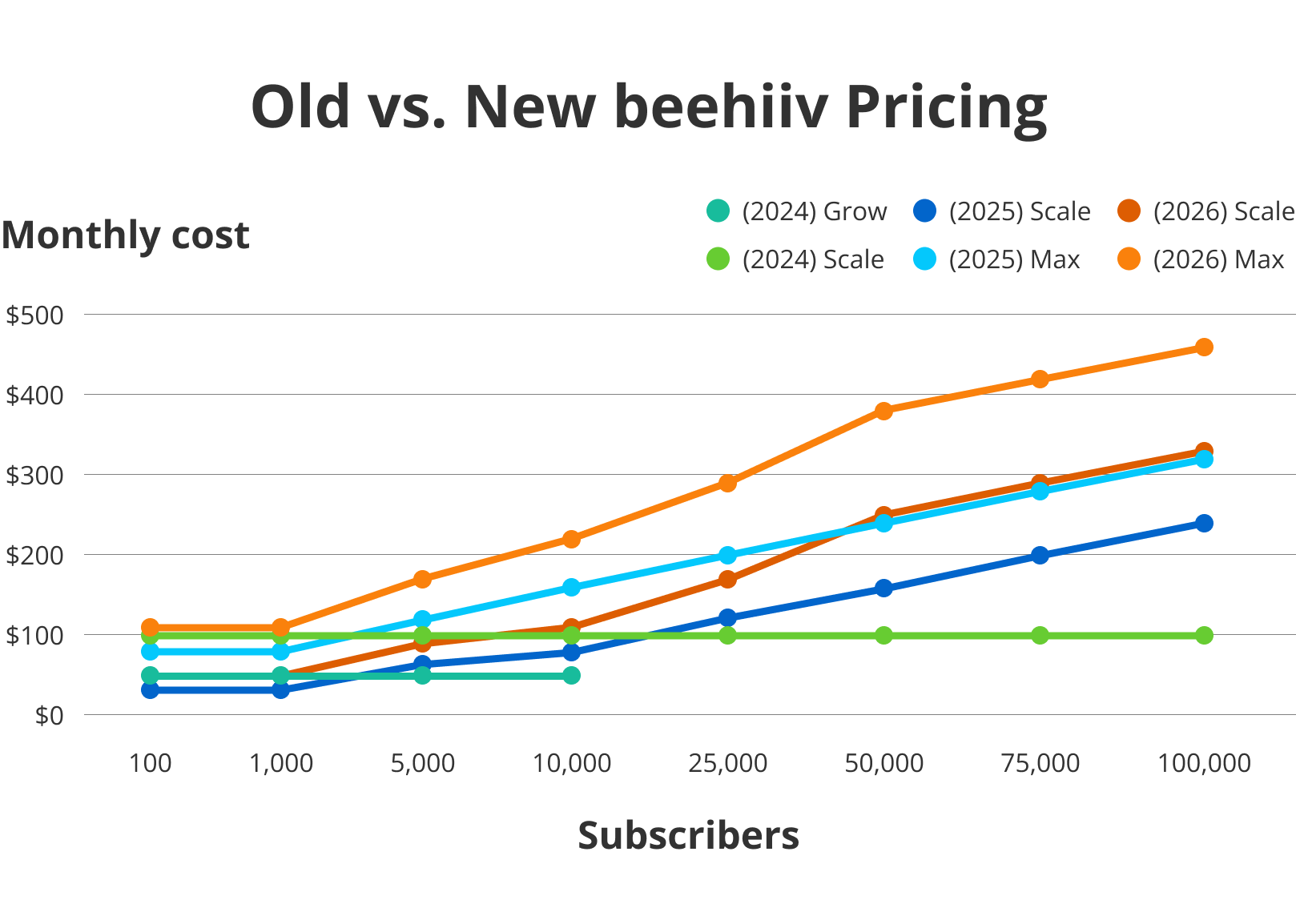
beehiiv removed support for free accounts, pricing increased drastically in the past 2 years (3.3-4.6x for 100k lists), and many of the advanced features are locked behind higher tiers.
Deliverability has also become a concern. Some users report ongoing inbox placement issues, and beehiiv’s own marketing emails have landed in my spam folder more than once — not a great sign for newsletters which live or die by inbox placement.
So the real question is: which beehiiv alternative is the right fit for you?
- BigMailer is ideal for high-volume senders, agencies, and franchises who want scalability, white-labeling, multi-brand management, and built-in email validation.
- Substack tends to attract influencers and writers with large audiences who care
- Ghost is often chosen by bloggers who want publishing control and ownership.
- Kit works well for creators selling digital products and courses.
- Sendy attracts technical users who want maximum cost efficiency.
- MailerLite is for creators and small teams who want an intuitive all-in-one marketing platform with landing pages and automations.
I’ve spent 20+ hours signing up for trials and reading through every customer review from the past year for these 6 beehiiv alternatives. I’ve categorized each alternative based on what I think it’s best at.
If you’re looking to save some money, I also created charts to show you how these alternatives’ pricing compares to beehiiv’s pricing.
My top picks for beehiiv alternatives:
- Best for Large Email Lists: BigMailer
- Best for Publishing: Substack
- Best for Bloggers: Ghost
- Best for Selling Digital Products: Kit
- Best for Budget Users: Sendy
- Best for All-In-One Marketing: MailerLite
- beehiiv Alternative Evaluation Checklist
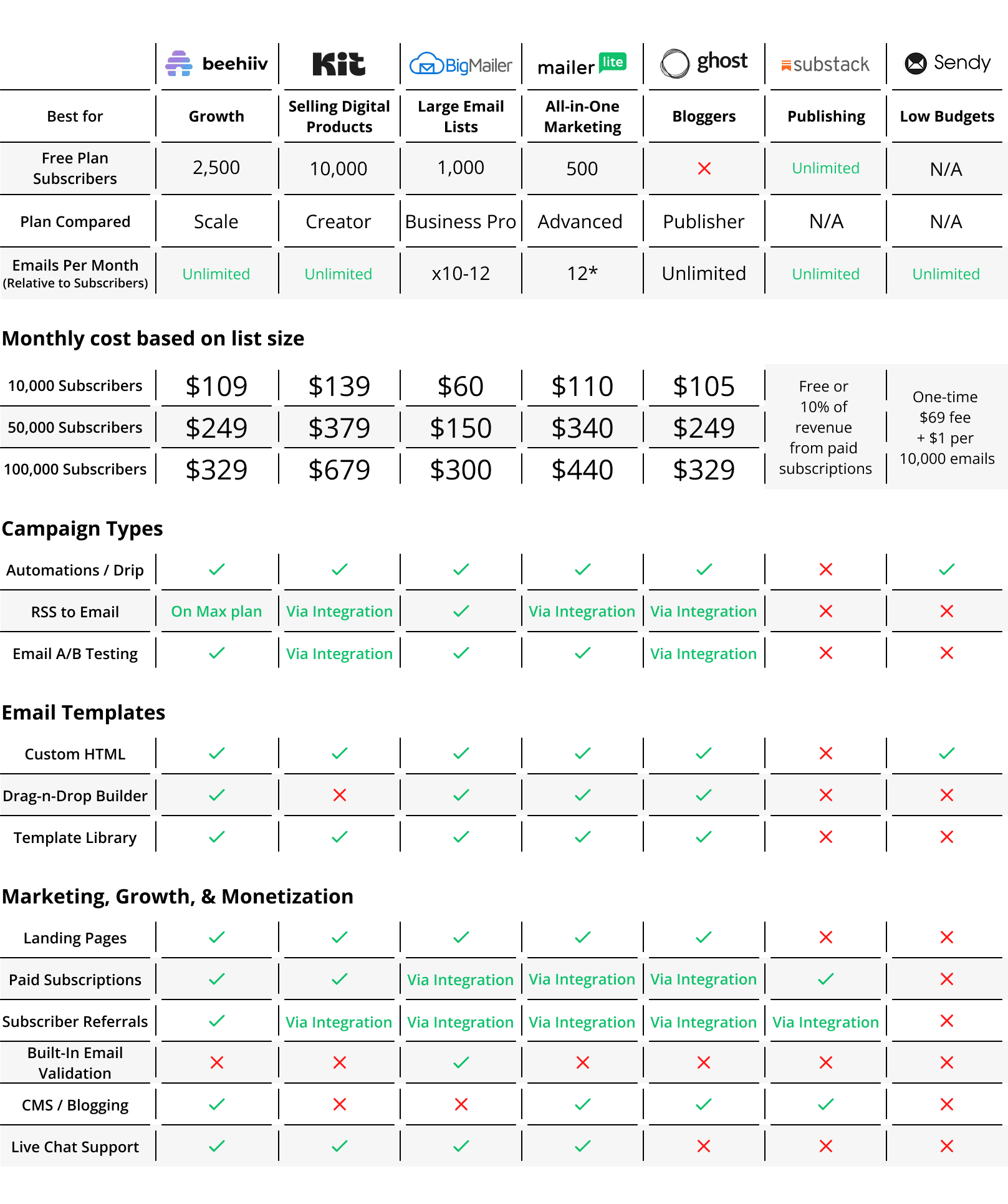
*MailerLite’s unlimited sending drops to x12 for lists over 50k
Last updated on February 24, 2026
1. Best for Large Email Lists: BigMailer
If you’re a former beehiiv customer who outgrew their free plan, OR you have a large email list, BigMailer is an alternative that could save you hundreds of dollars every month.
BigMailer is especially well-suited for marketing agencies, franchises, email consultants, or teams managing multiple brands that might need a white-label email marketing platform.
It has the most budget-friendly pricing of all these beehiiv alternatives while still offering advanced features.
One of those features is BigMailer’s built-in brand and user access management, which lets you easily manage multiple brands and team members from a single account. This allows you to keep all your clients, projects, team members, and email campaigns (marketing & transactional) in ONE place.
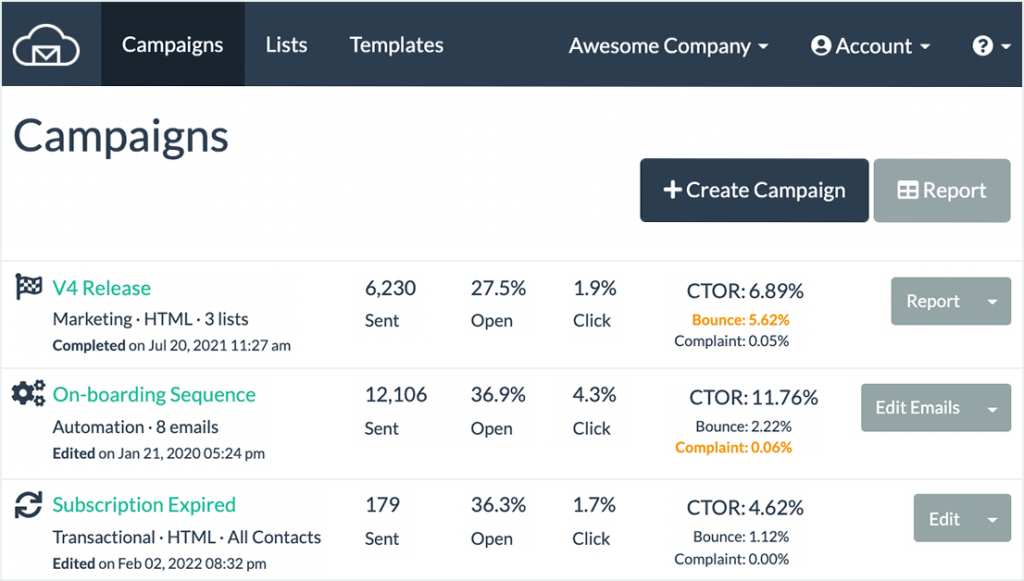
BigMailer’s customers rave about the top-notch customer service (available 7 days/week from 8 am – 8 pm EST). Just read through online reviews if you don’t believe me. Customers like that the support is very responsive and helpful, typically responding within minutes during business hours.
This is something you simply can’t get (or expect) from most major email marketing platforms.
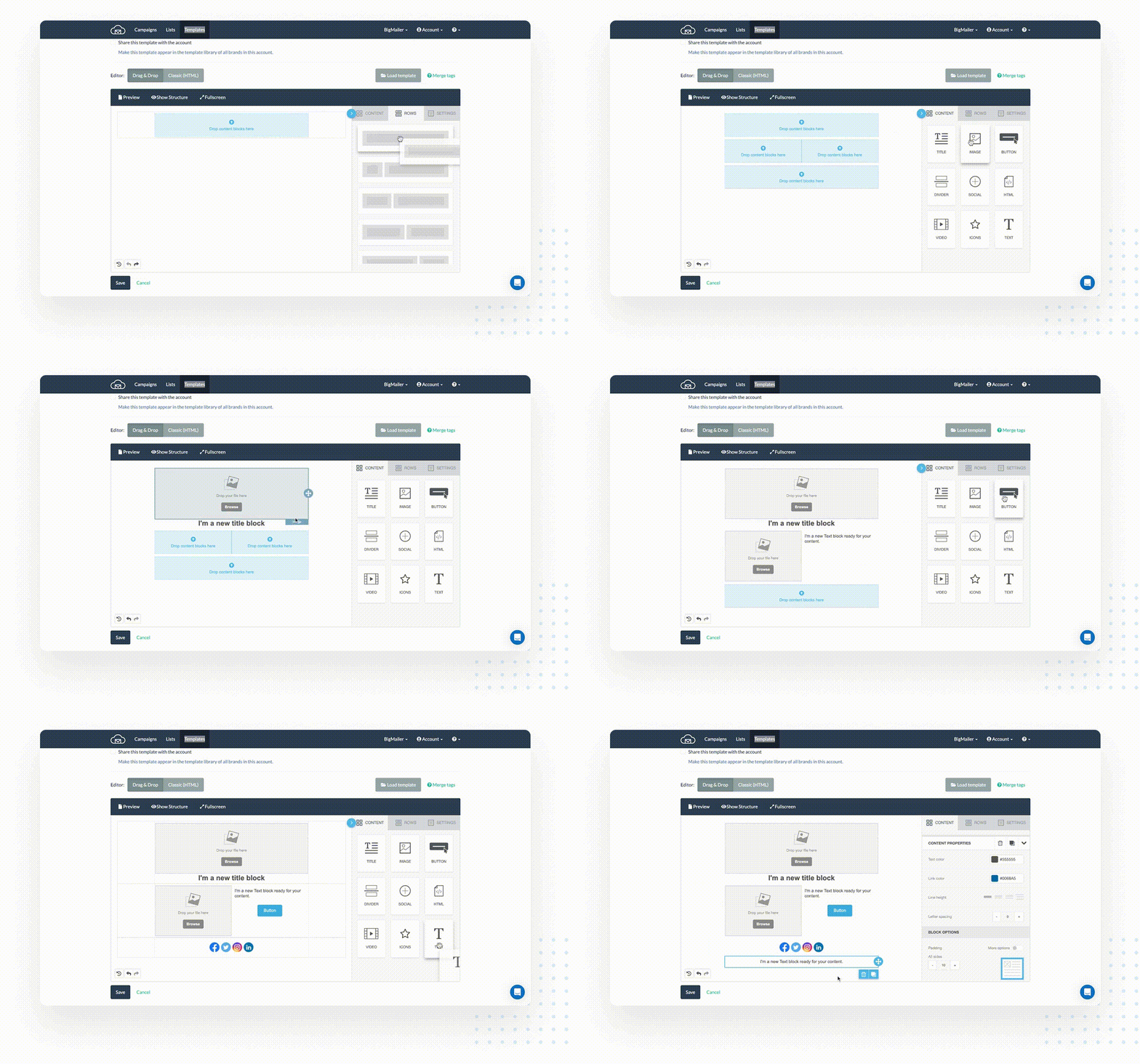
I also find BigMailer’s drag-and-drop email template builder quicker and more intuitive than most “budget” newsletter platforms on this list (many of them are clunky).
BigMailer isn’t built for single-location SMBs with lists under 10k. If your needs are simple and budget is tight, a free plan like Kit’s will likely make more sense.
Pros
- Affordable pricing for high volume sending (especially for over 100K+ list sizes)
- Great for marketing agencies or franchises that need to manage multiple accounts or brands
- White-label option
- The support is highly rated by customers
- Supports RSS-to-email automation
- Average of 99.7% delivery rate, thanks to built-in email validation
Cons
- Doesn’t offer an ad network like beehiiv
- Isn’t for publishing blog posts
- Not ideal for DTC or e-commerce companies (but neither is beehiiv) due to lack of direct integrations with Shopify and WooCommerce.
- Requires to verify sender domains with DNS records (like most providers), while beehiiv allows you to send from their domain.
Features
- Supports all email types – Newsletters, transactional, RSS-to-email, automations, and sequences.
- A/B testing – Test up to 3 subject lines to compare engagement rates
- Live chat and email support (7 days/week from 8 am-8 pm EST)
- Drag-and-drop and HTML template builders – Bring your own HTML email templates, choose from a library of customizable pre-made templates, or design your own templates with a drag-and-drop builder.
- Multi-brand management – Manage multiple brands and projects from a single platform.
- User roles and access control – Control who has access and permissions to your valuable email lists.
- Landing pages – Create landing pages to capture emails for your newsletter.
- Built-in email validation – Remove all invalid emails from your list during the import to improve your deliverability.
- Email throttling – Control the number of emails sent at a time to improve your deliverability for large lists, especially after changing providers or IP addresses.
- Integrations – Sync your customer records with hundreds of apps by using integrations with Zapier, Make, Pabbly, or Zoho (or webhooks to push data into your app).
- Referral programs – Grow and monetize your newsletter through referrals by integrating with Sparkloop.
Pricing
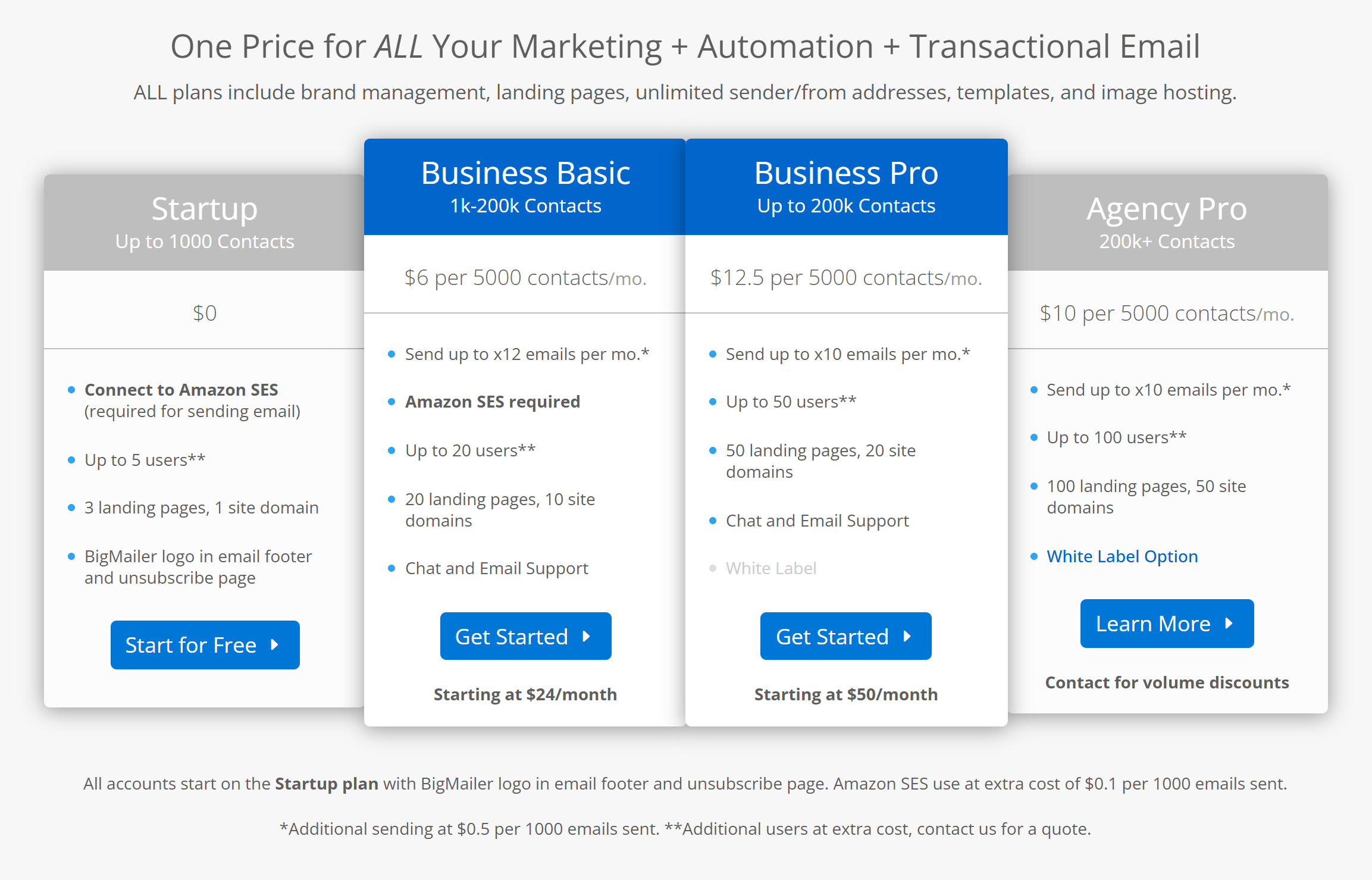
BigMailer offers flexible and affordable pricing based on the number of contacts in your email list. BigMailer has 3 main pricing plans:
- Business Basic – $6/month per 5,000 contacts (starts at $24/month) with up to 20 users (Amazon SES required)
- Business Pro – $12.5/month per 5,000 contacts (starts at $50/month) with up to 50 users
- Agency Pro – $10/month per 5,000 contacts and 100 users (For 200k+ contacts)
Note: Using Amazon SES incurs an added cost of $0.1 per 1,000 emails sent, paid directly to Amazon SES. This is just one of the ways BigMailer helps keep your bill more affordable if you don’t send often.
Here’s how BigMailer’s plans compare to beehiiv’s on price:
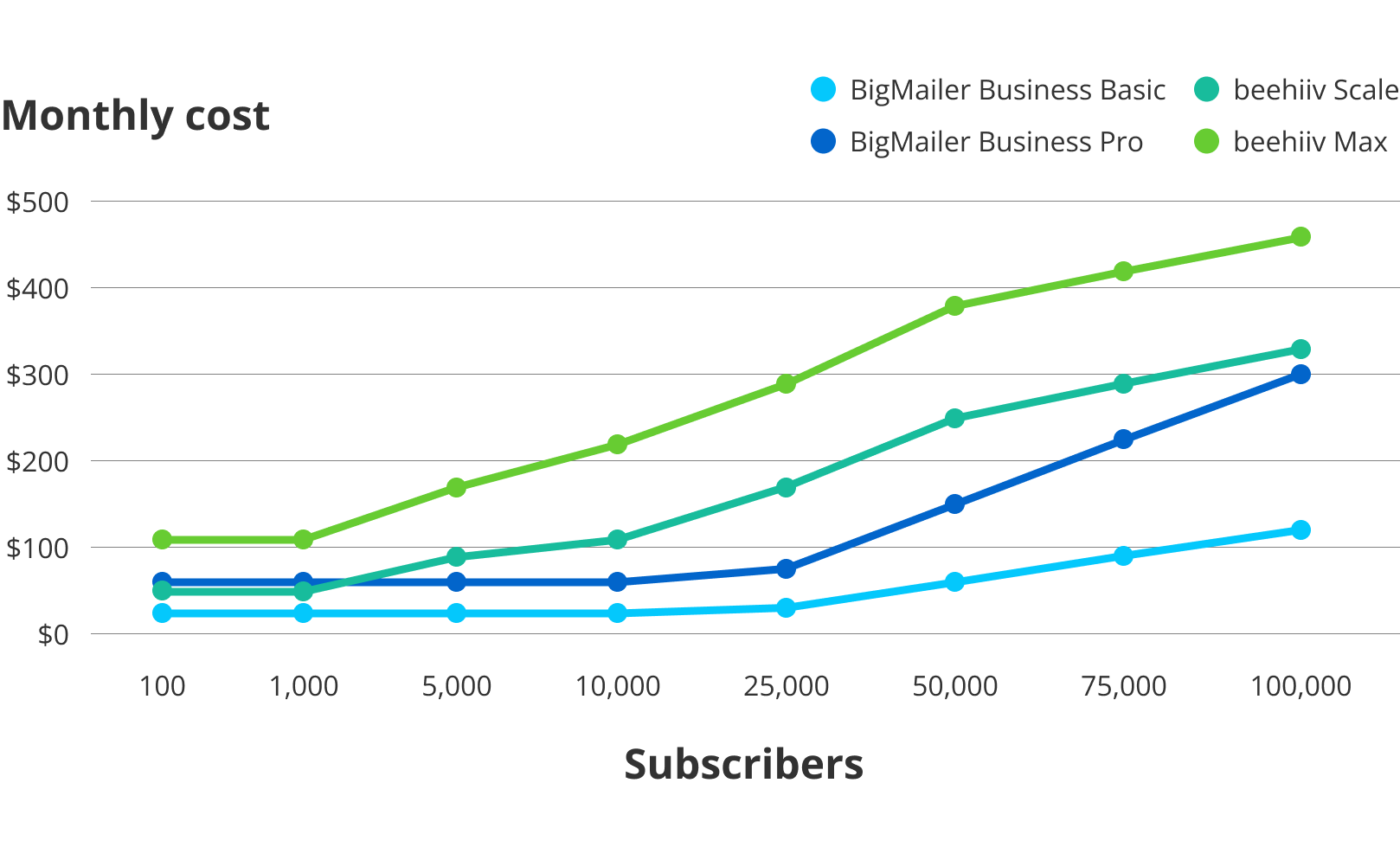
Check out BigMailer’s pricing page for more details.
Customer reviews
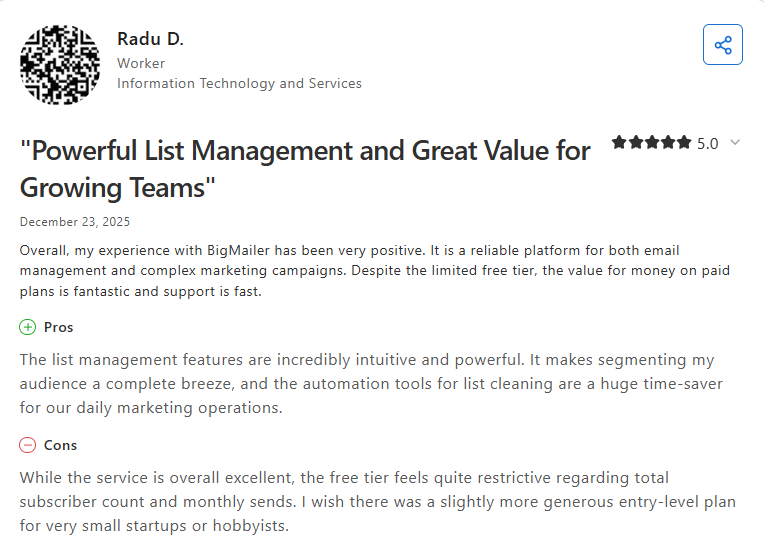
Customers love BigMailer’s ease of use, competitive pricing, feature-rich platform, and attentive customer support. There are very few customer complaints, but some customers wish the template library were larger.
Here’s what Radu has to say about using BigMailer:
2. Best for Publishing: Substack
Substack is an online platform where writers and content creators can publish newsletters and build subscription-based audiences. Hosting your newsletter on Substack gives you access to their extensive network of over 20 million readers, which is an advantage if you’re growing an audience from scratch.
Substack’s original stance was “ad-free forever,” but that’s changing. The company has announced plans to introduce ads, marking a significant shift in its long-standing “editorial” identity and signaling a move toward a more mainstream model.
Substack is a solid alternative to beehiiv for writers and thought leaders who value simplicity and storytelling over automation. You can publish, grow, and monetize your audience without a website, and earn through paid subscriptions or, soon, ad-supported content. The writing experience feels more like editing a Google Doc than managing a marketing platform, which is part of its charm.
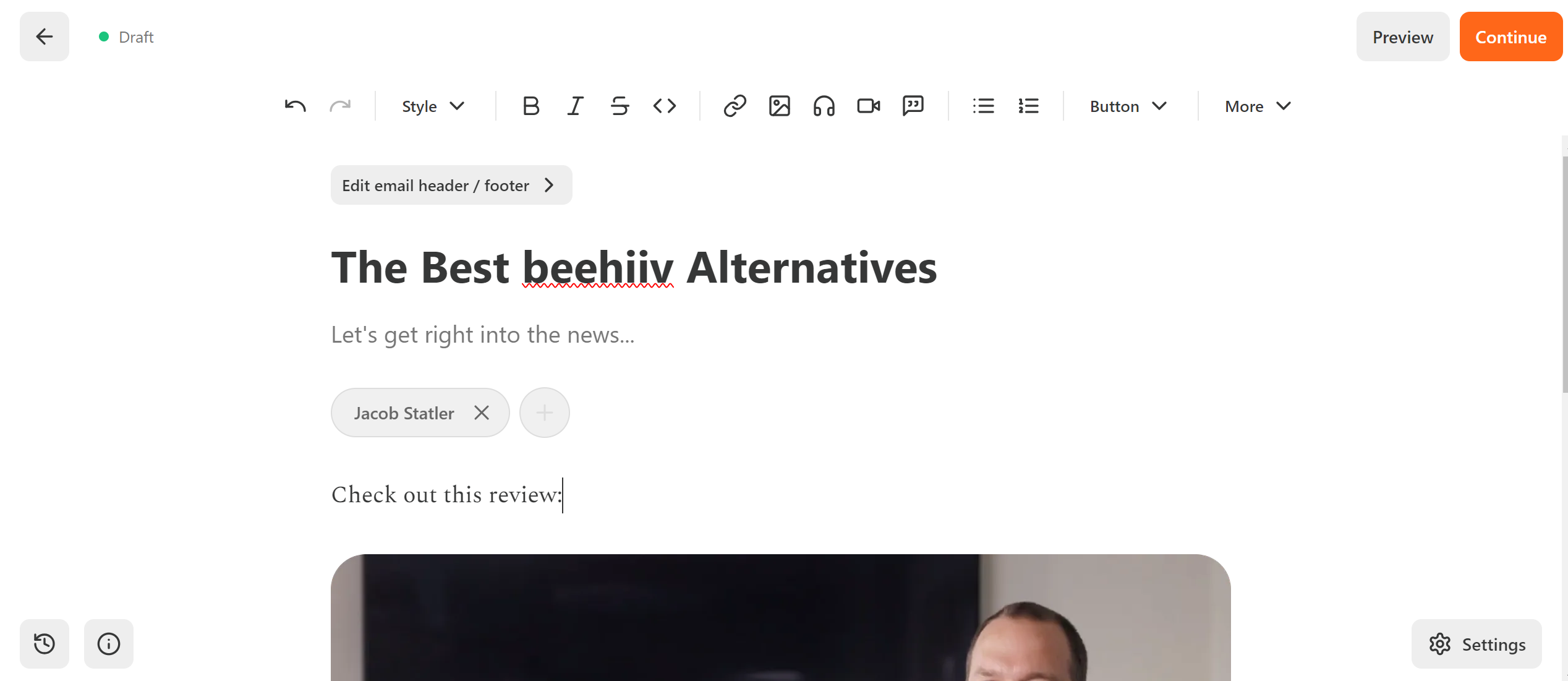
The main drawbacks are limited customization, minimal automation, and a 10% revenue fee. But for writers who want to focus on content rather than campaign management, Substack delivers a clean, community-driven publishing experience.
Pros
- Free to use
- Fees only apply when (or if) you get paying subscribers
- No website is required to join
- Easy to use and post content to
Cons
- Very limited email automation capabilities (no sequences or drip campaigns)
- Limited customization options
- Lack of API
- Standard fee = 10% of gross subscriber revenue
- Some users complain about customer support being slow and overreliant on AI
Features
- Create and personalize a profile with a name that reflects what your channel is about.
- Users can have as many newsletters as they want, including free and paid versions.
- Monetize your newsletter with paid subscriptions.
- Blogging, emailing, and podcasting features are free to use.
- Get a custom domain to host your newsletter.
- Access growth features like mentions, cross-posts, referrals, and recommendations.
Pricing
It’s free to set up an account and get started on Substack. If you enable paid subscriptions, Substack takes a 10% cut of your revenue. There’s also a 2.9% + $0.30 per transaction fee and a 0.7% fee for recurring payments.
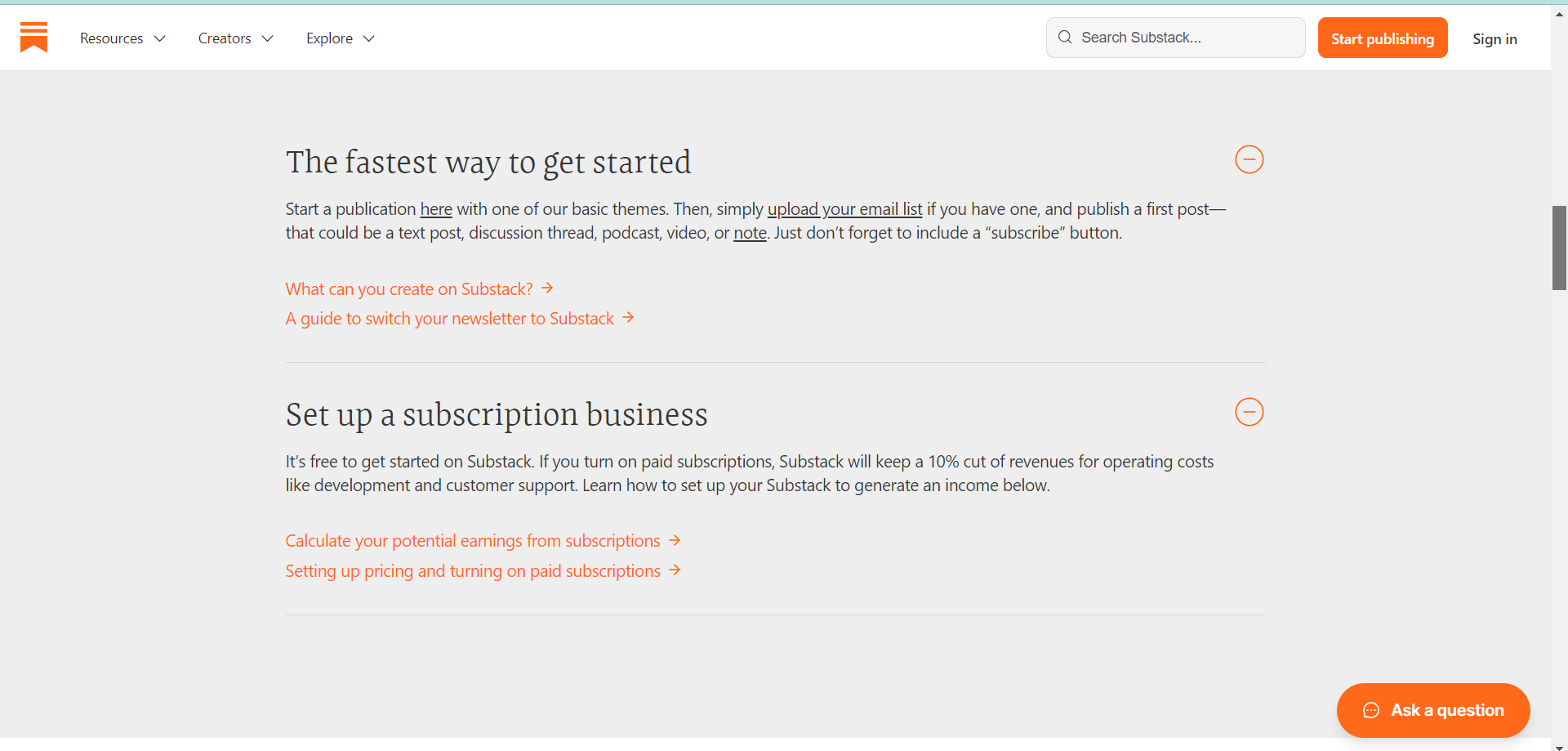
To learn more about Substack’s transaction fees, check out this page.
Customer reviews
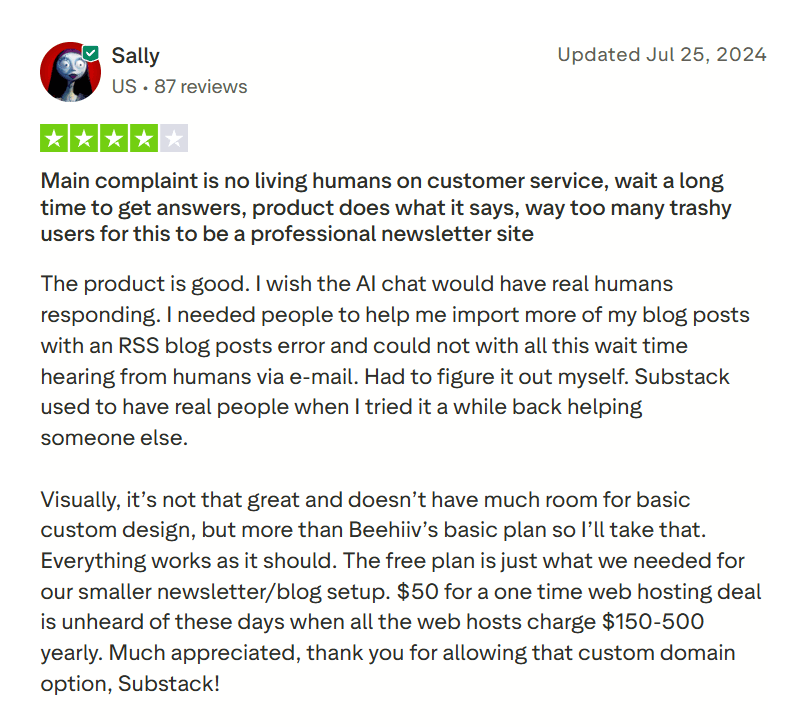
There are equal amounts of yays and nays among Substack users. Most users love how easy the platform is to use. But I also found many customer reviews noting that Substack’s customer service is “not present” and “they won’t respond.”
Here’s what Substack user Sally has to say:
3. Best for Bloggers: Ghost
The Ghost platform is known for its ability to customize themes, which gives you complete control over the design of your site and newsletter.
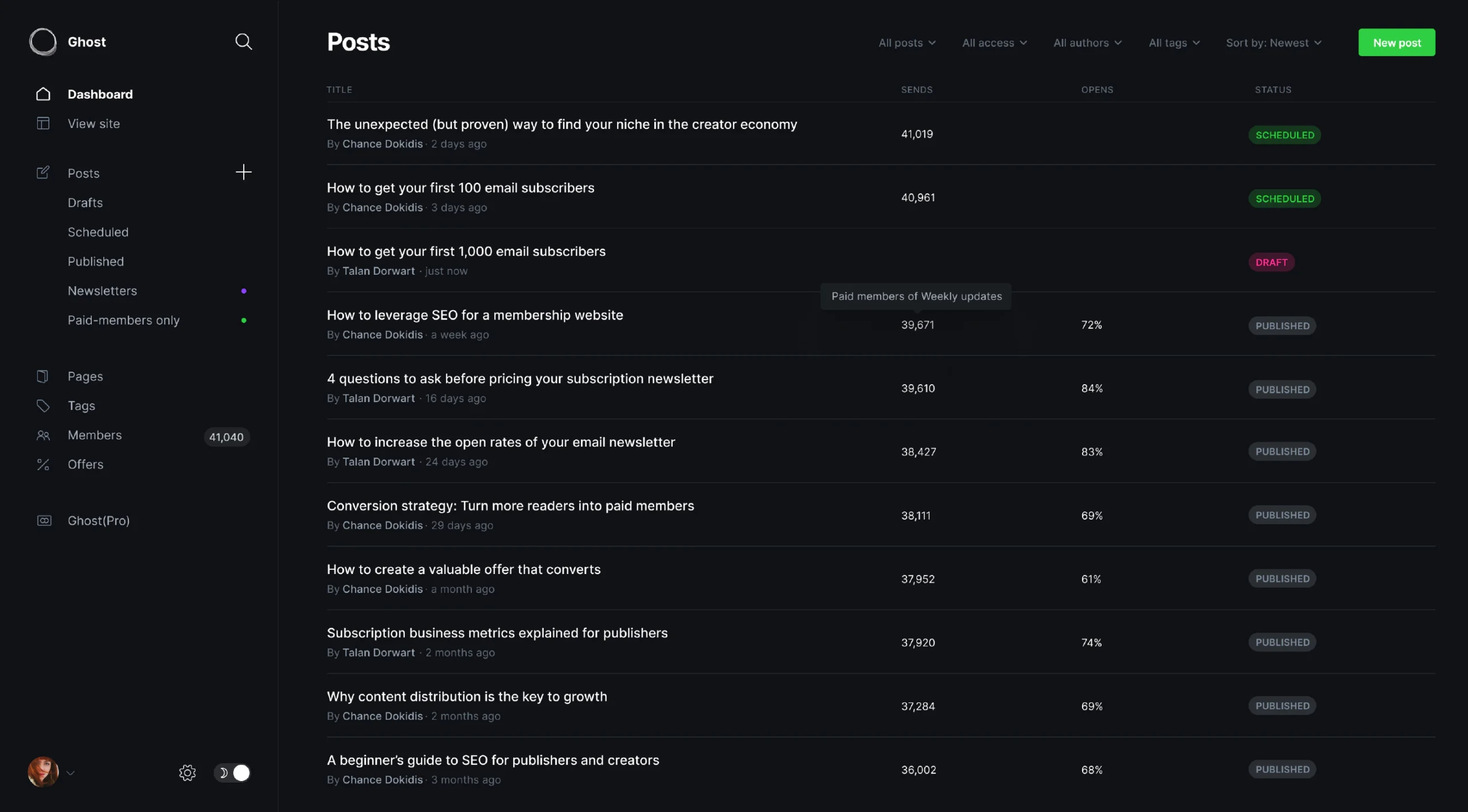
Ghost could be a good option for your newsletter if you plan on starting a blog and newsletter publication.
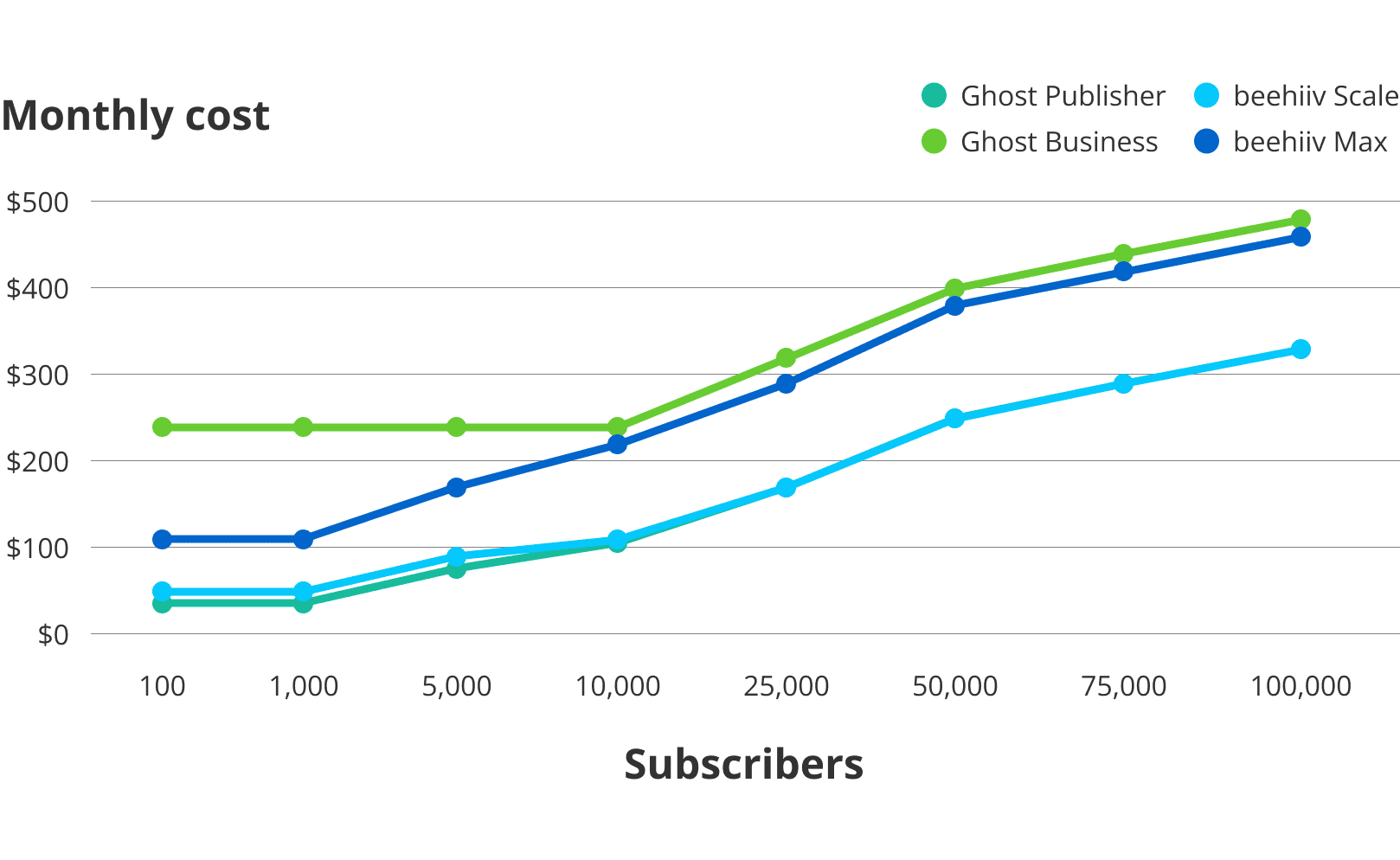
Its pricing is comparable to beehiiv’s until you get over the 25,000 subscriber mark. Then, it becomes drastically more expensive.
Because of this, I wouldn’t recommend Ghost if you already have a website, so you don’t have to pay for a feature you don’t need.
However, if you’re looking to start a paid subscription newsletter, this could be a good option because they don’t charge fees for that.
Pros
- Helpful if you also want to start a blog
- Extensive publishing and content tools
- UI is clean and uncluttered, which allows for easy setup for beginners
- No fees for paid subscribers
Cons
- Becomes more expensive than beehiiv after 10,000-25,000 subscribers, depending on your plan
- There’s only a credit-card-required 14-day free trial, not a free plan
- Some customers complain that the admin API is limiting and difficult to use
Features
- Site design – Create a custom website for your blog with the help of templates.
- Advanced creator tools – Publish to your website or newsletter and create content using Markdown and rich media.
- Grow your audience – Get subscribers to sign up for free or offer paid subscriptions.
- Membership management – Get insights into your subscribers and what content they’re engaging with.
- Offers & promotions – Run special promotions and offer discounts to encourage paid subscribers.
- Integrations – Connect your tech stack with over 50 integrations, including Google Analytics and Zapier.
Pricing
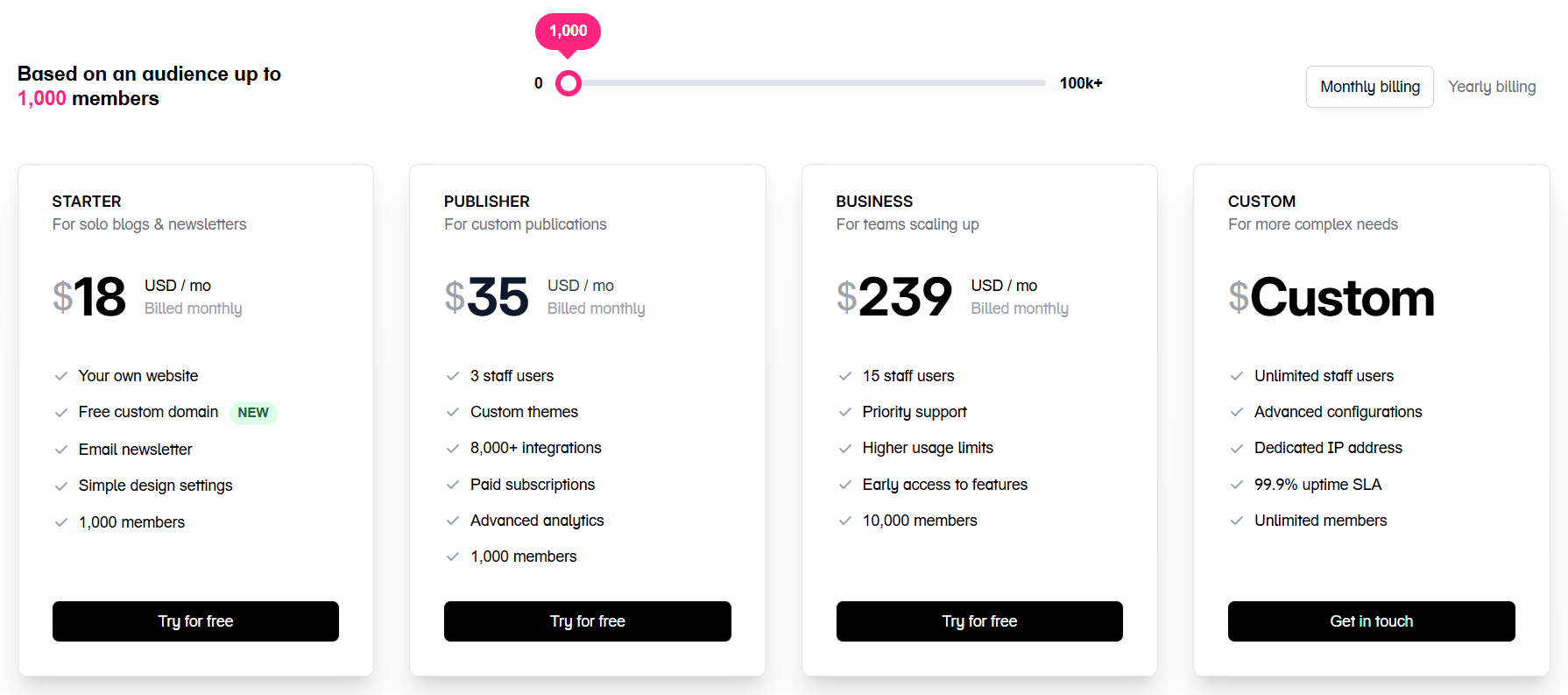
After your 14-day free trial, you’ll need to upgrade to a paid pricing plan.
Pricing plans start at $11/month for 500 members and go up to $3,019 for 385,000 members.
Here’s how Ghost’s pricing stacks up against beehiiv’s:
They offer about a 20% discount on annual pricing.
For more accurate details, check out Ghost’s pricing page.
Customer reviews
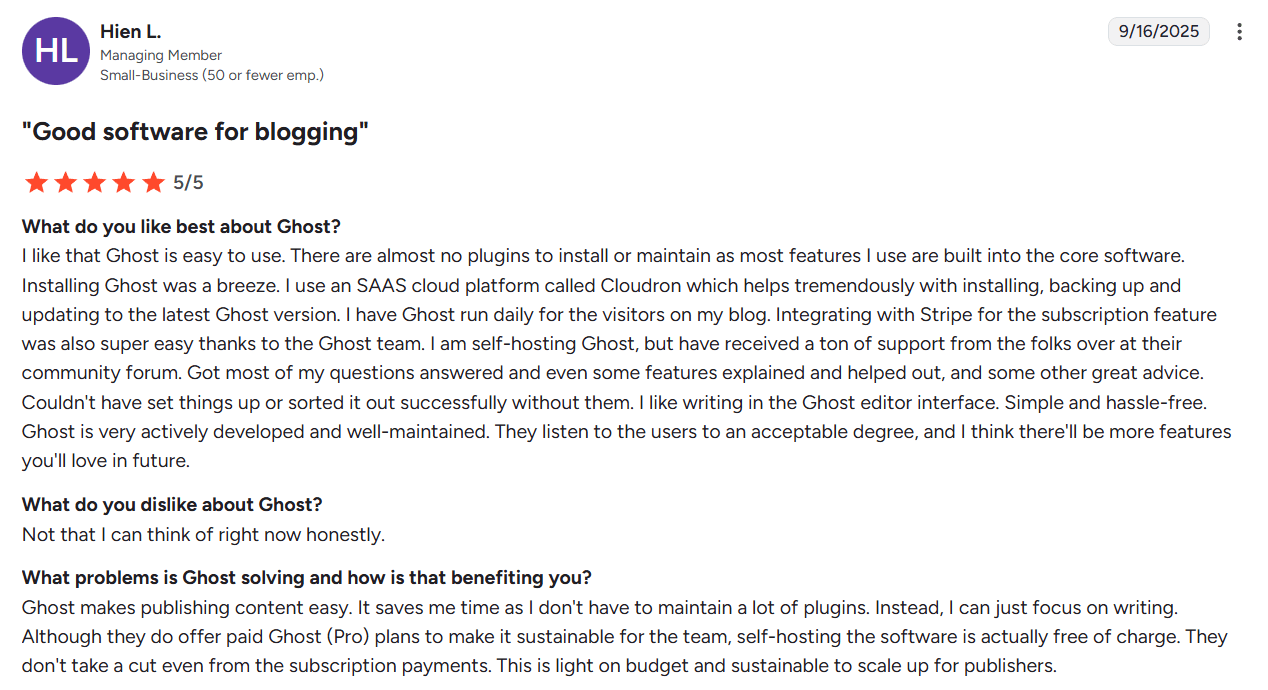
Ghost mainly received 4’s and 5’s in review forums. Customers like the clean, easy-to-use UI. They also like the option to view scheduled, published, and drafted articles that work well across mobile and web browsers. Some reviewers mention that editing templates can be challenging if you don’t have coding experience.
Here’s what Hien has to say about using Ghost:
4. Best for Selling Digital Products: Kit
Kit is a good choice for creators who sell digital products.
It gives you the tools you need to design and send emails, grow your audience with its Creator Network, and sell digital products (powered by Stripe). This is especially useful for businesses that sell courses or paid newsletter subscriptions.
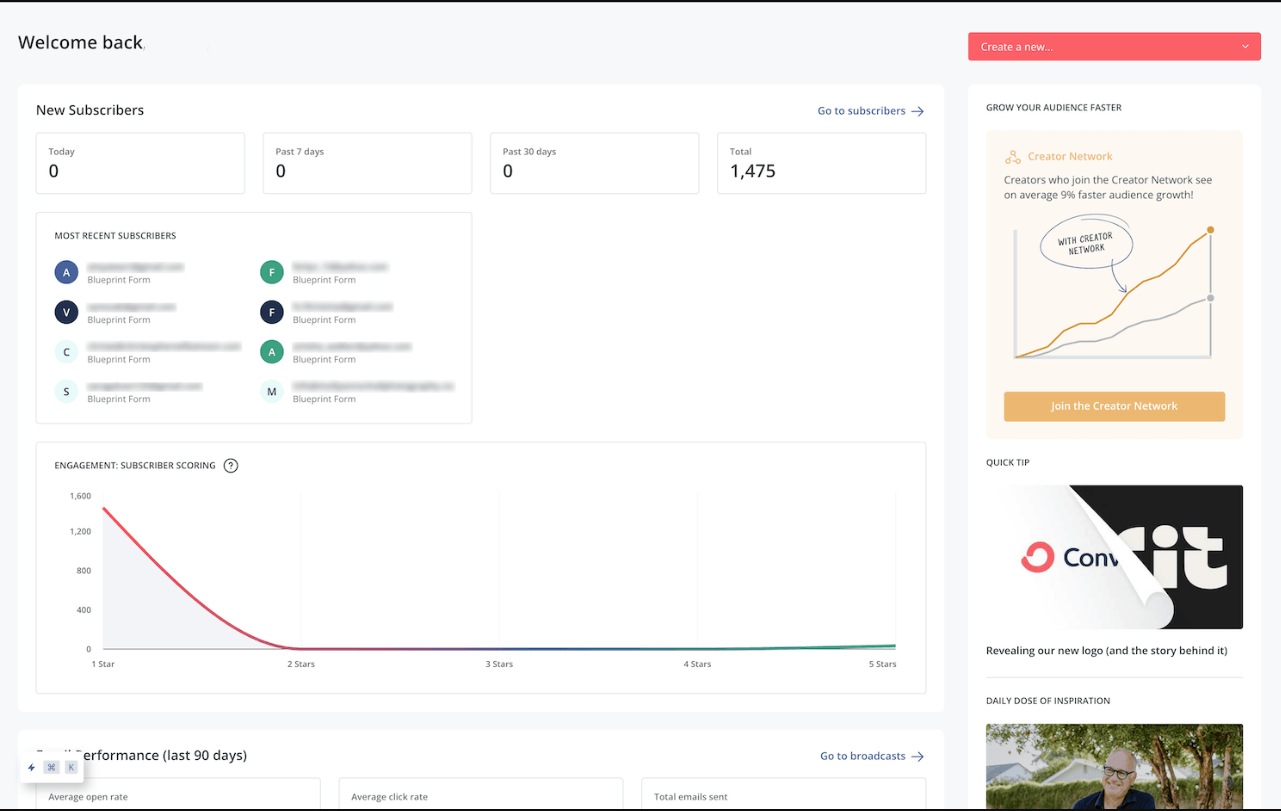
Kit offers a generous newsletter plan that’s free for up to 10,000 subscribers, which is the highest-volume free plan on this list.
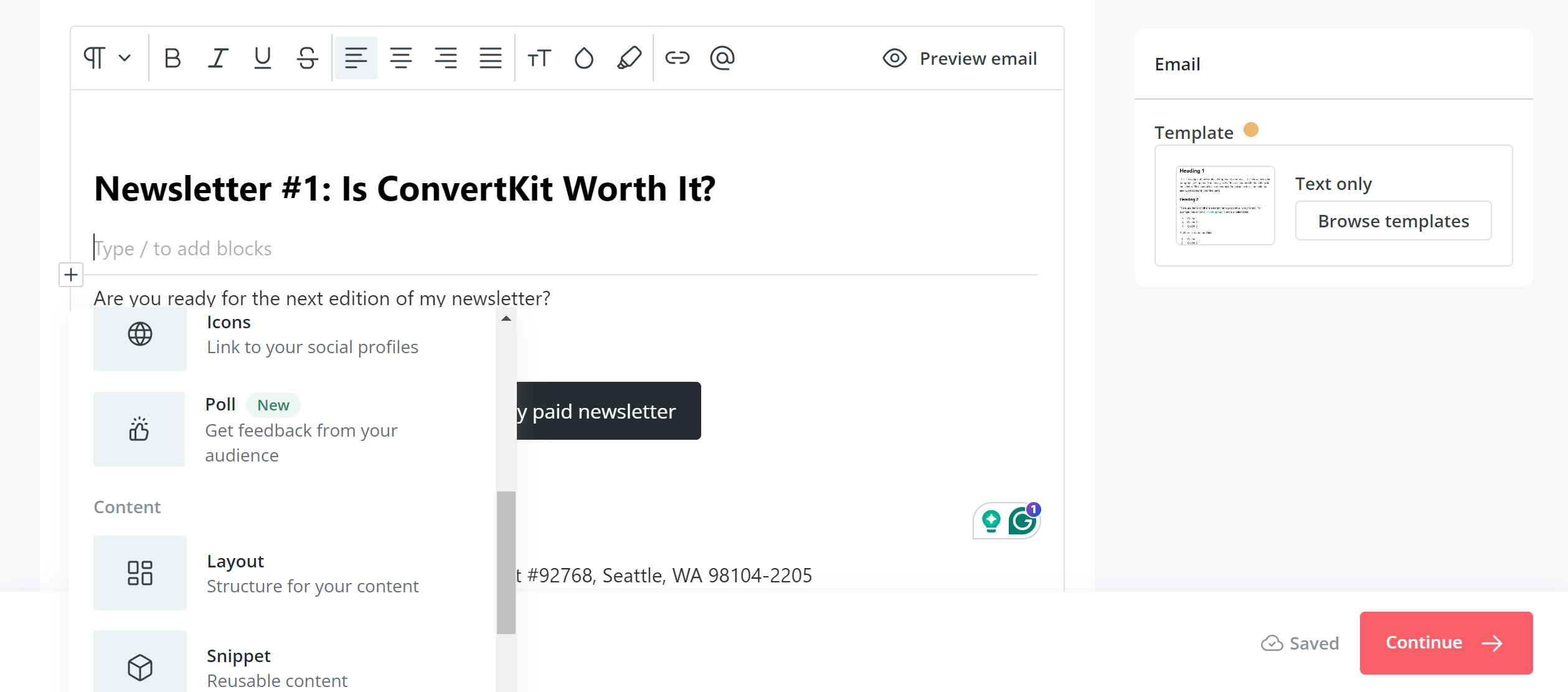
I found the email builder’s UI very intuitive and to have plenty of element options, including polls.
Pros
- Clean, organized UI
- Pre-built email automation templates (which is unique)
- Perfect for selling digital products directly to your audience
- Built-in editor is fast and easy to use
- The Creator Network gives you another option to grow your subscribers
- Offers a free newsletter plan for up to 10k subscribers
Cons
- Pricing becomes drastically more expensive than beehiiv’s after 25k subscribers
- Email designer can be frustrating to learn (no drag & drop feature)
- Advanced email personalization requires basic coding knowledge
- Landing page builder lacks functionality
- No spam testing
- Doesn’t offer transactional email
- Subscriber referrals are only available on Kit’s more expensive Pro plan.
Features
- Email designer – Visually design email templates or start from customizable pre-built templates.
- Deliverability – Kit boasts an average 99.73% deliverability rate.
- Visual automations – Use a visual building tool to create automated sequences.
- Recommendations – Use the Creator Network to have your newsletter recommended by other popular newsletters with similar audiences.
- Landing pages – Build hosted landing pages with templates and without code.
- Forms – Create signup forms for lead magnets, use pop-up forms, and create categorized signup forms.
- Commerce – Sell digital products and paid subscriptions with Stripe.
- Sponsor Network – Find advertisers through their Sponsor Network for your newsletter.
- Integrations – Integrate with e-commerce tools to make digital sales easy.
- RSS-to-email – Automatically send emails from curated RSS feeds.
Pricing
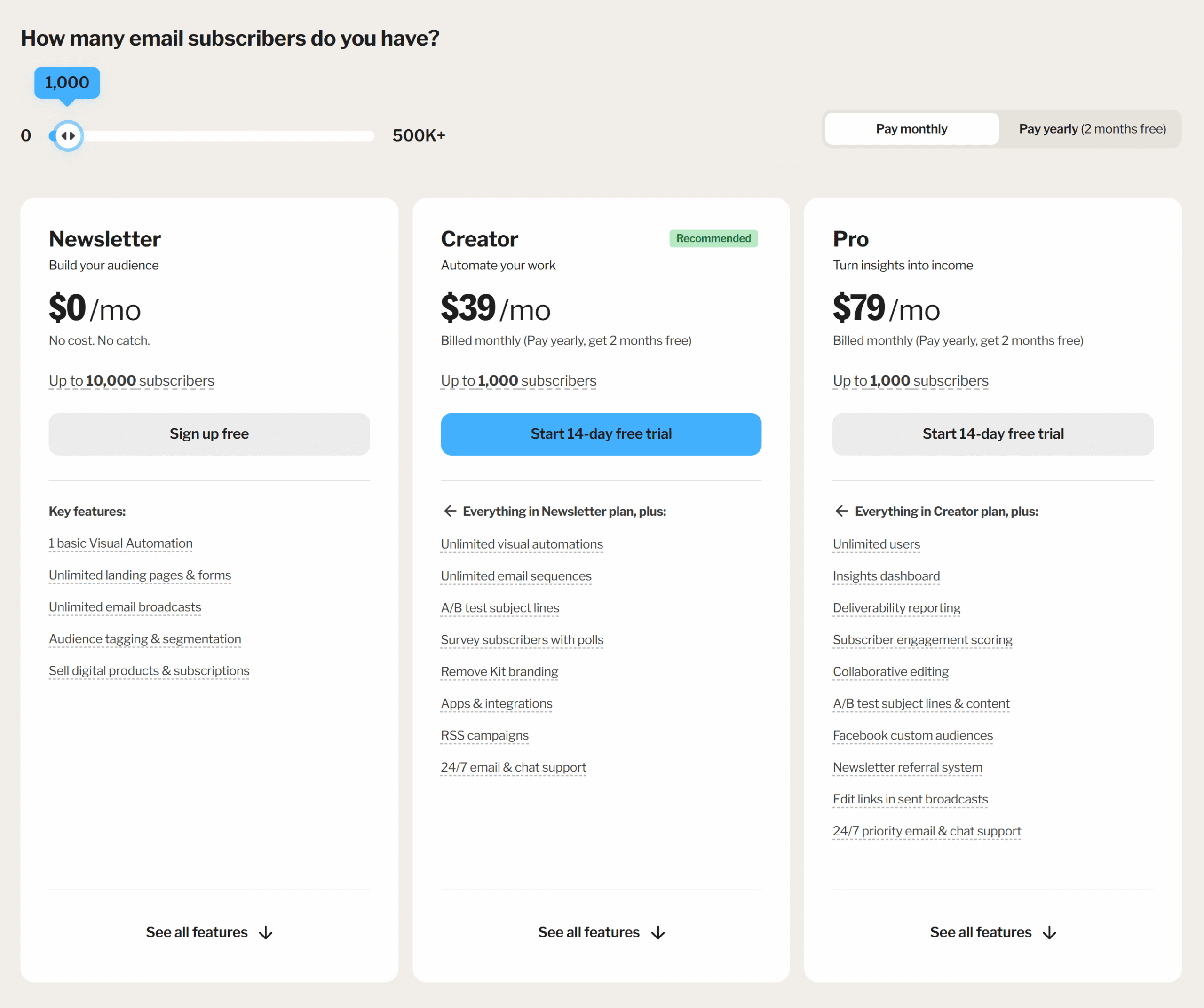
Kit offers 3 main plans. The free newsletter plan goes up to 10,000 subscribers. The paid plans start at $39/month for up to 1,000 subscribers and go up to $2,599/month for 400k subscribers.
Here’s how Kit’s paid plans stack up against beehiiv’s:
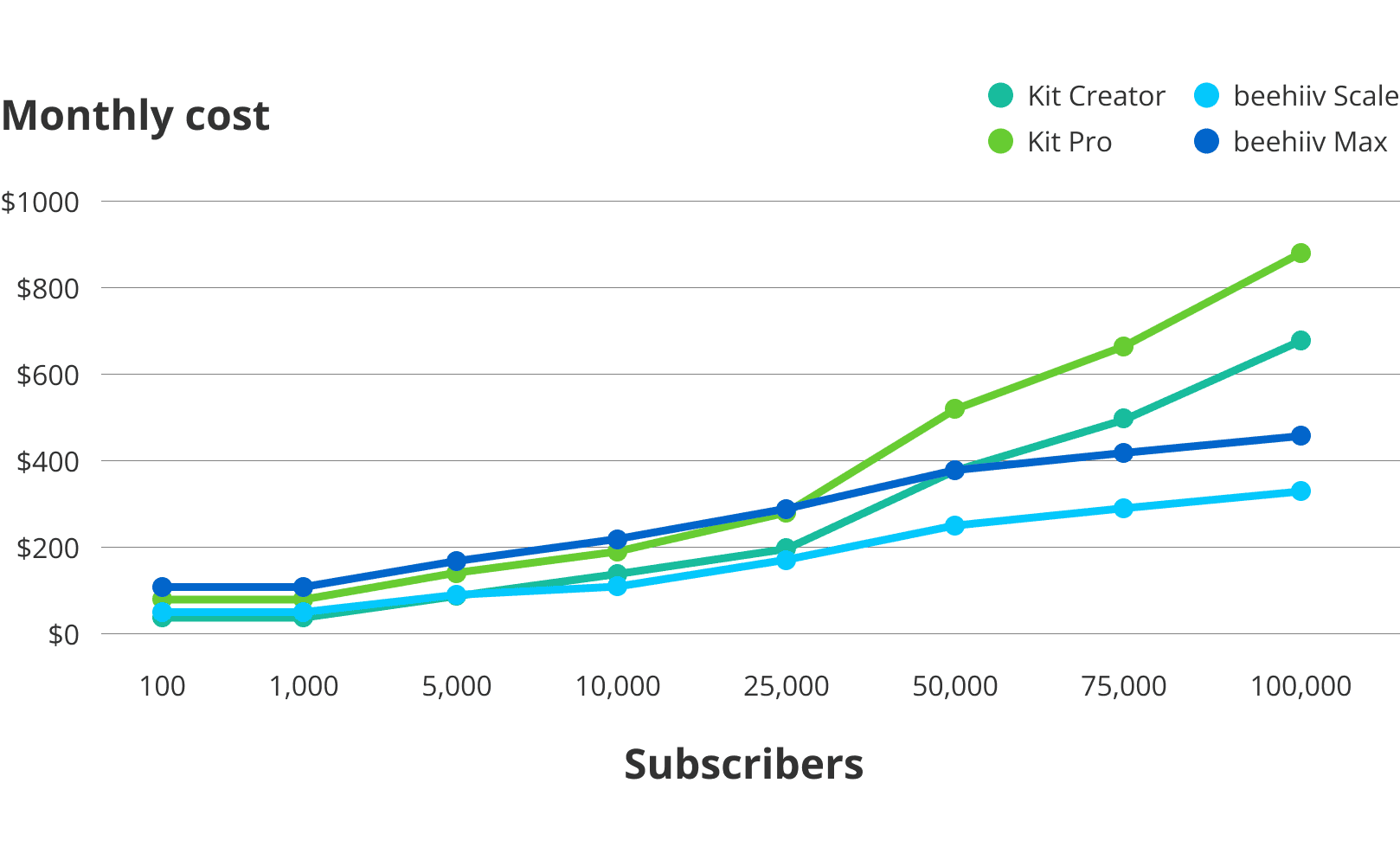
They offer 2 months off when you pay annually. For specific plan information, check out Kit’s pricing page.
Customer reviews
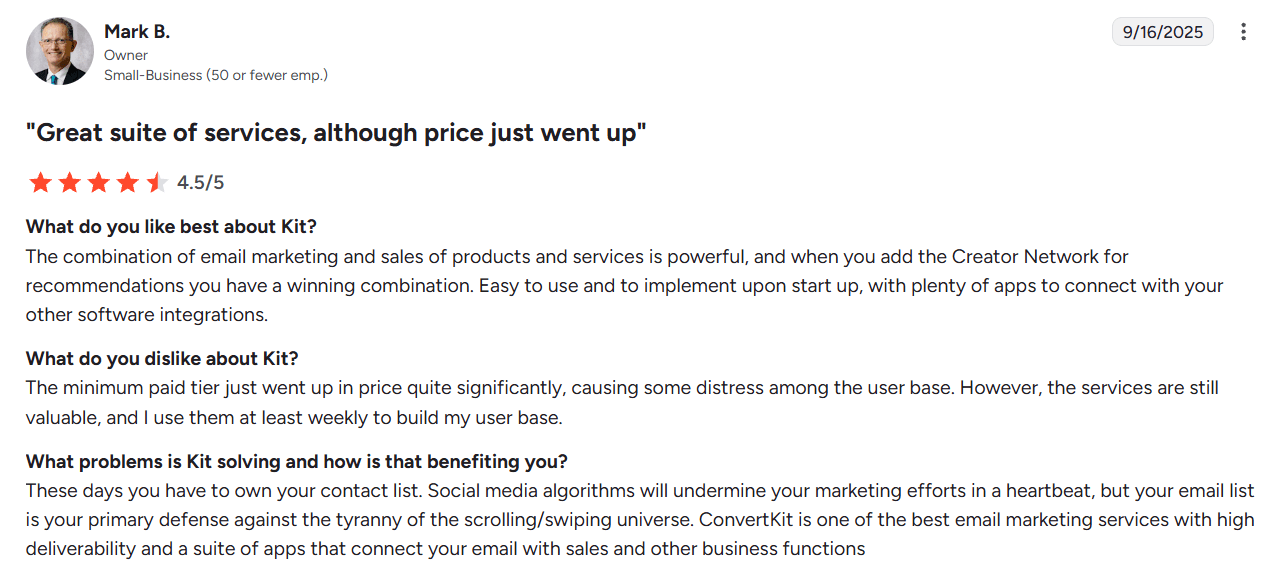
Kit receives mostly 4 and 5 stars across the board. Users love the easy writing experience and advanced automation features. They also note that the Creator Network program has helped build their email list by partnering with other creators who share their audience. The only common complaint from users is the recent price increase, although some would like more advanced reporting features.
Here’s what Mark has to say about using Kit:
5. Best for Budget Users: Sendy
Sendy is a self-hosted email newsletter platform (which means the software has to be installed and hosted on your own server).
Emails are sent through Amazon Simple Email Service (SES).
Unlike other platforms, you only pay Amazon SES for what you send after the initial $69 fee for the software, making Sendy the most affordable option on this list.
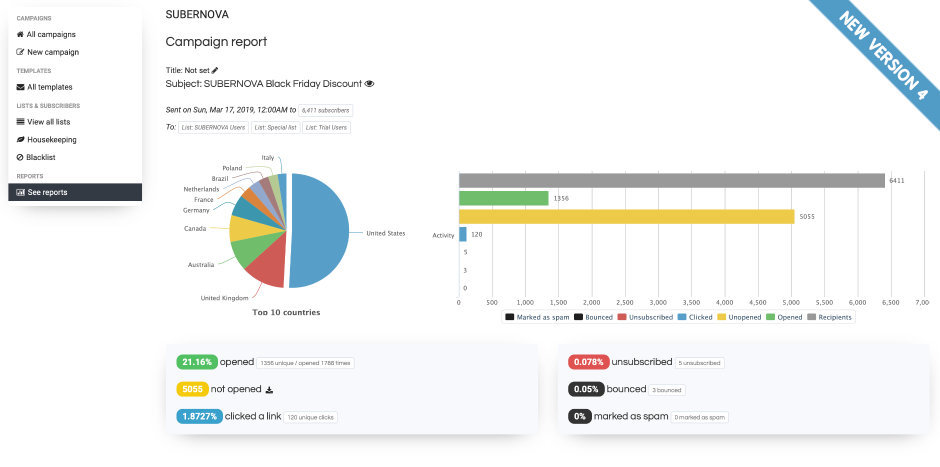
This is the only email service provider on this list that doesn’t have an easy-to-use email template builder or support image hosting.
If you’re technically inclined, the cost savings you get with Sendy might be worth it. However, if you care more about having more built-in features that are easy to use, this won’t be the choice for you.
Pros
- The most affordable beehiiv alternative on this list
- Good functionality for the price
Cons
- Steep learning curve to begin using
- No drag-and-drop email builder
- Requires some technical knowledge
- Basic reporting
- No image hosting
- Customer support is minimal and only available through email
- Some users report that uploading files is slow
- Email sending speed is limited based on your server capacity so an email campaign can take hours instead of minutes to go out on a small, cheap server
Features
- No monthly fees – Pay only when you send emails (emails sent via Amazon SES)
- Reports – See reports to track opens, clicks, bounces, complaints, and countries.
- Autoresponders – Set up automated email drip campaigns for set time intervals.
- White-labeled client accounts – Manage and set limitations for multiple brands under your account.
- List segmentation – Create segments for your email list to deliver to a targeted audience.
- Rules & Webhooks – Set up custom automations that trigger when subscribers take an action.
- List & subscriber management – Organize your email list based on custom fields.
- Custom fields – Store additional contact data besides just “name” and “email.”
- Custom domains – Setup custom domains to send from that are still recognizable as you. You pay for this feature separately based on the number of custom domains you want to add.
- Housekeeping – Easily clean your email list of inactive and unconfirmed subscribers.
- Integrations – Use Zapier to connect Sendy to other apps.
Pricing
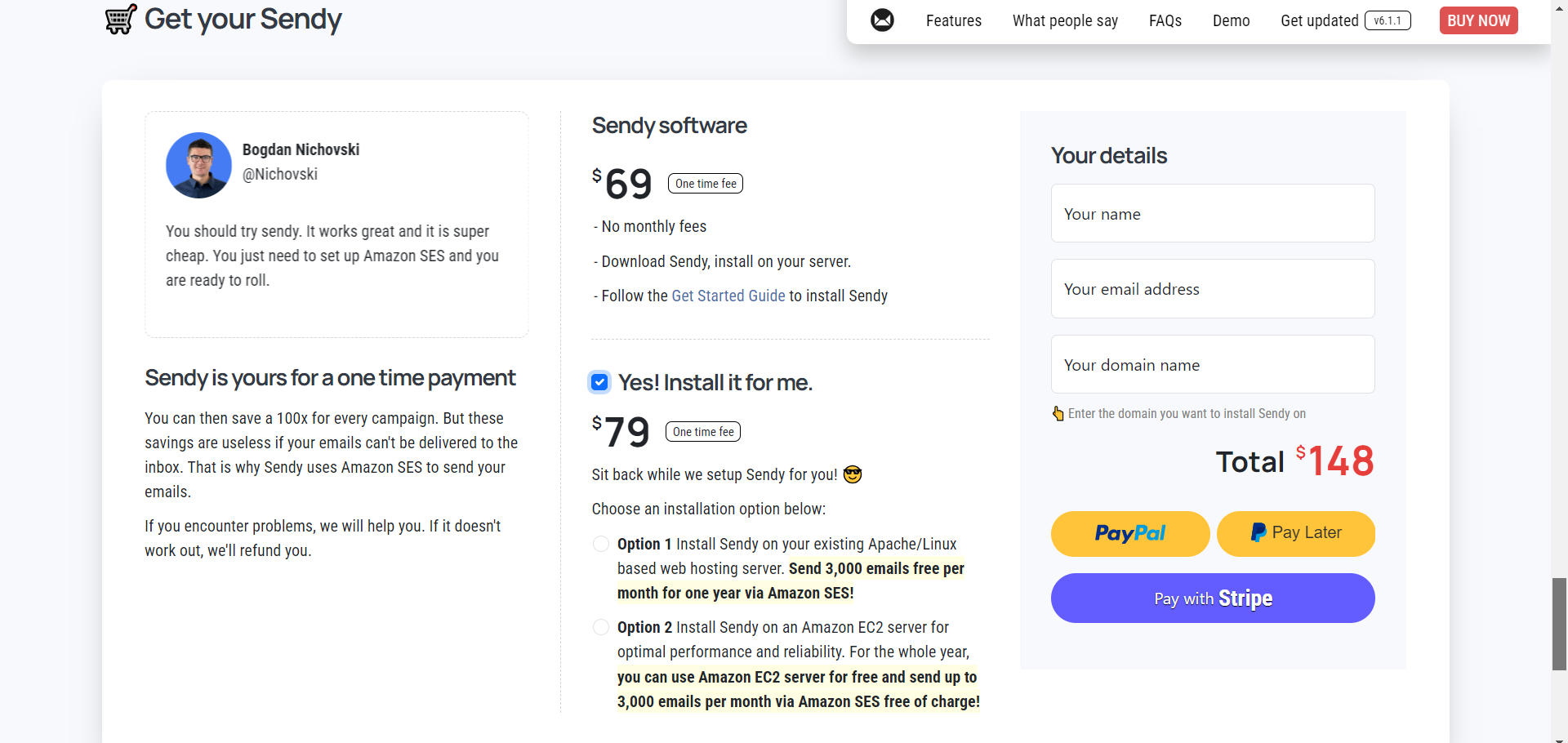
Sendy offers the most simple pricing on this list. You pay a $69 one-time fee for the software and then $1 per 10,000 emails sent to Amazon SES. There’s an optional $79 installation fee if you’d like Sendy to be set up for you.
For more details, check out Sendy’s pricing here.
Customer reviews
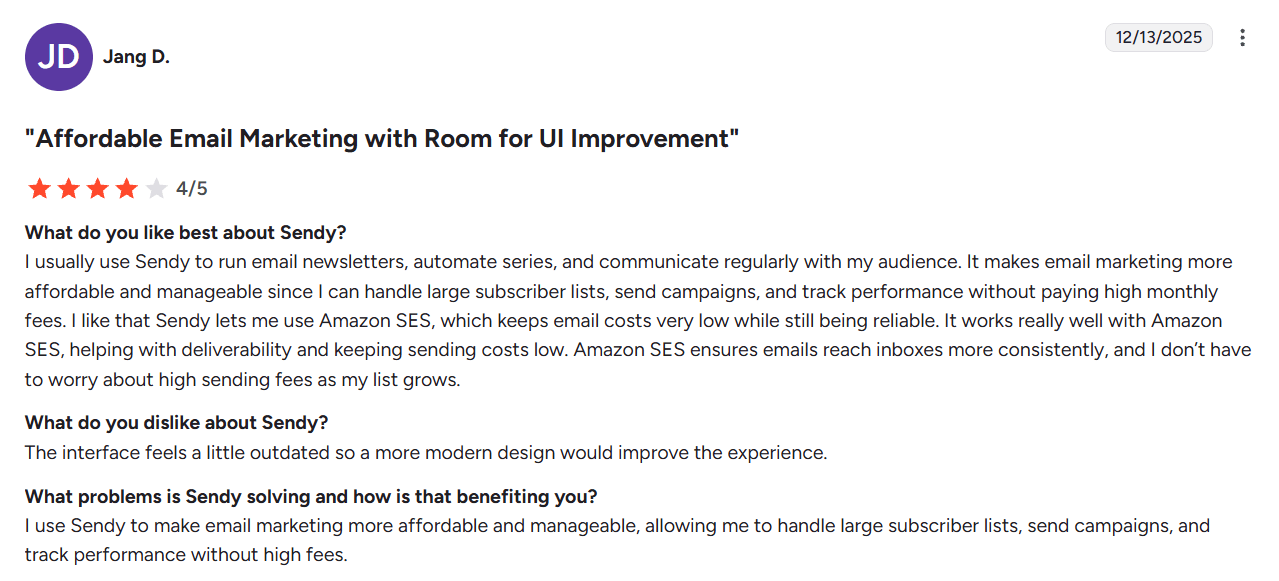
Like other platforms, Sendy receives 4 and 5 stars in customer satisfaction surveys. Users commonly praise the platform’s affordability and reliability. However, they also mention limited out-of-the-box features and slow customer service.
Here’s what Jang has to say about using Sendy:
6. Best for All-In-One Marketing: MailerLite
MailerLite is an all-in-one marketing platform — like Mailchimp, but cheaper. It goes beyond newsletters with advanced ecommerce automations, plus non-email tools like a website and blog builder, pop-ups, and a digital product platform.
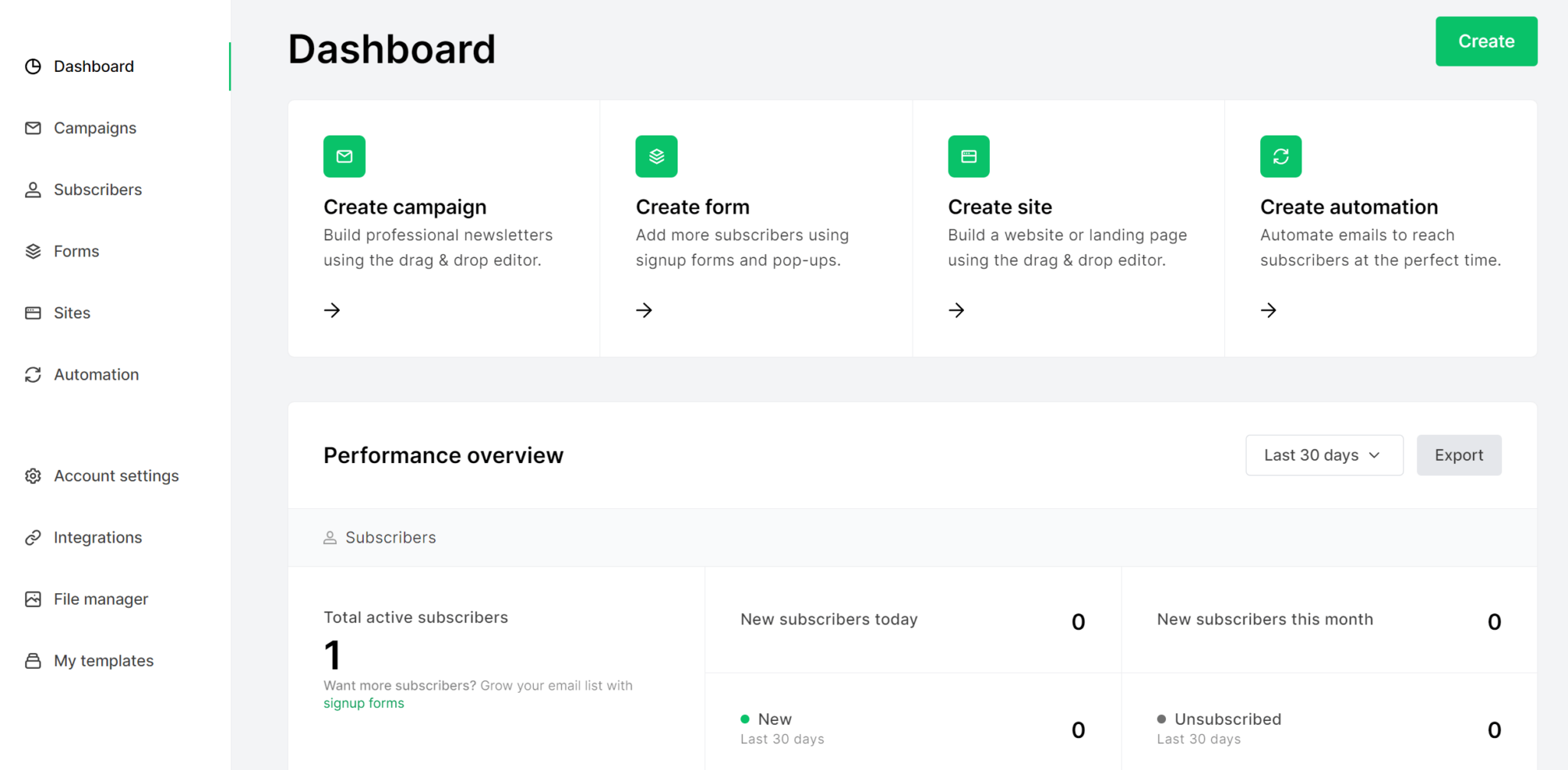
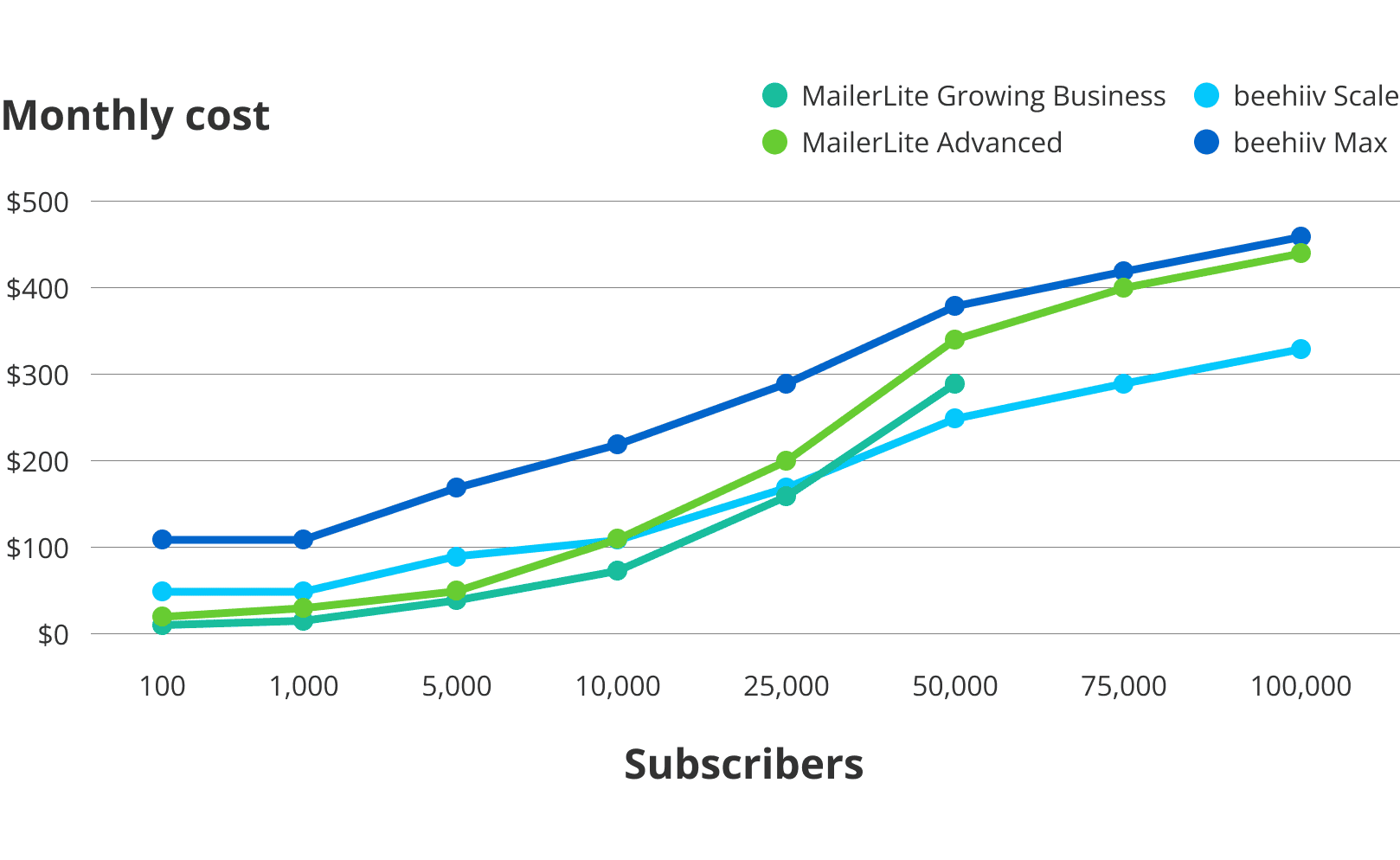
MailerLite is also one of the more affordable alternatives on this list for lower-volume senders, but it’ll still cost more than beehiiv after you surpass 25k subscribers.
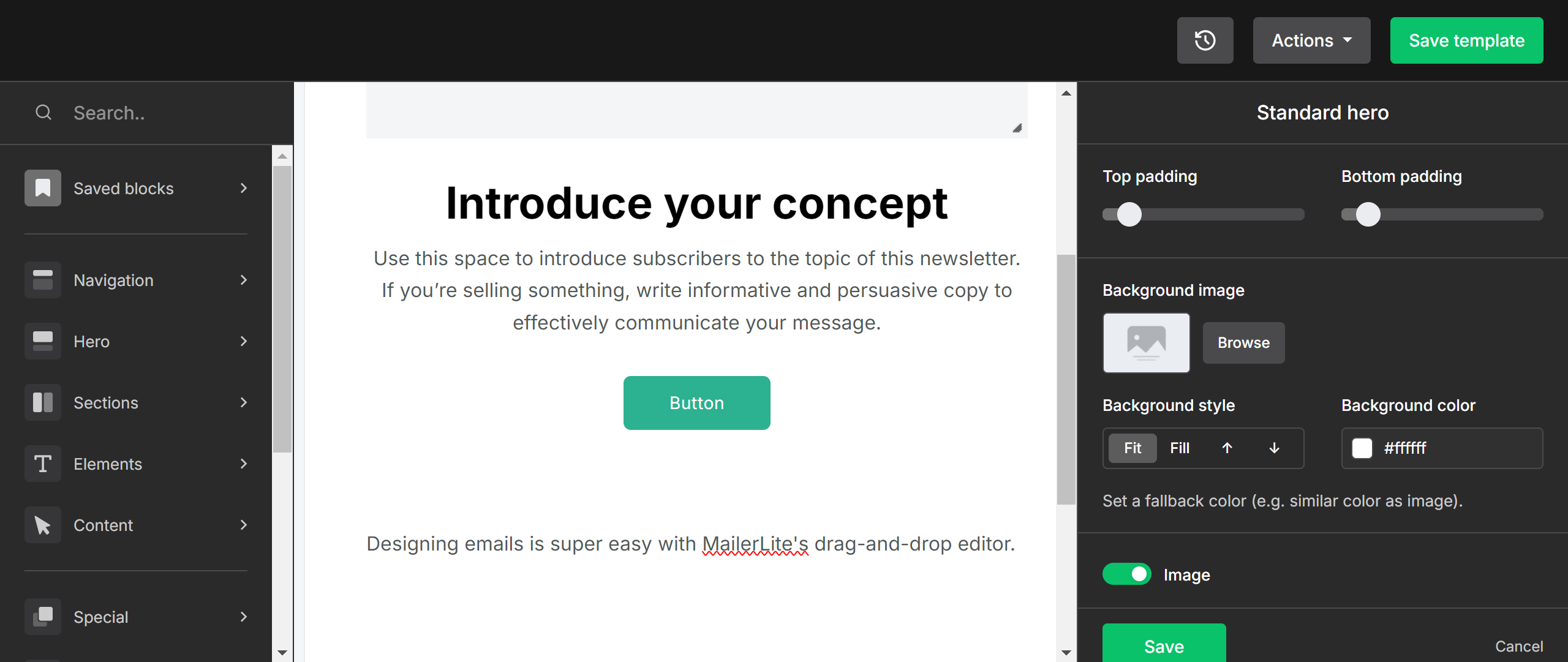
I like how its email designer “blocks” are categorized, making it quick to find design elements to add.
If you’re looking for a newsletter platform that’s also made for ecommerce while still being on a budget, this could be a good choice for you.
Pros
- Free plan for up to 500 subscribers
- Loaded with features (including for building a website)
- Easy to use drag-and-drop email template builder
- More affordable than beehiiv if you have fewer than 25k subscribers
Cons
- Live chat support is only available on the more expensive Advanced plan
- Custom HTML templates are only available on the more expensive Advanced plan
- Becomes more expensive than beehiiv when you have over 25,000 subscribers
- Reviewers commonly mention various bugs
Features
- Automation – Set up automated workflows and sequences based on triggers.
- Newsletter editors – Design your newsletters with a rich text or drag-and-drop editor.
- Email notifications – Send notification emails to your customers.
- Website & blog builder – Build a website with blog capabilities using a drag-and-drop editor.
- Landing pages – Create customizable landing pages with a drag-and-drop editor or start by generating one with AI.
- Signup forms – Capture signups with embedded and pop-up forms.
- Email verifier – Use MailerCheck to verify email addresses in bulk.
- Digital products – Sell your digital products with Stripe, then deliver them with email.
- E-commerce – Connect your ecommerce platform to send transactional emails.
- Paid newsletter subscriptions – Offer paid subscriptions with their Stripe integration.
Pricing
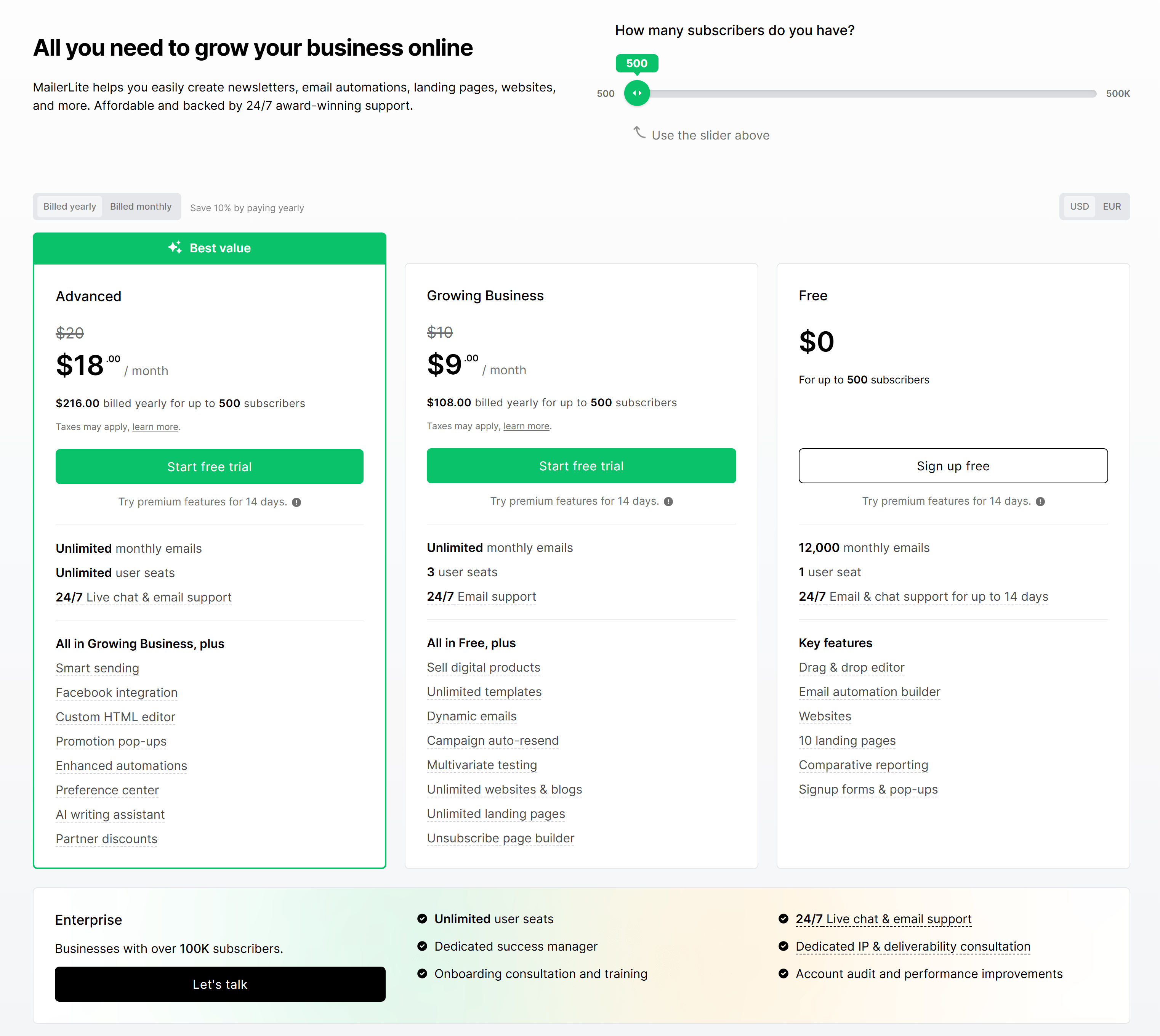
MailerLite offers 3 main plans for marketing emails. The free plan goes up to 500 subscribers. Paid plans start at $10/month for up to 500 subscribers and go up to $1,900 for 500k subscribers.
Here’s how MailerLite’s plans compare to beehiiv’s:
If you sign up for an annual plan, you get 10% off. Check out MailerLite’s pricing page for more plan details.
Customer reviews
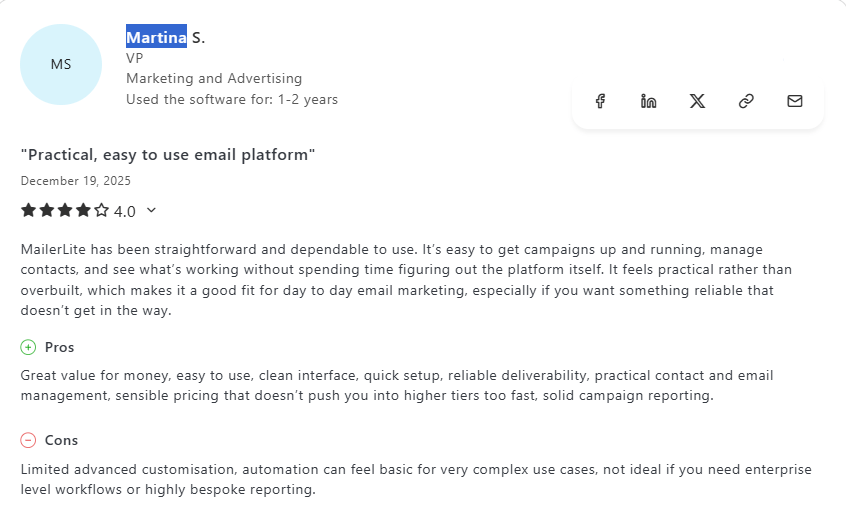
Mailerlite receives mostly 4 and 5 stars from its users. Most reviews praised the affordable pricing. Reviews were largely positive or largely negative regarding support.
Here’s what Martina has to say about using MailerLite:
Beehiiv alternative evaluation checklist
So which beehiiv alternative will best fit your needs?
Here’s a checklist to help make your decision easier:
- Does it fit your budget?
- Is it easy to use?
- Who will be primarily responsible for working with the email platform? Are they tech-savvy?
- Does it have the features you need?
- Which features and capabilities are the most important to you and your clients?
- Does the platform help you follow email deliverability best practices by helping you filter out bad emails?
- Does the platform meet your compliance standards?
- Does it integrate with the software you already use?
- Will it grow with your email list without drastically increasing costs?
- Is the customer support reputable and known for being available & helpful?
Ready to make the switch from beehiiv?
If you’re a marketing agency, email consultant, or have a large team, BigMailer has all of the features you need to create, distribute, and grow your newsletter — at a much lower cost than beehiiv.
Have questions about BigMailer’s features or pricing? Reach out to us via chat or schedule a demo.
Or, if you’re ready to give the BigMailer platform a try, get started with a free account.
Important: All providers covered in this article are built for permission-based email marketing. Using purchased, scraped, or third-party lists for cold outreach or lead generation is typically against their terms of service and can result in immediate account suspension.
Author: Jacob Statler
