
7 Best Amazon SES Alternatives in 2026
Updated on March 10, 2026
Amazon Simple Email Service (SES) has been used by developers to send transactional email for years, and more and more marketers are now using it for marketing campaigns as well. That’s because SES can be very cost-effective for sending high-volume bulk campaigns, with the right setup. Usually, a separate platform is used to manage campaigns, reporting, and assets (templates and images), while Amazon SES is used solely for email sending.
Amazon SES UI isn’t designed to be user-friendly for non-technical marketers and lacks basic features you’d expect from a typical email marketing platform. To make things worse, SES UI doesn’t make it easy to monitor your sender reputation, and any issues can result in an automatic suspension of your SES account. Although they recently added email validation to their stack, so maybe we’ll see even more features down the road.
I’ve spent 20+ hours signing up for trials and reading through every customer review for the top 7 Amazon SES alternatives from the past year. The best part? These tools offer excellent features without breaking the bank.
I didn’t include the popular alternative, Sendy, on my list of hosted-only platforms because it’s self-hosted software.
Top alternatives that connect to Amazon SES:
These tools help you keep costs down by using your own SES connection while delivering the user experience of a traditional email marketing platform (the best of both worlds). You get better asset management (campaigns, templates, image hosting) and reporting.
Top traditional ESPs
These platforms send emails from their servers and don’t allow sending through Amazon SES. They can be more expensive for infrequent senders but offer more advanced marketing capabilities, and some provide multi-channel options beyond email.
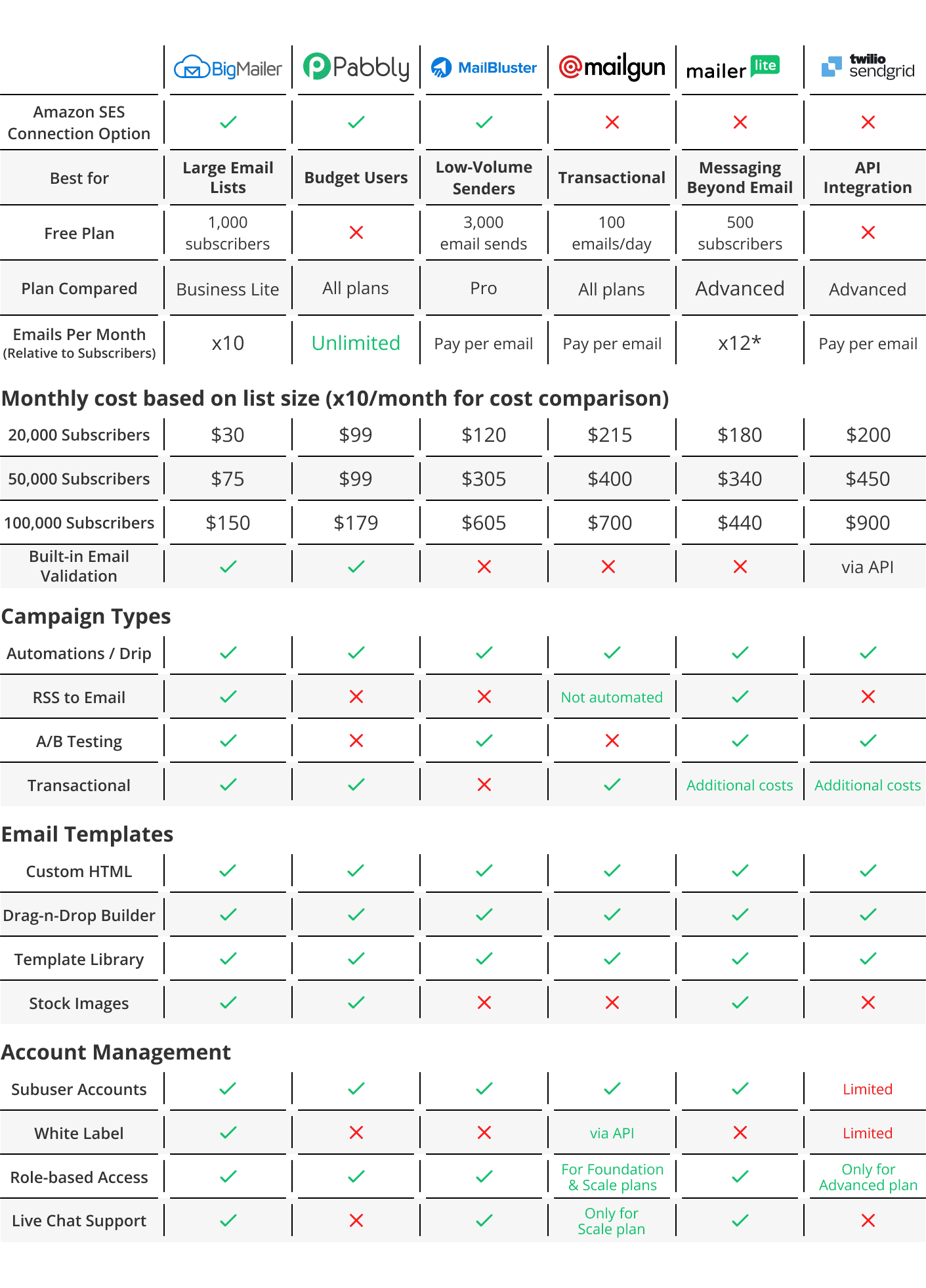
*MailerLite’s unlimited sending drops to x12 for lists over 50k
Last updated on March 3, 2026
1. Best Value For High-Volume Senders: BigMailer
BigMailer is a hosted email marketing platform that lets you use Amazon SES on the backend with BigMailer’s UI. You can also use BigMailer without SES and additional setup steps, which is useful as a backup if your SES account ever gets suspended.
BigMailer is built for multi-brand (aka subaccount) management and is ideal for marketing agencies, franchises, email consultants, media companies, and large teams. This platform offers the most features for the money of any option on this list.

Here are my main reasons why:
BigMailer’s built-in brand management and user role-based access allow you to manage multiple brands and team members (up to 100) from a single account. This allows you to keep all your clients, projects, team members, and email campaigns (marketing & transactional) in ONE place. You can also analyze engagement by email domain to troubleshoot deliverability issues and optimize for inboxing.
Its built-in email validation helps you weed out invalid email addresses and typo spam traps to protect your sender reputation and follow email deliverability best practices (one of the only platforms on this list with this feature built in).
You can also use email throttling to control the number of emails you send within time intervals, improving deliverability for very large lists (over 100k).
I find BigMailer’s drag-and-drop email template builder faster and more intuitive than most platforms on this list (many are clunky).
Templates can be saved to your library and easily shared with other brands, which is especially useful for agency clients in the same industry or franchise. This slashes time spent on template creation when managing multiple brands (clients or locations).
Users rave about the very responsive customer service (available 7 days/week from 8 am – 8 pm EST), which connects you with BigMailer’s support team that’s based in the USA.
Interested in a quick tour? Watch this demo video.
Pros
- Affordable pricing based on list size, which makes it especially valuable for high-volume sending
- Multiple brand management and role-based user access controls
- White-label platform option
- Supports RSS-to-email automation
- No upfront setup fees
- You can use Amazon SES to send with BigMailer
- Support via live chat is available 7 days a week
Cons
- Not ideal for DTC or e-commerce companies due to a lack of direct integrations with e-commerce platforms like Shopify
Features
- Supports all email types – Newsletters, transactional, RSS-to-email, automations, and sequences.
- A/B testing – Test up to 3 subject lines to compare engagement rate.
- Live chat and email support (7 days/week from 8 am-8 pm EST)
- Drag-and-drop and HTML template builders – Bring your own HTML email templates, choose from a library of customizable pre-made templates, or design your own templates with a drag-and-drop builder.
- Multi-brand management – Manage multiple brands and projects from a single platform.
- User roles and access control – Control who has access and permissions to your valuable email lists.
- Landing pages – Create landing pages to capture emails for your newsletter.
- Segmentation – Segment based on campaign activities or custom fields.
- Advanced engagement reporting – See engagement by email domain, which helps troubleshoot and optimize your inboxing more easily.
- Built-in email validation – Remove all invalid emails to improve your deliverability.
- Suppression lists – upload lists to exclude from sending (for example, unsubscribes or complainers from another provider) without extra cost
- Email throttling – Control the number of emails sent at a time to improve your deliverability for large lists, especially after changing providers or IP addresses.
- Integrations – Sync your customer records with hundreds of apps by using integrations with Zapier, Make, Pabbly, or Zoho (or webhooks to push data into your app).
- Referral programs – Grow and monetize your newsletter through referrals by integrating with Sparkloop.
- Live chat and email support – Get access to a USA-based support team 7 days per week from 8 am to 8 pm EST.
Pricing
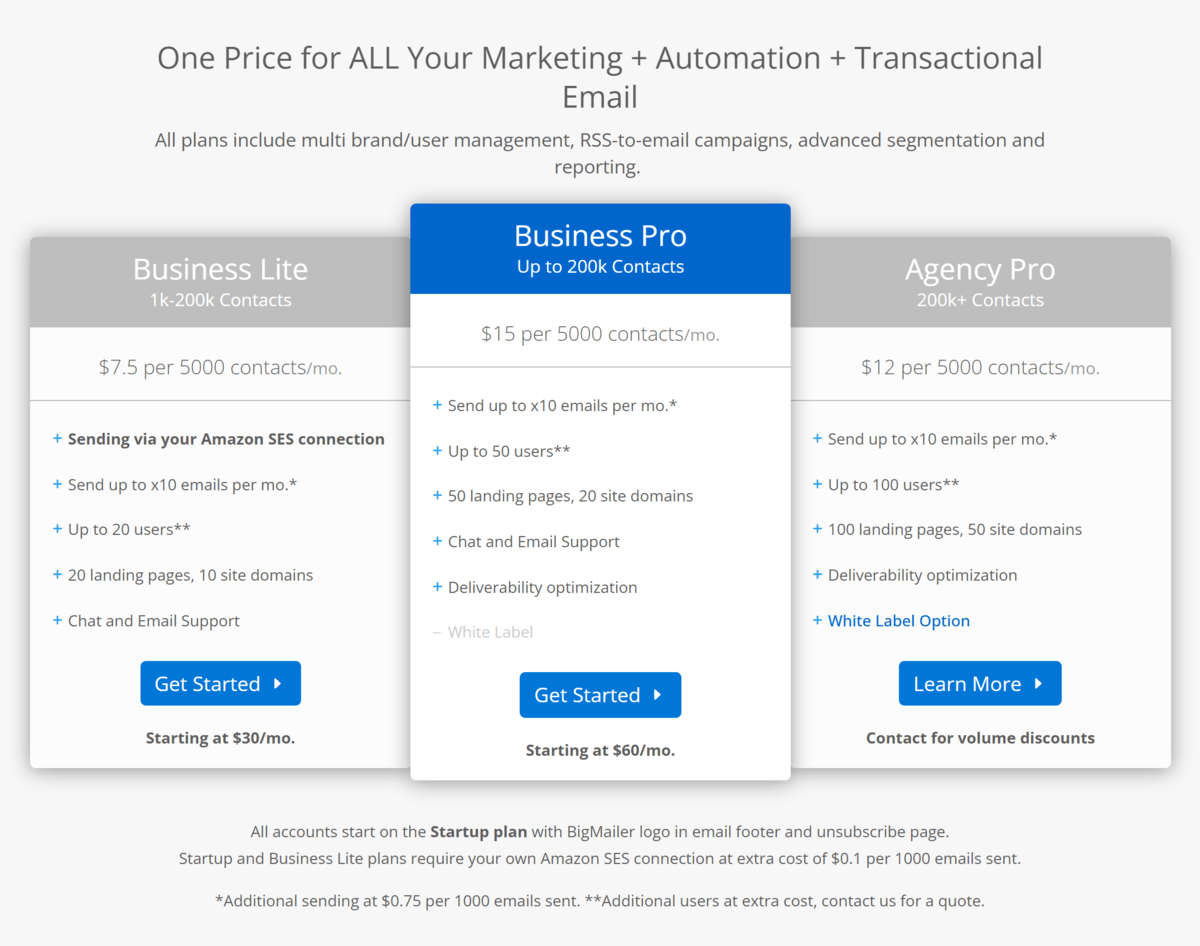
BigMailer offers flexible and affordable pricing based on the number of contacts in your email list.
These are 3 main pricing plans:
- Business Lite – $7.50/month per 5,000 contacts (starts at $30/month) with up to 20 users (Amazon SES required)
- Business Pro – $15/month per 5,000 contacts (starts at $60/month) with up to 50 users
- Agency – $12/month per 5,000 contacts, starting at 200,000+ contacts and $480/mo. White label option.
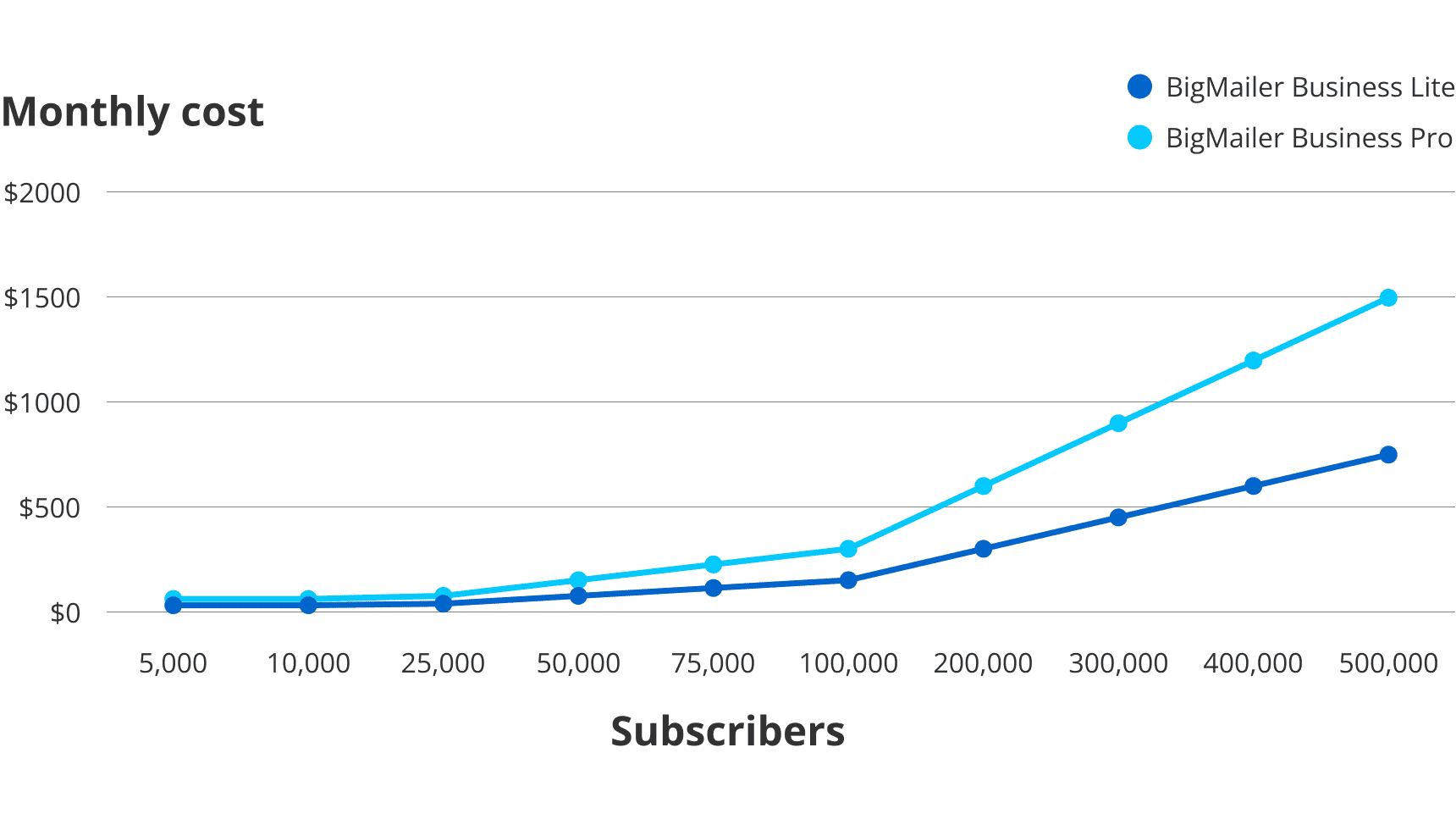
Note: Using Amazon SES incurs an additional cost of $0.1 per 1,000 emails sent, billed directly by Amazon SES. This is one way BigMailer helps keep your bill more affordable if you don’t have a high-frequency schedule. If you send at least 10 campaigns per month, SES fees add up quickly, and the BigMailer Pro plan becomes the more affordable option.
Here’s how much you’ll pay for the Basic and Pro plans based on the size of your email list:
Check out BigMailer’s pricing page for more details.
Customer reviews
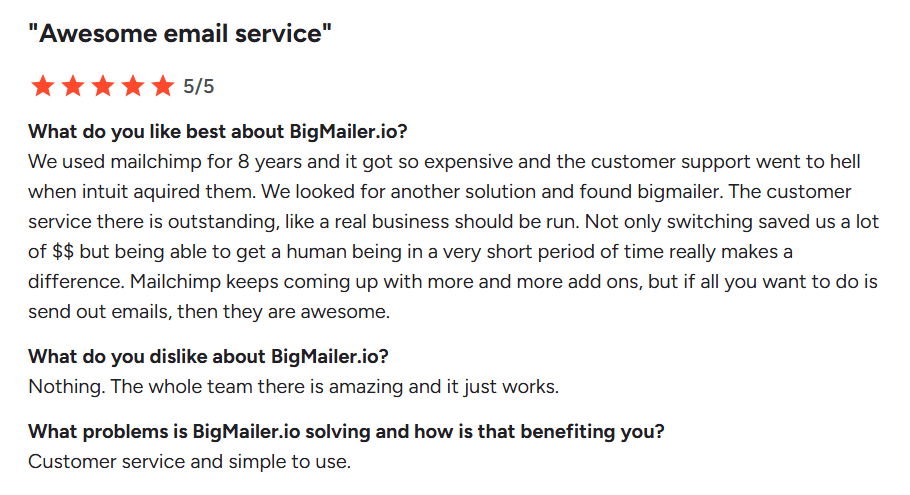
Customers love BigMailer’s ease of use, competitive pricing, range of features, and attentive customer support. There are very few customer complaints, but a few wish the template library were more extensive.
Here’s what one verified user has to say about using BigMailer:
 ‘
‘
2. Best for Budget Users: Pabbly
Pabbly is a hosted email marketing platform best suited for small businesses on a budget. You can send emails via Amazon SES or from Pabbly’s servers.
There are no extra charges for unlimited email sending, which is ideal if you email your list more than 10 times per month.
It offers an easy-to-use drag-and-drop email builder that requires no coding.
You can integrate multiple SMTPs (Simple Mail Transfer Protocols) to ensure continuous email delivery, even if one of your SMTP accounts gets suspended. By connecting your email marketing service with a dependable SMTP relay, you can minimize the risk of blacklisting and improve your email delivery rate.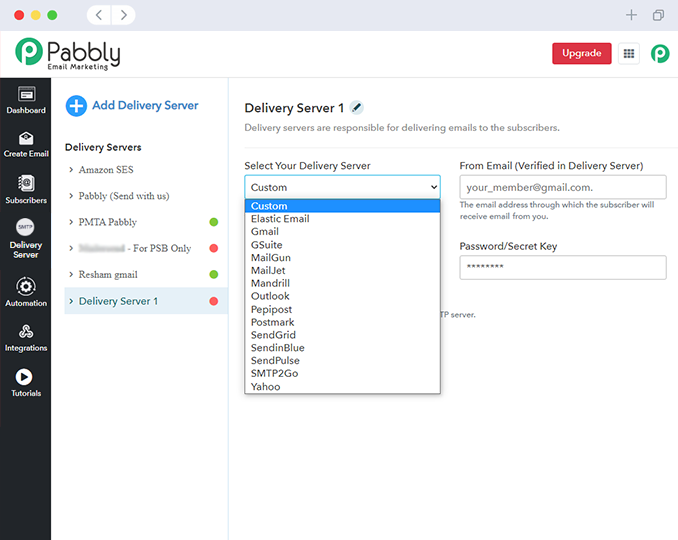
There’s a 7-day free trial to get a feel for Pabbly before signing up for a plan.
Some users complain that the customer support (based in India) isn’t great, analytics are basic, and templates are limited.
Pros
- Easy to design emails
- Cost-effective pricing
- Unlimited email sending without additional costs
- Email throttling – This allows you to limit the number of emails sent per day.
- Can connect to Amazon SES to save on sending cost
- Can connect multiple SMTPs
Cons
- Some customers have complained that customer support isn’t great
- Only a 7-day free trial (no free plan)
- Basic reporting and analytics compared to other tools on this list
- Limited amount of templates
- They don’t natively offer AB testing (so you have to do it manually with segments)
- No white-label tools
Features
- Email Builder – Design emails from plain text, HTML code, or a drag-and-drop builder.
- SMTP Routing – Send an email campaign using up to 50 delivery servers to decrease the chances of being blacklisted.
- Auto-follow-ups – Send an automatic follow-up email to non-opens
- Segmentation – Create list segments based on multiple criteria and searches.
- Throttle Emails – Set a sending frequency for mass emails.
- Forms – Capture signups by embedding forms on your websites.
- Automations – Set up custom triggers and delays for automated emails.
- Suppression lists – Create lists for excluding emails from campaigns that unsubscribe, bounce, and complain.
- 1 Click Resend – Resend an email to someone who didn’t open your last email.
- Integrations – Use Pabbly Connect to integrate with 2,000+ apps.
- Support – Connect with customer support via email or live chat.
Pricing
Pabbly offers 3 pricing plans for email marketing and a 7-day free trial for up to 100 subscribers, as well as a 30-day money-back guarantee. Paid plans start at $29/month for up to 5,000 subscribers and go up to $1,599/month for 1,000,000 subscribers.
Here’s how much you can expect to pay based on the size of your email list:
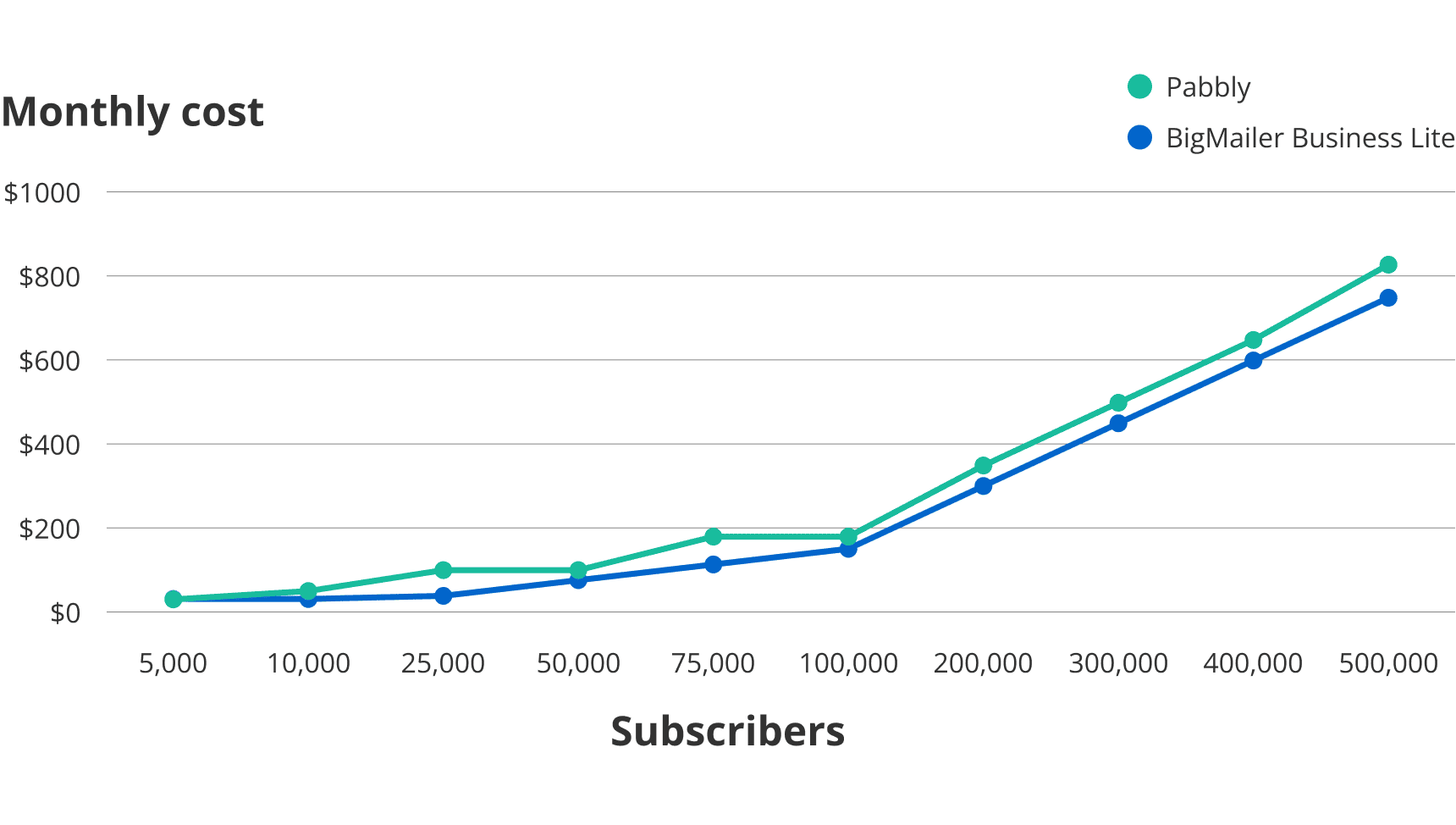
Pabbly offers a 20% discount when you pay annually.
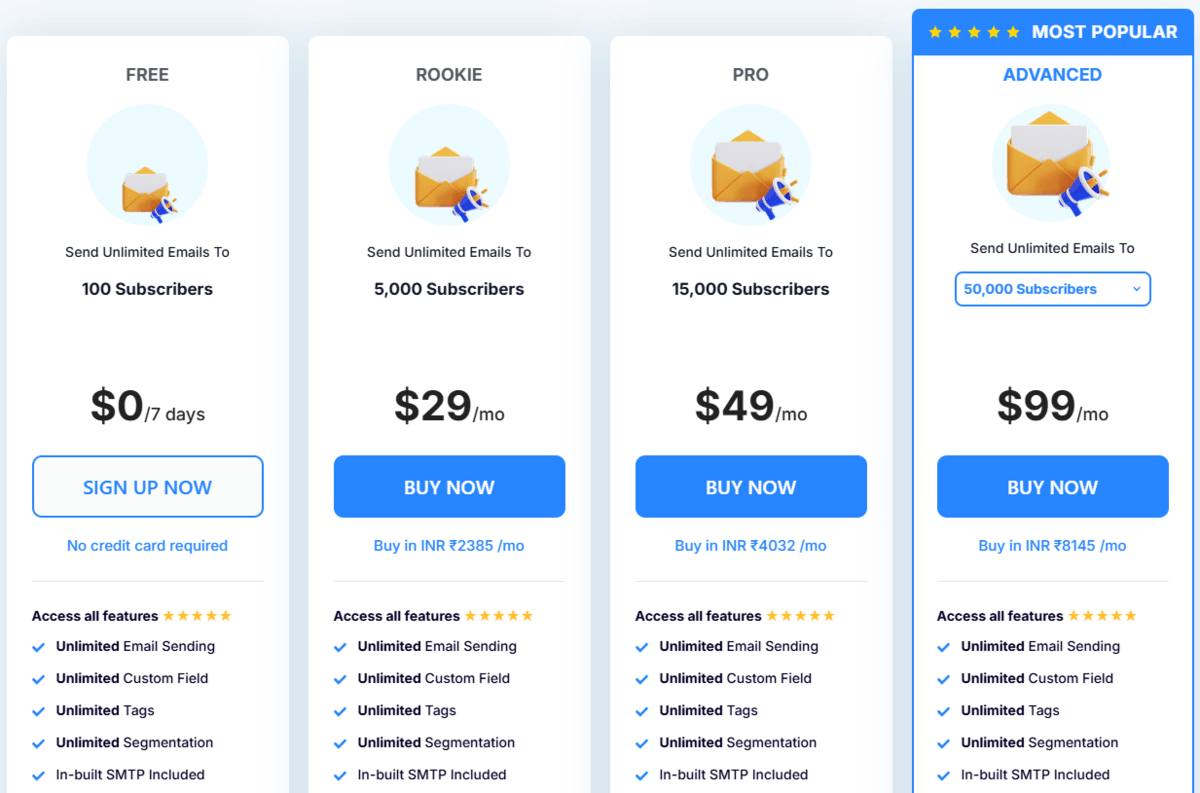
Learn more about Pabbly’s pricing here.
Customer reviews
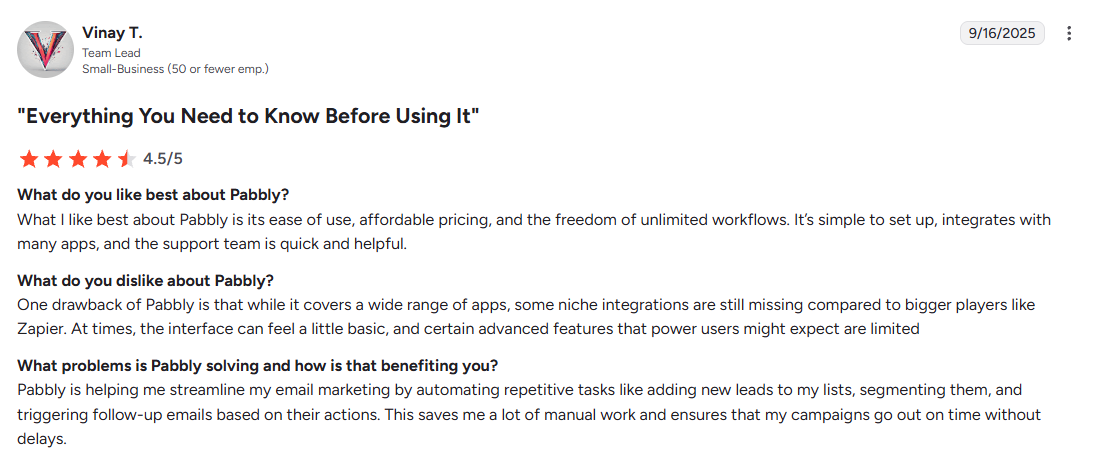
Pabbly received 4.1/5 stars on G2. Users loved its ease of use and competitive pricing. Many complained about software bug issues. One common complaint amongst users was the not-so-great customer support and basic reporting features compared to other tools.
Here’s what Vinay has to say about Pabbly:
3. Best for Low-Volume Senders: MailBluster
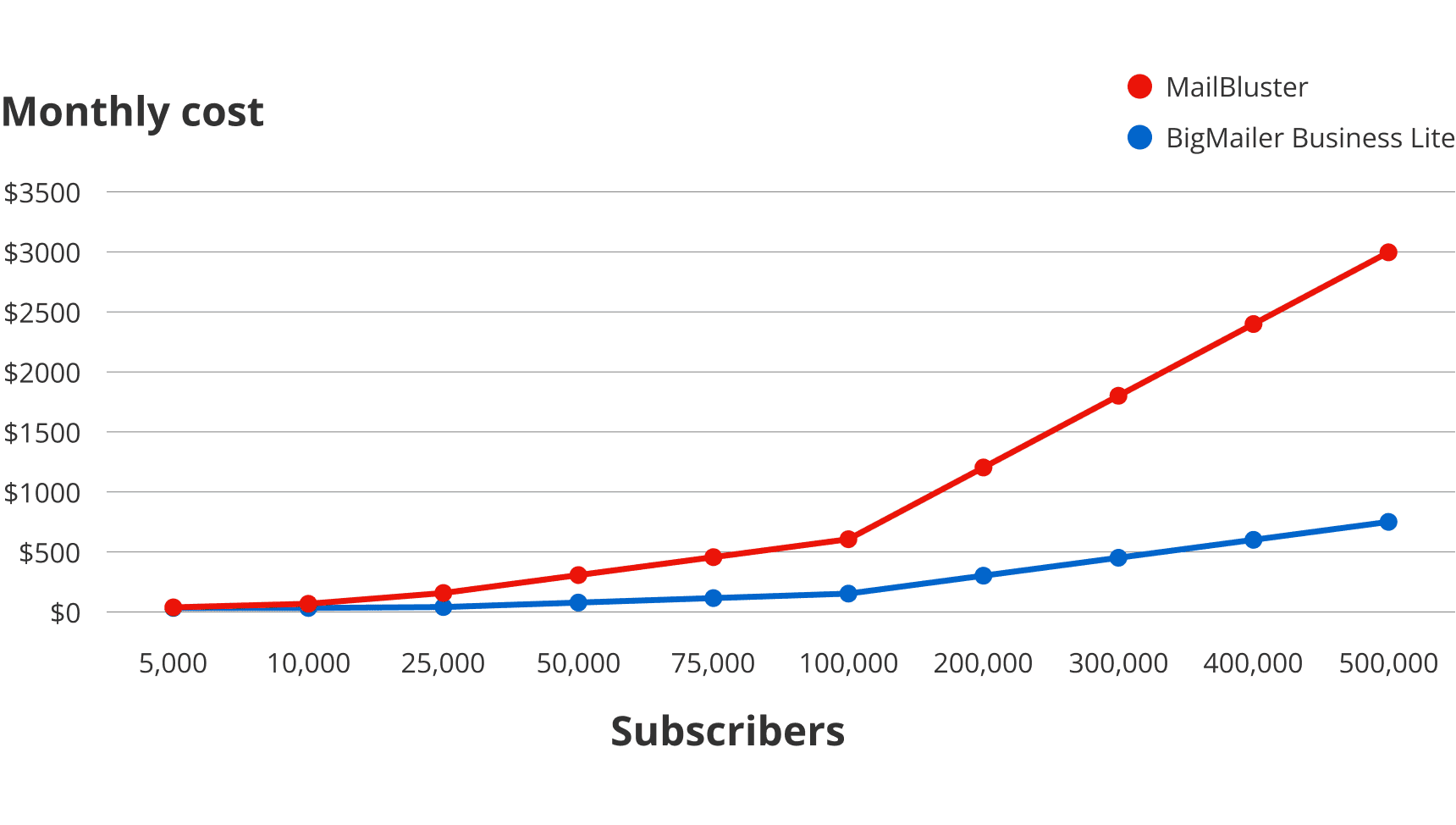
MailBluster is a hosted platform that allows you to send (only) via SES. MailBluster is a good option if you need to minimize your email marketing costs and also send fewer than 10,000 emails per month.
Its pay-per-email pricing structure makes it a good fit for businesses that don’t send high-volume emails regularly because it becomes significantly more expensive for high-volume senders.
It’s particularly well-suited for marketers who only need basic automation and aren’t interested in overly complex features.
The platform is easy to use, with a clean dashboard and a drag-and-drop email builder, making it a great option for non-technical users after they set up Amazon SES.
One of its unique features, TimeWarp Delivery, lets you schedule emails in your recipients’ time zones.
MailBluster only supports Amazon SES for sending, which comes with some restrictive policies.
While the platform is known for quick customer support, it lacks comprehensive tutorials, making it harder for beginners to get the most out of it.
Pros
- Easy to use, clean dashboard
- Low cost if you send less than 7,500 emails/month
- No limitation on the number of contacts to store
- Unlimited email sends
- Users find the customer support responsive
- Allows scheduling emails in your subscribers’ time zones
Cons
- Free plan only offers 3,000 sends
- Does not support other SMTP servers (Amazon SES policies can be restrictive)
- Not many tutorials to learn how to use its features
- Gets expensive if you send more than 10,000 emails per month
Features
- Segmentation – Create segments based on opens and link clicks.
- A/B testing – Segment your email list to test different campaigns.
- Templates – Access a library of pre-built templates or create your own.
- Timewarp Delivery – Send emails per your subscriber’s time zone.
- Tracking and reports – Track clicks, opens, bounced, unsubscribes, complaints, and e-commerce conversions.
- Drag & drop email builder – Design emails with a drag & drop email builder or customize further with HTML.
- Double opt-in – Allows leads to verify their email address when they subscribe to help avoid the spam folder.
- Mass add, delete, or unsubscribe leads – Easily delete, add or unsubscribe mass leads.
- Multiple brands, users, & roles – Manage separate brands and set role access for users.
Pricing
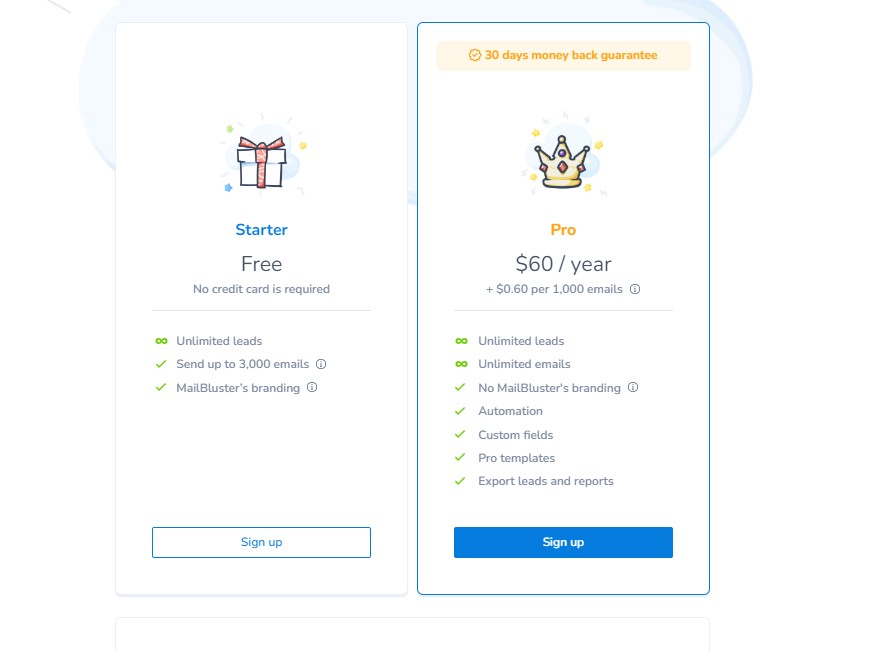
MailBluster offers a free plan for up to 3,000 email sends. Its paid plan costs $60/year, plus $0.60 per 1,000 emails. In addition, you’ll pay $0.0001 per email to Amazon SES.
For pricing comparison, this is how much you’ll pay for various amounts of contacts if you email them 10 times per month (not counting Amazon SES costs):
Check out MailBluster’s pricing calculator for more details.
Customer reviews
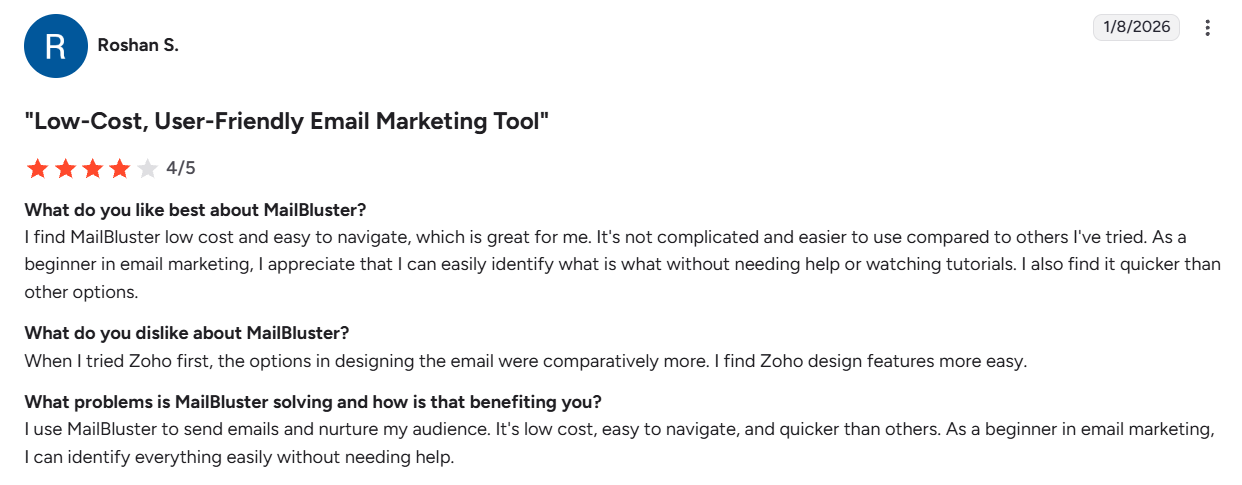
MailBluster received a 4.8/5 rating on G2. Users enjoyed the ease of use, simple automations, and user-friendly interface. Some complained about the usage-based pricing and would prefer a month-to-month option.
Here’s what Roshan has to say about MailBluster:
4. Best for Transactional Email: MailGun
If you’re a developer comfortable with the technical side of Amazon SES and send a lot of transactional emails, you might like Mailgun. This hosted email delivery service is API-driven, making it great for embedding email capabilities right into your platform.
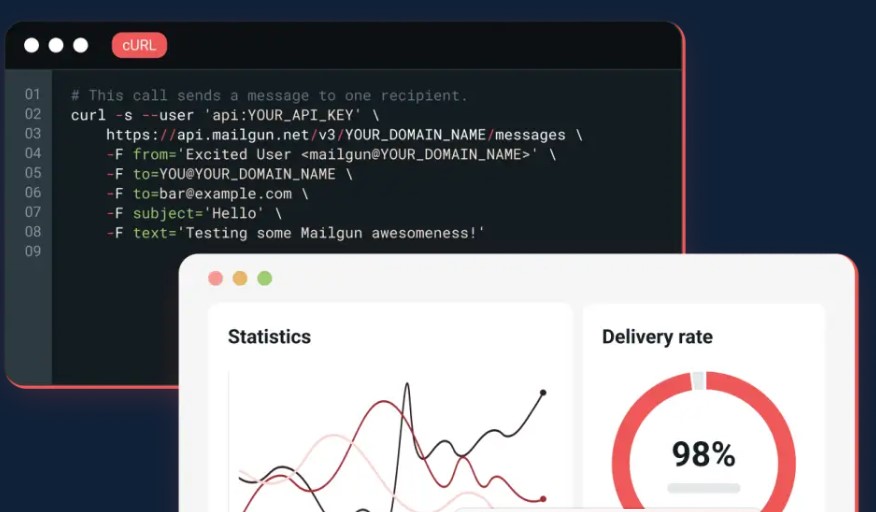
You can design emails with HTML or their WYSIWYG (what you see is what you get) builder.
If you enjoy in-depth email tracking, Mailgun’s API logs, retention, and email analytics are highly detailed.
You’ll be able to track error codes with exact timestamps and explanations, so you can diagnose deliverability issues and fix future campaigns.
The free plan allows you to send 100 emails daily. However, some users’ biggest complaints are higher bounce rates, emails occasionally landing in spam folders, and slow support.
Pros
- You can use HTML or the WYSIWYG email builder
- Offers a free plan for sending up to 100 emails/day
- Detailed analytics
- Comes with email validation (on the highest tier)
Cons
- Some users have complained about high bounce rates and emails landing in spam
- Slow support
- Not for those who aren’t tech-savvy
- Doesn’t offer native A/B testing
Features
- Email template builder – Design emails with HTML or a drag-and-drop builder.
- Send API – Send automatic transactional emails by connecting via the API to your app.
- SMTP relaying – Use MailGun’s SMTP servers or use a local SMTP server at the same time.
- Email logs – Retain detailed logs of email errors for up to 30 days.
- Analytics – Visualize 40+ data points, including delivery rates, opens, clicks, bounces, unsubscribes, error codes, and more.
- Routing – Route and parse inbound emails.
- Validation – Automatically verify new emails or verify email lists in bulk.
- Inbox placement testing – See if your email will land in spam, promotions, social, or main inbox before sending.
- Email preview – Preview what your emails will look like on desktop and mobile before sending.
- Reputation monitoring – Monitor and receive notifications about your domain and IP reputation.
- Deliverability services – Get deliverability consulting from a technical account manager.
Pricing
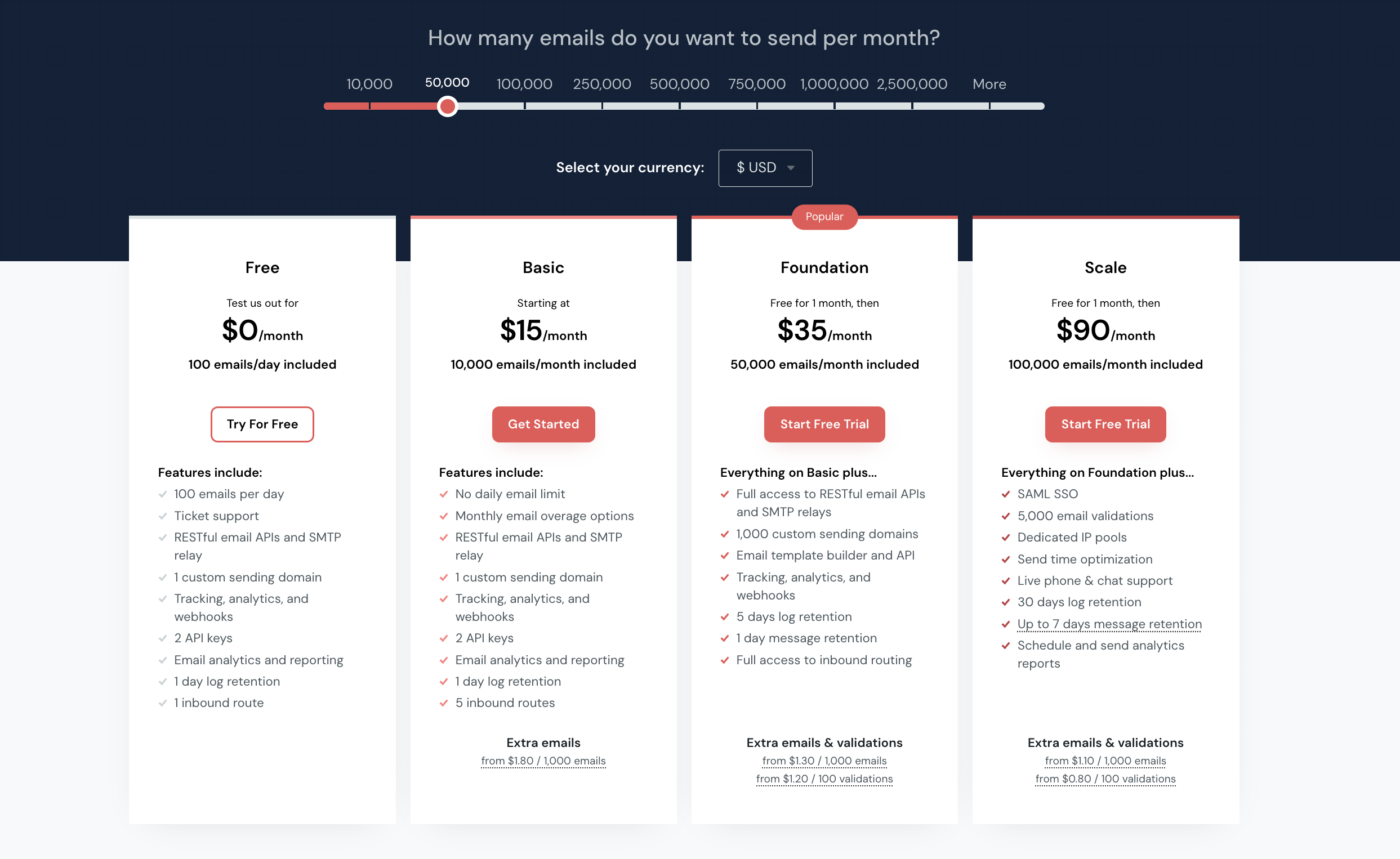
Mailgun offers 3 pricing plans and a free plan with 100 emails/day. Paid plans start at $15/month for 10,000 emails/month and go up to $1,250/month for 2,500,000 emails/month.
Note: Depending on the plan you select, there will be a charge for additional emails sent. For example, if you choose the Foundation plan, extra emails & validations will cost $1.30 per 1,000 emails and $1.20 per 100 validations. The overage rate can cost you more than the base subscription if you’re not careful.
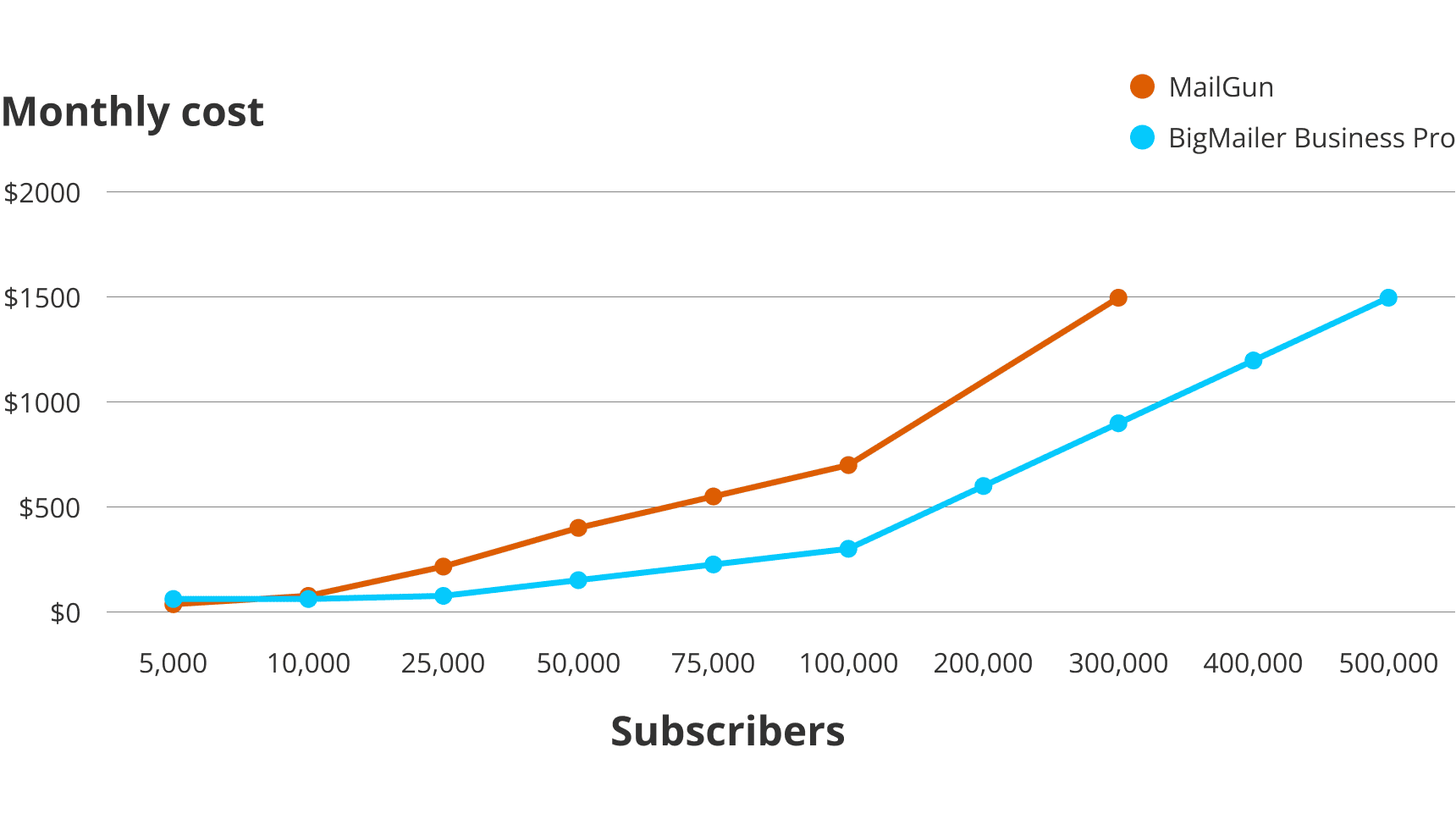
To compare pricing, this is how much you’ll pay for various amounts of contacts if you email them 10 times per month:
Check out MailGun’s pricing page for more details.
Customer Reviews
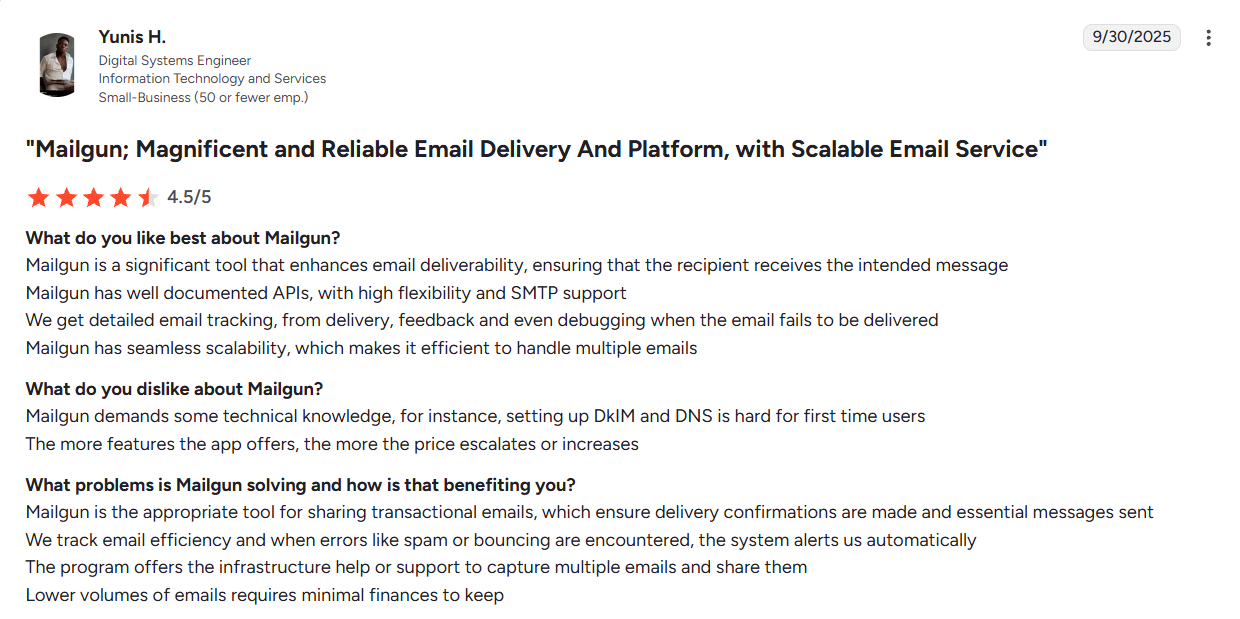
Mailgun has a 4.2/5 rating on G2. Most users enjoyed its API quality. However, many were unhappy with its customer support.
Here’s what Yunis, a verified user, has to say:
 ‘
‘
5. Best for Messaging Beyond Email: MailerLite
MailerLite is a hosted marketing platform and a good option if you’re looking for more than just an email marketing tool. It supports additional features like SMS, surveys, quiz creation, and a website builder, as well as more direct integrations with other platforms.
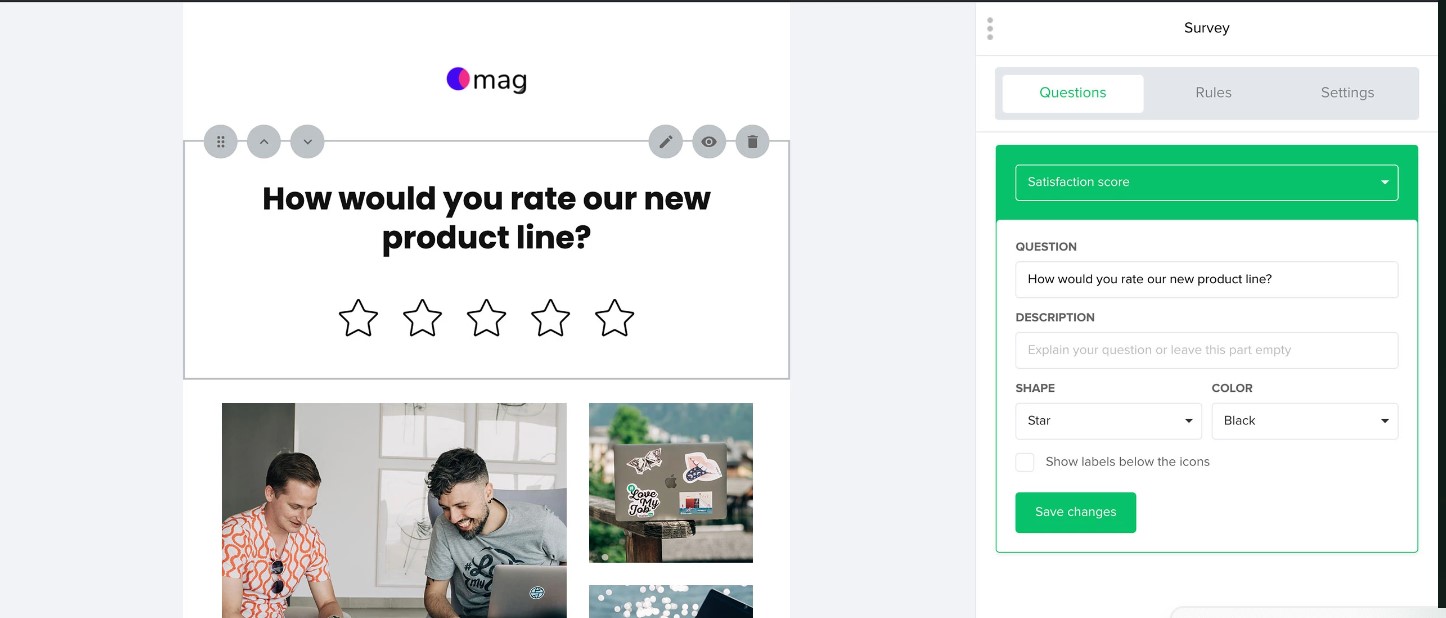
I found the interface easy to navigate, which is helpful if you’re not great with tech.
MailerLite can handle both simple and advanced campaigns, making it a good fit for SMBs. It’s also a good fit for ecommerce companies because of its integrations with ecommerce platforms.
MailerLite can be more expensive than the other tools on this list, especially as your subscriber list grows.
If you need a broader range of tools and don’t mind paying a bit more for ease of use and extra features, MailerLite is a good choice.
Pros
- Free plan for up to 500 subscribers (with limitations)
- Multivariate testing
- Easy to use drag-and-drop email template builder
- Offers non-email marketing features like a website and blog builder
Cons
- Email templates and custom HTML editor not available on Growing Business and Free plans
- Some users have also stated that navigating the design edit tools can be a bit challenging
- One of the most expensive Amazon SES alternatives on this list
- You have to pay extra for transactional features (Unlike BigMailer, where this is included in the pricing)
- Live chat support is only available on the more expensive Advanced plan
Features
- Automation – Set up automated workflows and sequences based on triggers.
- Newsletter editors – Design your newsletters with a rich text or drag-and-drop editor.
- Email notifications – Send notification emails to your customers.
- Website & blog builder – Build a website with blog capabilities using a drag-and-drop editor.
- Landing pages – Create customizable landing pages with a drag-and-drop editor or start by generating one with AI.
- Signup forms – Capture signups with embedded and pop-up forms.
- Email verifier – Use MailerCheck to verify email addresses in bulk.
- Digital products – Sell your digital products with Stripe, then deliver them with email.
- E-commerce – Connect your ecommerce platform to send transactional emails.
- Paid newsletter subscriptions – Offer paid subscriptions with their Stripe integration.
Pricing
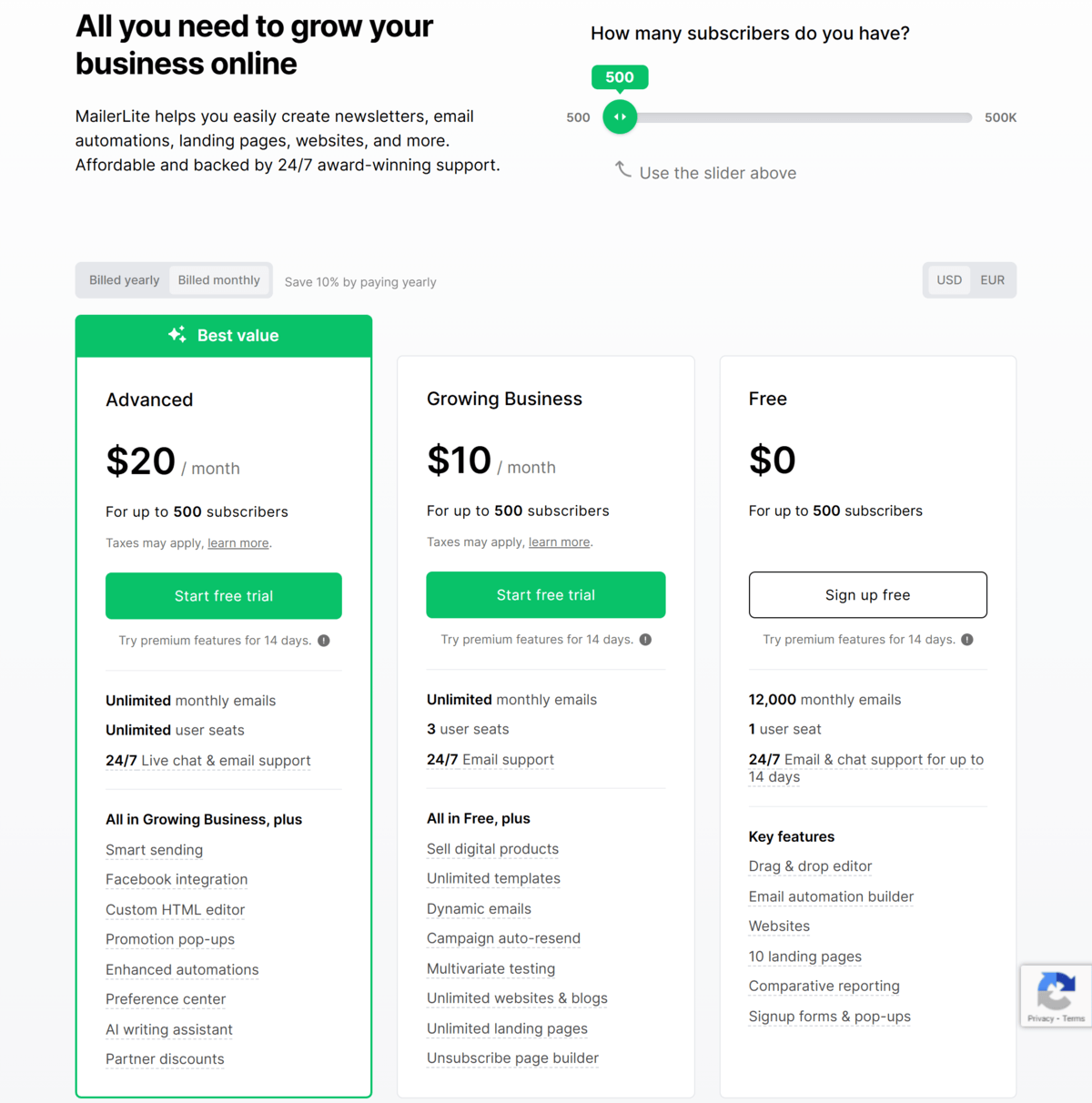
MailerLite offers 3 main plans for marketing emails. The free plan includes up to 500 subscribers. Paid plans start at $10/month for up to 500 subscribers and go up to $1,900 for 500,000 subscribers.
Here’s how much you’ll pay for the Growing Business and Advanced plans based on list size:
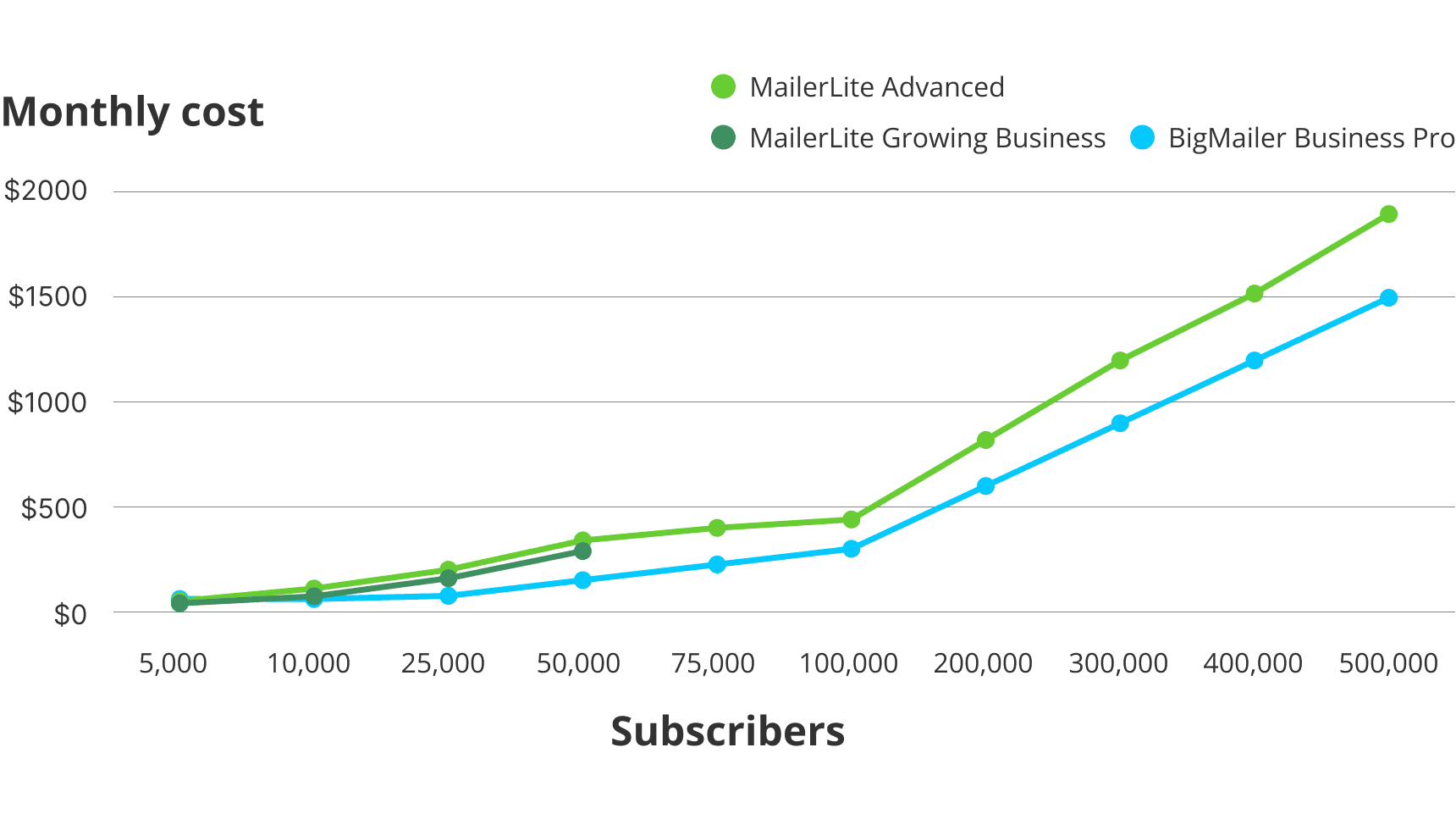
If you sign up for an annual plan, you’ll receive 10% off.
Check out MailerLite’s pricing page for more accurate details.
Customer reviews
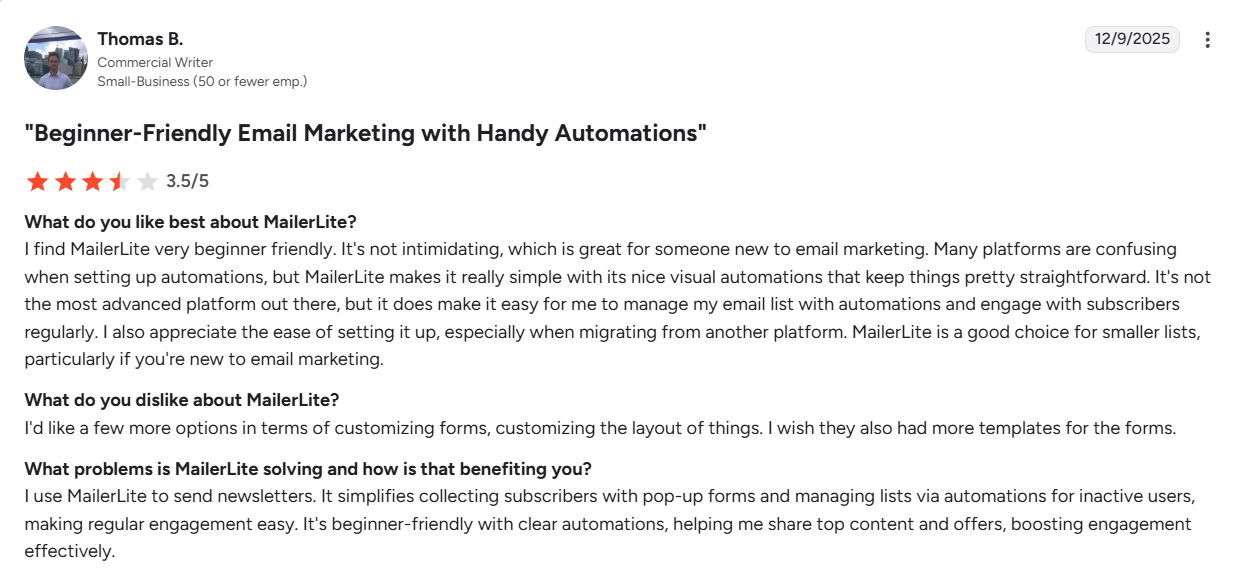
MailerLite has a 4.6/5 rating on G2. Many users praise MailerLite for their affordable pricing. However, some customers complained that their accounts were blocked after paying for unlimited monthly emails (MailerLite prioritizes compliance and consent, so this might be related).
Here’s what Thomas has to say about MailerLite:
6. Best API Integration: SendGrid
SendGrid is a hosted alternative to Amazon SES, similar to Mailgun (ideal for developers). It offers an easy-to-use interface and tools for both transactional and email marketing.
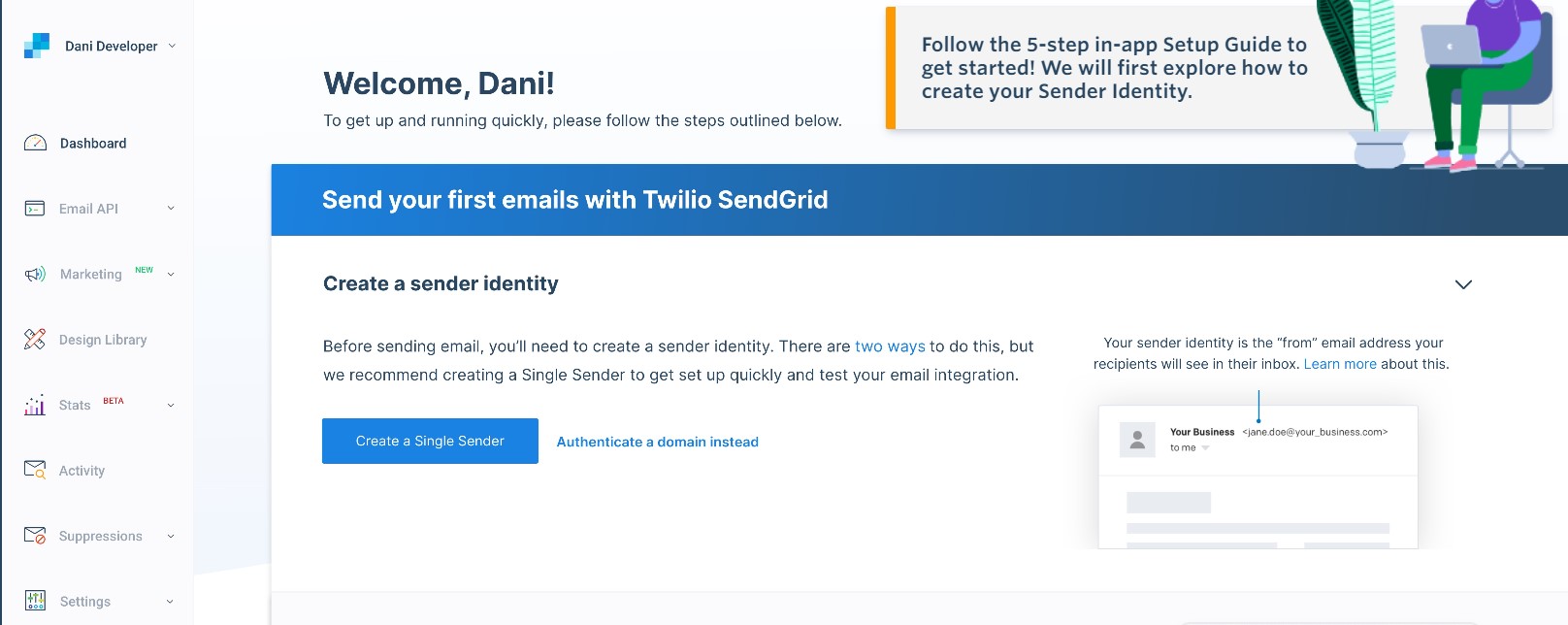
I liked the easy drag-and-drop email builder and customizable templates that let you send personalized email designs at scale.
If you’re a developer, it integrates with other software easily via its API.
SendGrid can handle high-volume email sending, but it can become more expensive than other options on our list.
SendGrid also limits sub-user management and access to certain features, such as email validation, on its lower-tier pricing plans, which may not be ideal for businesses requiring greater flexibility.
Pros
- Easy-to-use interface
- Can handle high-volume sending efficiently
- Easy to use the API
- Can integrate Sendgrid into your apps
- Supports both transactional and marketing emails
Cons
- Many users complain about the customer support
- One of the most expensive options on our list
- No access to dedicated IPs on lower pricing tiers
- No access to email validation on lower pricing tiers
- No sub-user management on lower pricing tiers
Features
- Email API – Allows integration for sending transactional emails via API.
- SMTP Service – Send emails through Twilio Sendgrid’s servers.
- Email Validation – Remove non-deliverable email addresses from your list via an API.
- Deliverability Insights – Monitor your email deliverability and get personalized deliverability advice.
- Dynamic Templates – Create and design personalizable templates with or without code that you can send programmatically and collaborate on with other users.
- 5-minute Integration – Use Sendgrid’s API to send transactional emails, set up alerts, and more.
- Email Automation – Create sequences based on triggers and time delays.
- Signup Forms – Create customizable signup forms and embed them on webpages or generate a landing page hosted by Sendgrid.
- Email Testing – Test responsive designs, find broken elements, and get a spam score before sending.
- Email Design – Design mobile-friendly emails using a drag-and-drop or code editor.
- Email Statistics – Reporting for email campaigns (clicks, opens, delivered, etc.).
- A/B Testing – Test up to 6 variations of an email at once (not for automation emails).
Pricing
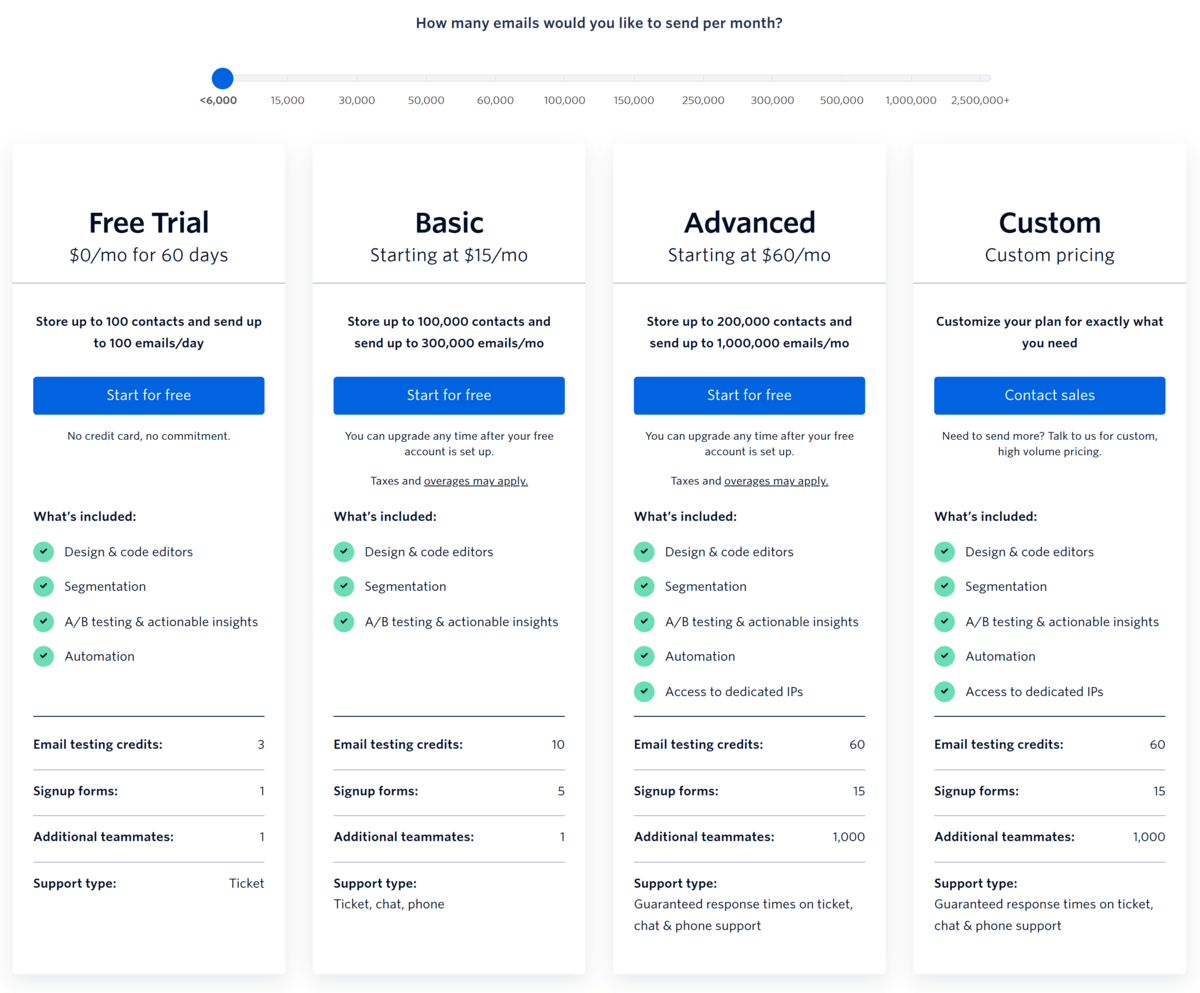
SendGrid offers 3 pricing options for its Marketing Campaign plans, with pricing based on the number of contacts and emails sent per month. The 60-day free trial includes up to 100 contacts and 6,000 emails per month.
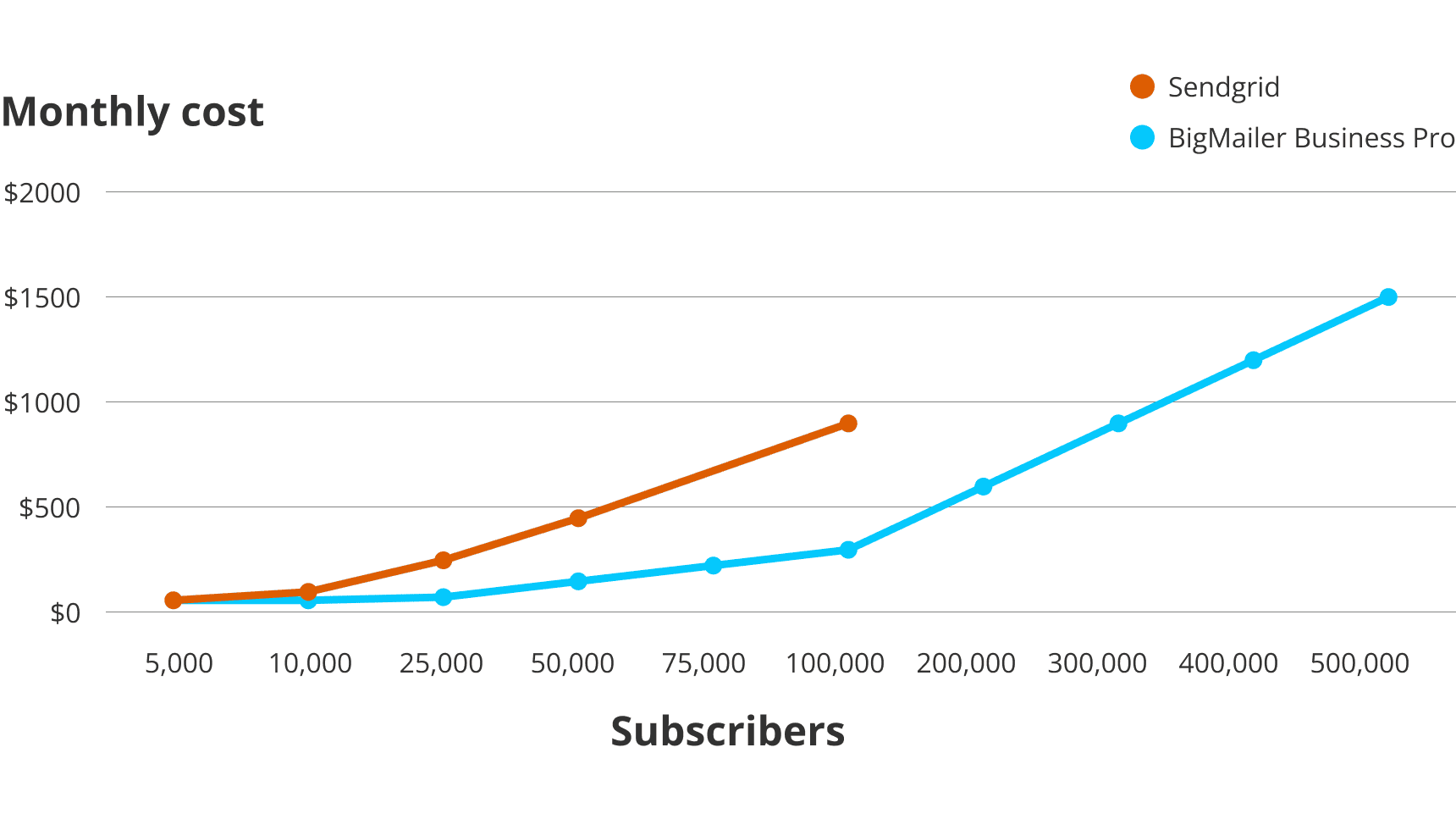
Paid plans start at $15/month for 5,000 contacts and up to 15,000 emails per month and go up to $900/month for 200,000 contacts and 1,000,000 emails per month.
Here’s how much you’ll pay for various amounts of contacts (based on their recommended plans), but keep in mind the sending limits are only 3-5x the contact list, which is much less than the usual 10x:
Check out Sendgrid’s pricing page for more details.
Reviews
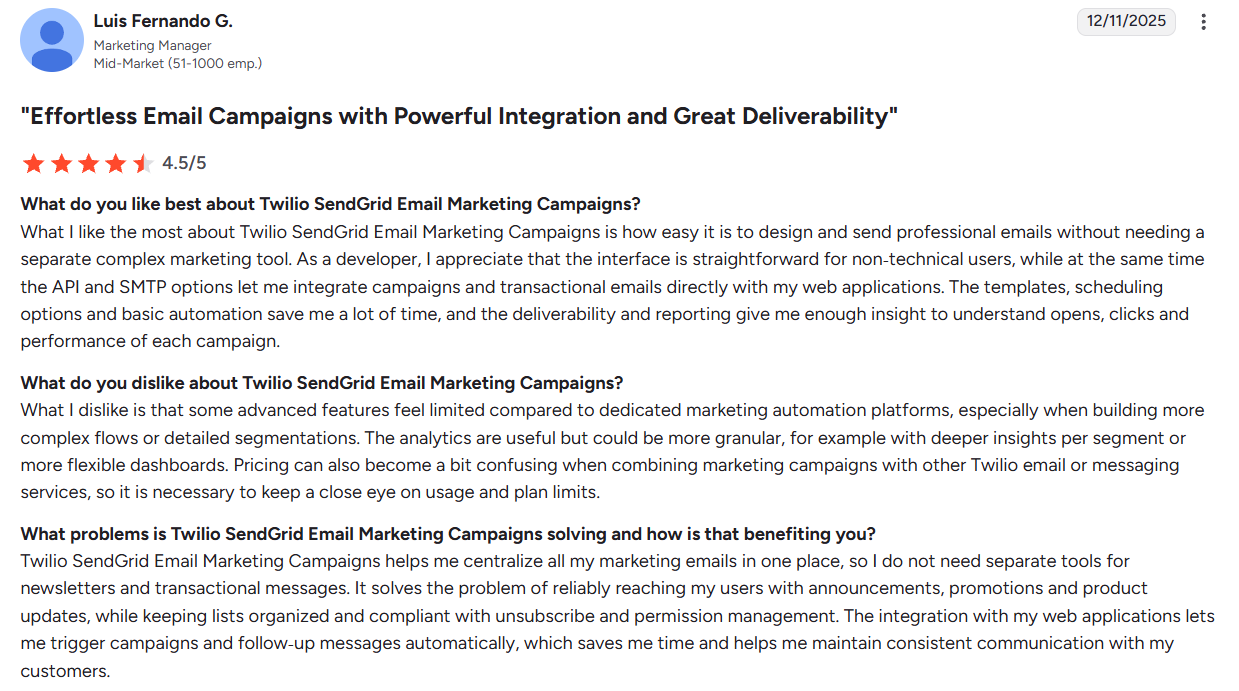
SendGrid received a 4/5-star rating on G2. Users report liking the UI and analytics but find SendGrid more expensive than comparable features in other tools.
Here’s what Luis has to say about SendGrid:
7. Best for Developer-Focused Email Delivery: Mailtrap
Mailtrap is an email platform for developers and product teams. The platform doesn’t link directly to Amazon SES, so you’ll be sending through Mailtrap’s servers.
You get both transactional email sending and marketing capabilities in one place, with high inboxing rates and a developer-friendly API.
One of Mailtrap’s strengths is analytics. You get dashboards that break down your email performance across every major mailbox provider. This makes it much easier to spot and fix deliverability issues, rather than guessing what’s wrong.
The API, SDKs, and SMTP service support all the major programming languages, so the integration is straightforward whether you’re sending user-triggered emails or scaling up your campaigns.
In addition, you get 24/7 expert support from the Business plan onwards.
Pros
- Combines transactional email and marketing in one platform
- Industry-best analytics with comprehensive dashboards for every mailbox provider
- 24/7 expert technical support
- High deliverability rates and fast email delivery
- Developer-friendly with RESTful API and official SDKs
- Intuitive contact management and segmentation
Cons
- Might be more than you need if you only want basic transactional email
- Some learning curve if you’re new to email infrastructure
- Can be pricier than Amazon SES alone for small-volume senders
Features
- Email API/SMTP – Send transactional emails with flexible API and SMTP integration supporting major SDKs.
- Email Marketing – Create and send campaigns with a drag-and-drop builder, AI content assistance, and contact segmentation.
- Advanced Analytics – Monitor delivery rates, open rates, click rates, bounce rates, and spam scores by mailbox provider.
- Email Templates – Pre-built templates with API support for faster campaign creation.
- Scalable Infrastructure – Handle high-volume sending with reliable delivery infrastructure.
- Contact Management – Intuitive tools for organizing and segmenting your audience.
- Campaign Automation – Set up automated email workflows and sequences.
Pricing
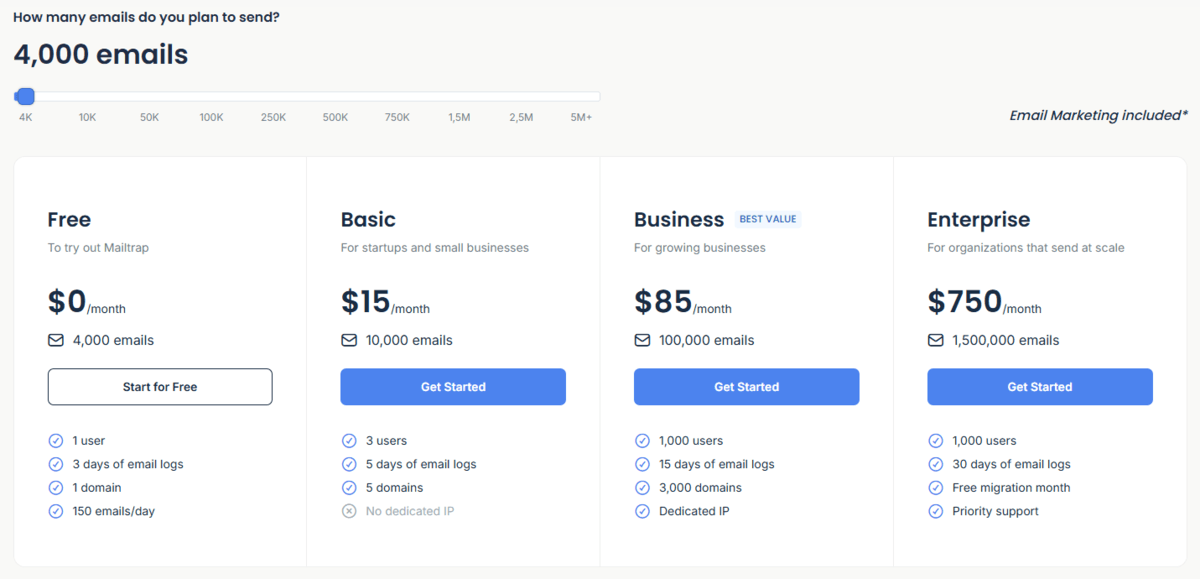
Mailtrap offers a Free forever plan with 4,000 emails a month and 100 contacts. Paid plans start at $15 a month for 10,000 emails and up to 5,000 contacts. The highest Enterprise plan is $1,250 for 3,500,000 emails and up to 2,500,000 contacts.
Note: Specific overages apply based on the plan you select. For example, if you’re on the Basic plan, you pay $1 for every additional 1,000 emails. However, with the Basic plan, you can send up to 100,000 emails for $30, avoiding overages.
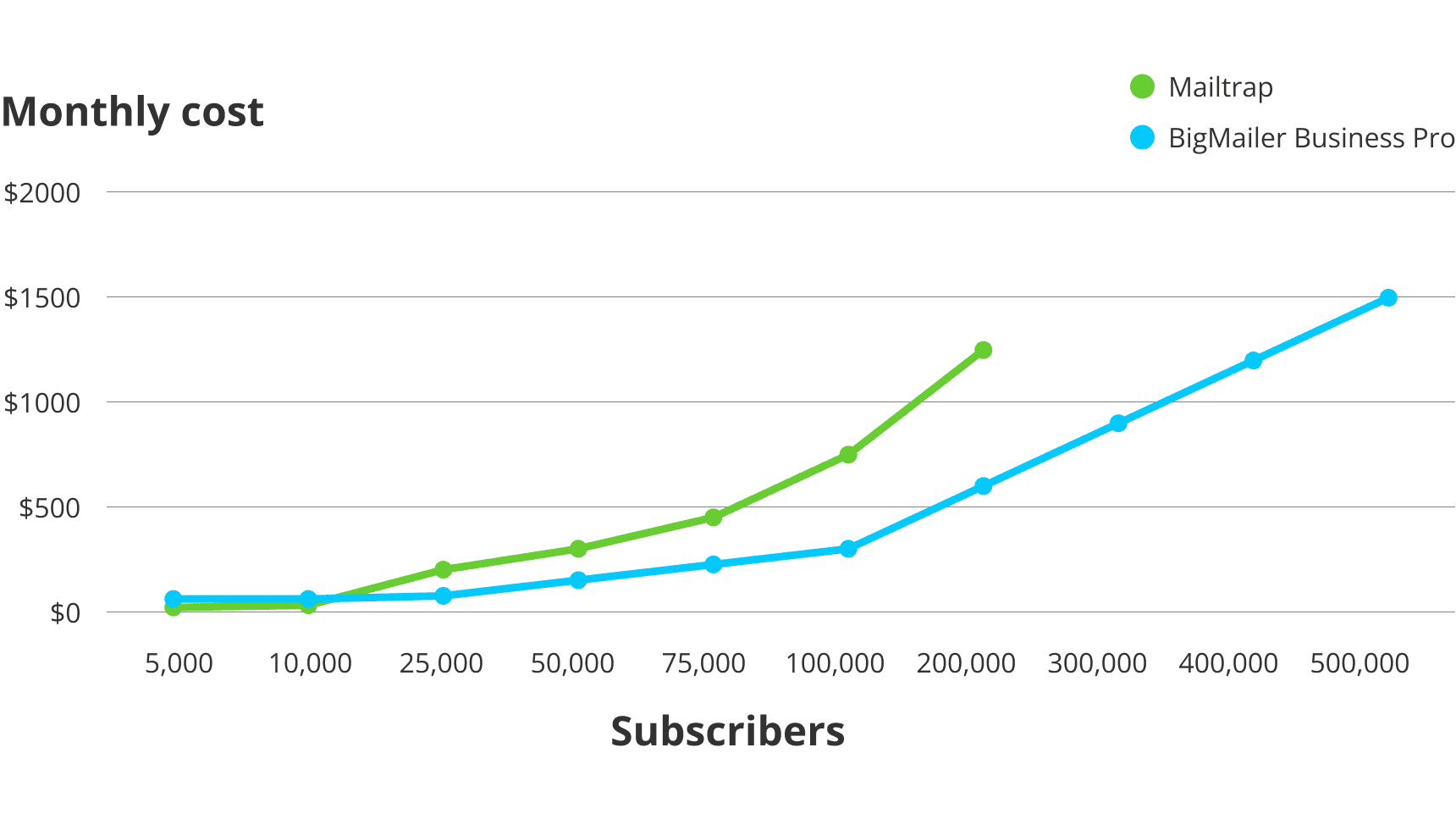
For pricing comparison purposes, this is about how much you’ll pay for various amounts of contacts if you email them 10 times per month (based on their recommended plans):
Check out Mailtrap’s pricing page for more details.
Customer Reviews
Mailrap received a 4.8/5 rating on G2. Users appreciate its ease of setup, reliable transactional email delivery, strong, developer-friendly API and SMTP integrations, and helpful, responsive support. However, the platform offers limited advanced email marketing automation features, so some users still need to rely on third-party tools.
See what Edoardo has to say about using Mailtrap:

FAQ
Is Amazon SES worth it?
The answer depends on your needs. If you don’t mind the technical complexities of Amazon SES, it might be worth it because of its low cost, especially if you’re sending high-volume emails. The problem arises when you outgrow the platform and need more advanced features for your email marketing efforts.
Can I use Amazon SES for free?
Amazon SES does have a free tier. Free-tier customers receive up to 3,000 message charges at no cost each month for the first 12 months. These SES products are eligible for the SES free tier:
The following SES features are eligible for the free tier:
- Outbound emails
- Inbound emails
- Virtual Deliverability Manager outbound processing
Each email sent counts as one message charge, and each email received also counts as one message charge. If Virtual Deliverability Manager is enabled, each email sent counts as two message charges.
Any combination of usage up to 3,000 total message charges per month qualifies for the free tier.
After exceeding the free tier, pricing is:
- Outbound email: $0.10 per 1,000 emails
- Inbound email: $0.10 per 1,000 emails
- Incoming mail data: $0.09 per 1,000 mail chunks
- Outgoing attachments: $0.12 per GB of data
Additional charges apply for features such as dedicated IP addresses, archiving, and deliverability tools.
As of July 15, 2025, new AWS customers also receive up to $200 in AWS Free Tier credits, which can be used toward SES and other AWS services.
Learn more about Amazon SES’s free tier here.
Why are the emails that I send using Amazon SES getting marked as spam?
One of the main reasons emails end up in spam folders is a lack of proper authentication. Unlike most top ESPs, Amazon SES allows you to start sending emails with just a sender email verification, while domain verification via DNS records is the ideal setup.
Another reason is likely the quality of the IP pool your account is on, with a lot of low-quality senders and a poor IP reputation. When you start sending from a new account, your account is evaluated based on engagement and may be moved to a lower-quality IP pool if you have a high bounce or complaint rate. It’s best to only send to recently engaged subscribers when starting out with a new email platform, including Amazon SES.
Ready to Choose Your Amazon SES Alternative?
If you’re a marketing agency, email consultant, or have a large team, BigMailer has all the features you need to create, distribute, and grow your marketing efforts with or without Amazon SES at a much lower cost.
Have questions about BigMailer’s features or pricing? Reach out to us via chat or schedule a demo. Or, if you’re ready to give BigMailer a try, get started with a free account.
Important: All providers covered in this article are built for permission-based email marketing. Using purchased, scraped, or third-party lists for cold outreach or lead generation is typically against their terms of service and can result in immediate account suspension.
Author: Jacob Statler
Author: Jacob Statler
