
The Email Marketing for Agencies Guide
Published on October 13, 2025
Running email marketing for one brand is hard enough. Doing it for dozens of clients — each with their own lists, branding, goals, and expectations — is a whole different game.
Unlike in-house teams that focus on a single audience, agencies have to juggle it all: multiple sender domains, old or unverified contact lists, inconsistent assets, and clients who don’t always understand what’s hurting their deliverability. One bad list can tank a sender’s reputation and jeopardize deliverability across the board.
To do email right, you need more than a tool. You need infrastructure. That means using a platform built for agencies, with multi-brand management, white labeling, and centralized controls baked in, and pairing it with scalable, repeatable, and profitable processes.
This guide walks you through every step of building a high-performing email marketing service for your agency — from picking the right ESP and onboarding clients to automating campaigns, monitoring deliverability, and proving ROI.
If you’re ready to streamline your workflows, protect your sender reputation, and turn email into a revenue-driving machine for your clients (and your agency), this guide’s for you.
Here’s how to set up an agency for email marketing services in 10 steps:
- Choose an Email Marketing Platform Built for Agencies
- Set Up Your Email Marketing Infrastructure
- Onboard Clients the Right Way
- Clean Your Clients’ Email Lists
- Create a Client-Specific Strategy
- Build Branded Templates & Assets
- Launch High-ROI Automations First
- Manage Campaign Production at Scale
- Monitor & Improve Deliverability
- Report Results & Prove Value
How to Price & Package Your Services
1. Choose an Email Marketing Platform Built for Agencies
Before onboarding a single client, choose an email platform that’s actually built for agency use.
Here’s what to look for:
- Multi-brand (aka sub-account) management. Look for a solution that allows you to manage multiple brands from a single dashboard, with the ability to share templates across accounts. This is a massive time-saver if your agency works within the same industries, like real estate, restaurants, nonprofits, etc.
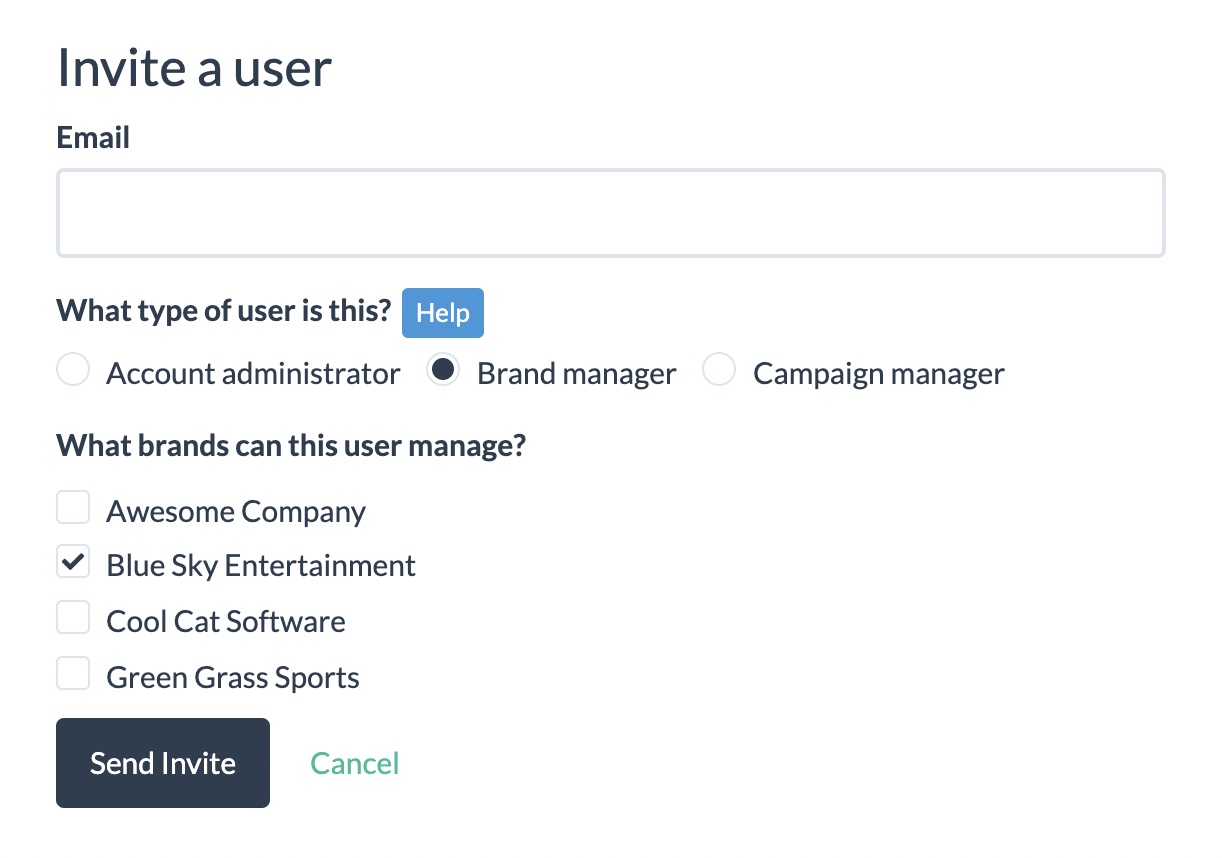
- Role-based user management. You should be able to assign the right level of access to each team member based on their role. This keeps data secure and prevents mistakes.
- Simple pricing. Platforms that charge additional fees per user or per brand/sub-account can erode profit margins fast for agencies with inactive brands. Look for platforms that scale pricing based on number of subscribers or email sends.
- White label option. White labeling enables you to customize the platform with your own domain, branding, and pricing. It also unlocks additional revenue if you add usage fees to your monthly retainer.
- Built-in email validation. Verifying each email address on your list to ensure it’s a functioning address that can receive messages, and eliminating risky addresses, is a top priority. A platform with this feature built in handles this automatically, saving you time and money on 3rd party tools.
Looking for an email marketing platform with these features built in? BigMailer was built specifically for agencies managing multiple brands at scale, with unlimited sub-accounts, built-in email validation, and white label features included. Start free or schedule a demo to see why 10,000+ brands choose BigMailer.
2. Set Up Your Email Marketing Infrastructure
Once you’ve selected a platform that supports multi-brand management, it’s time to build a solid foundation to protect your clients’ sender reputation and keep deliverability high.
Start by configuring email authentication for every brand you onboard — this includes SPF, DKIM, and DMARC records. These protocols prove to inbox providers that your emails are authentic. Skip them, and even your best-designed campaign can land in spam. Or worse, your client’s domain could be flagged as suspicious.
Next, create brand-specific sub-accounts or workspaces for each client. This keeps lists, templates, senders, and reporting cleanly separated, while still giving your team centralized visibility and control. This makes scaling easier without juggling multiple tools or logins.
If your platform supports it, turn on white label functionality. This swaps out the ESP’s branding for your agency’s. So you’ll need to set up things like:
- A custom domain for logins and all URLs
- Your logo to appear in the site header, login page, and transactional emails
- A support email address to be referenced when a user gets an error
This helps clients feel like they’re using your proprietary software instead of a generic tool.
Whether you manage 5 brands or 50, having this infrastructure in place ensures your agency offers professional email marketing at scale.
3. Onboard Clients the Right Way
86% of customers say they’ll remain loyal if onboarding and continuous education are provided.
Strong client relationships start with a smooth onboarding process.
In email marketing, this means gathering the right info upfront and setting clear boundaries from day one.
Start with an intake form or onboarding interview that covers the essentials. Ask for campaign goals, list size, and segmentation details, where their contacts came from, what templates or branding assets they have, and any compliance documentation (especially proof that their contacts opted in). This step is critical for planning and protecting your agency from sending to risky or purchased lists that could hurt deliverability.
Once you’ve gathered the details, set up a dedicated sub-account for the client inside your email marketing platform. This keeps their data and campaigns isolated and allows for shared access.
Assign user roles based on each person’s actual responsibilities. For example, a designer may only need access to edit templates, but not the power to send campaigns. This will help limit the possibilities of client data getting leaked or errors being made in campaigns.
From there, set up an approval workflow that outlines who reviews what, when, and how.
- Who manages email lists?
- Who designs templates?
- Who signs off on the final copy?
- Who checks links and design?
- Where should feedback go?
A clear communication plan helps your team avoid delays, messy revisions, and accidental sends that could damage a brand.
Get this process right once, and it becomes an efficient, repeatable system that improves client satisfaction across the board.
4. Clean Your Clients’ Email Lists
List quality makes or breaks the success of any email marketing efforts.
But as an agency, you’re likely to inherit lists with addresses that haven’t been emailed in years. Contacts may be outdated, scraped, or never opted in at all.
That’s why step #1 of list cleaning is always to validate the list using either a built-in email validation or a 3rd-party tool, like Bouncer.
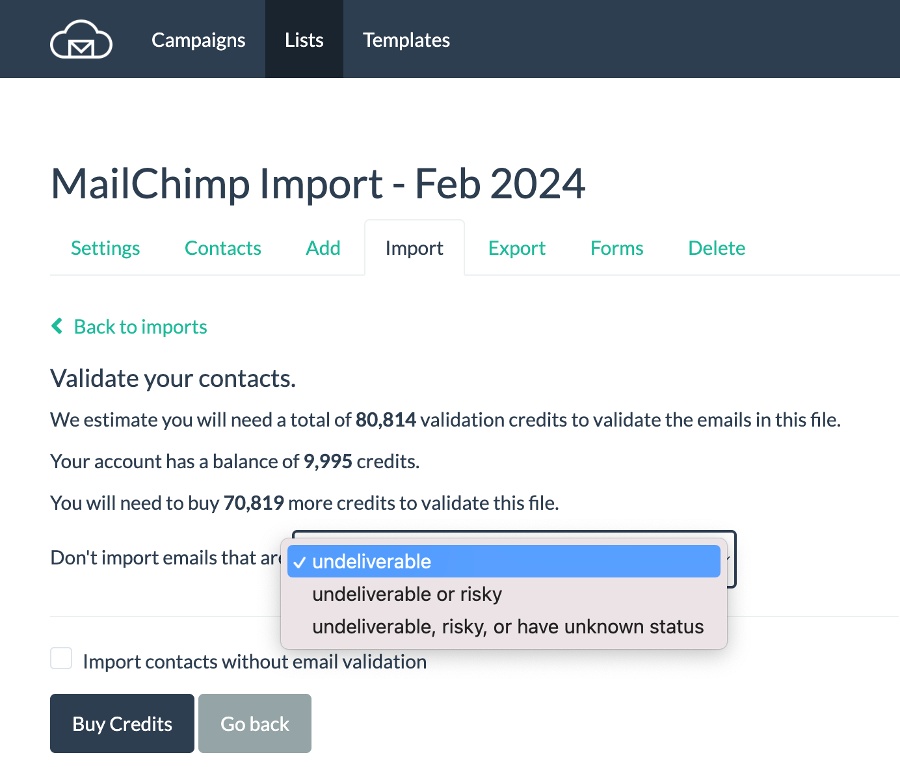
If you use a platform like BigMailer, you can validate contacts during the import process (not many platforms offer this).
This shouldn’t be optional. By getting rid of undeliverable email addresses, you’ll protect sender reputation and help deliverability in a single swoop.
If you email a list, and the bounce rate is higher than 2%, that’s a sign that your list needs verification, as it has decayed past the point of natural churn. And if you’re sending from shared infrastructure, poor-quality lists from one client can impact inbox placement for everyone.
This is where client education matters. Your client might think a purchased list of 50,000 contacts is a fast path to growth. But if they want results, they need to understand the trade-offs. Colder lists lead to lower engagement, higher complaint rates, and long-term deliverability damage. In some cases, they can even get your account suspended.
Make it clear: the real ROI comes from permission-based, organic list growth, not shortcuts. When clients understand that healthy lists = inbox placement = revenue, they’re much more likely to follow best practices.
5. Create a Client-Specific Strategy
While you should absolutely reuse email strategy frameworks across similar clients, especially those in the same industry, every client deserves a plan tailored to their goals, audience, and funnel.
The key is to build repeatable systems without defaulting to cookie-cutter campaigns. Start with these 4 steps to develop a strategy that works for each client:
1. Define audience segments and campaign objectives for each client. Help your clients get clarity on who they’re targeting and what they want to achieve. Are they nurturing leads? Driving store traffic? Promoting events? 65% of marketers say segmented emails have a better open rate than unsegmented emails.
2. Align your email strategy to the customer journey and broader business goals. Re-engagement flows, onboarding sequences, and educational series should all support where a subscriber is in their journey. Each campaign should move people closer to a conversion.
3. Set up branded landing pages and opt-in forms. Make sure your client is collecting emails in a way that’s visually consistent with their brand and optimized for conversion. This is a crucial component of the funnel for driving new subscribers.
4. Create your campaign calendar. The calendar should align with events, product launches, and promotions, but don’t be afraid to inject creativity. Marketing calendar helps you build a plan around both major and niche holidays. Think beyond Valentine’s Day and into fun, brand-aligned themes like “National Pet Day” or “Pi Day.”
With the right strategy in place, every client gets a mix of consistency, creativity, and performance delivered efficiently from your side.
6. Build Branded Templates & Assets
Once you’ve nailed down a strategy, it’s time to bring it to life with polished, on-brand templates. A solid template library saves hours across your team, ensures consistency, and reduces the chance of formatting errors that break on mobile or land you in spam.
If you serve multiple clients in the same industry, like restaurants, real estate, or nonprofits, build a few core templates tailored to that niche (Better yet, start with your ESP’s template library to save more time).
Store them in a shared library so your team can quickly pull from and adapt as needed, rather than designing from scratch every time.
Next, design reusable templates that align with each client’s brand guidelines. Stick to consistent fonts, color palettes, logo placement, and CTA styling. Templates should look sharp, while following best practices for mobile responsiveness and accessibility so they work on every device.
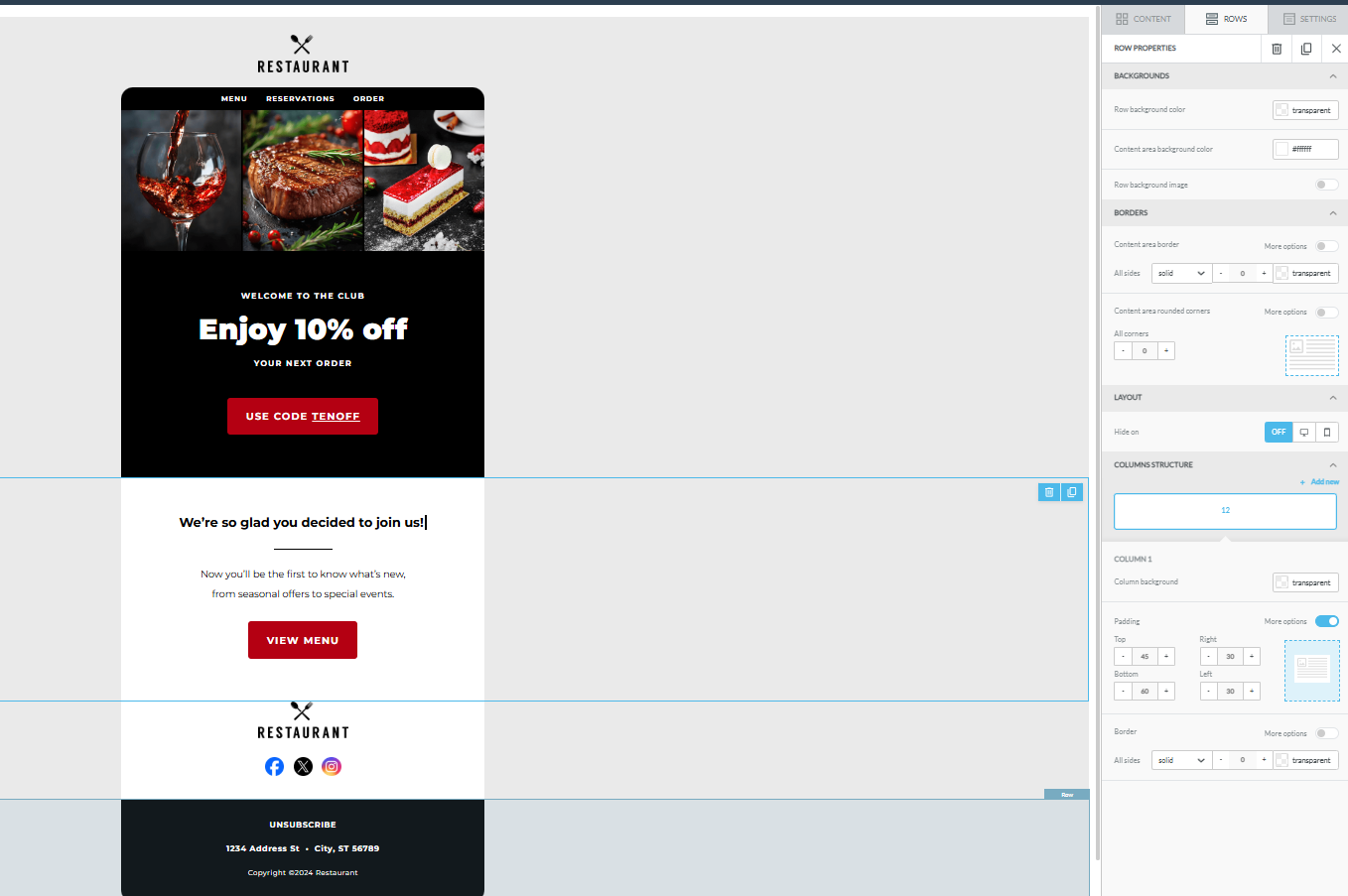 To personalize at scale, use dynamic content blocks and merge tags that automatically insert client-specific details, like names, locations, or logos. Be sure to design reusable templates for widely used campaigns, like welcome emails, annual sales, onboarding flows, re-engagement campaigns, and transactional emails.
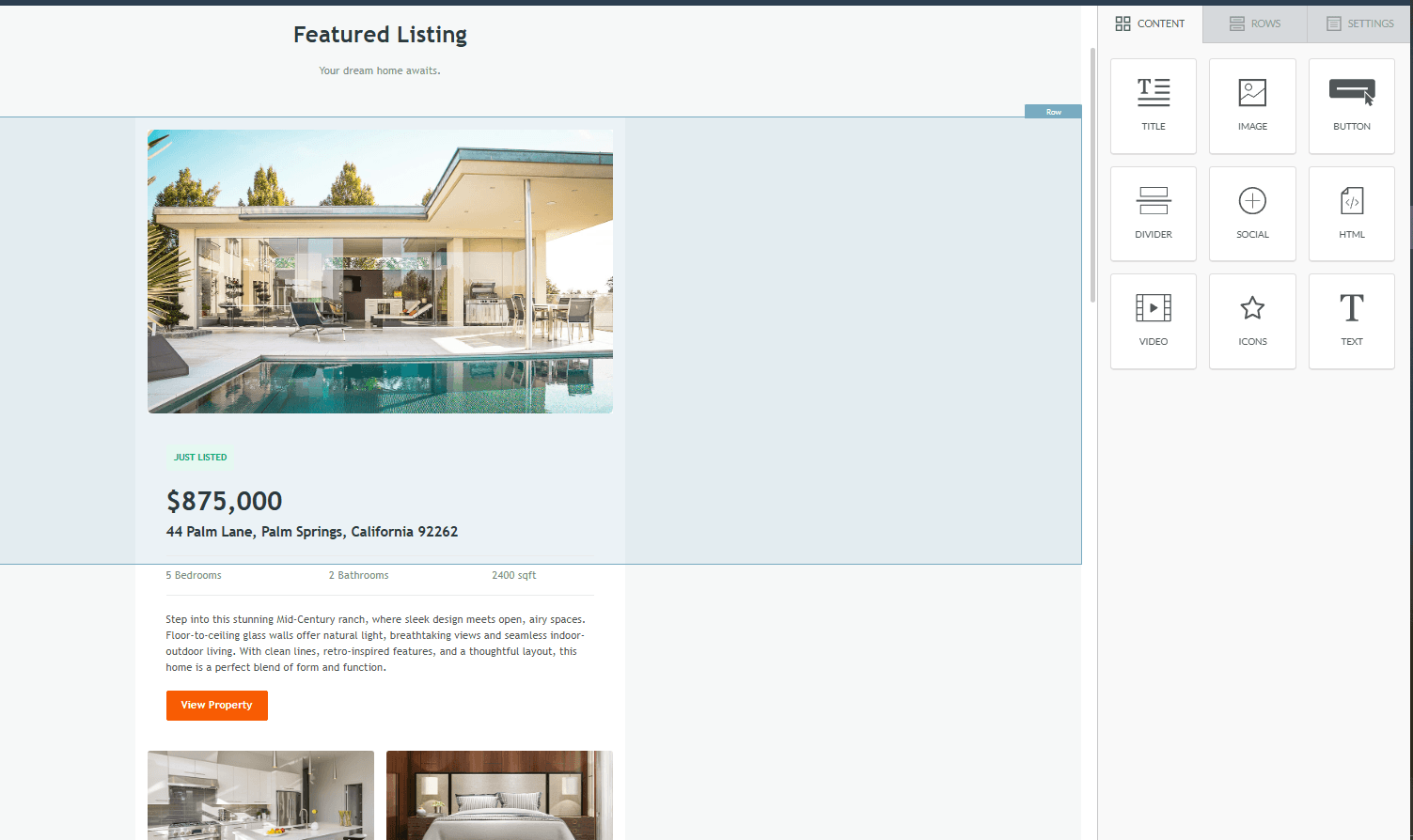
When your team can drop in content and send campaigns confidently, you can spend less time formatting and more time optimizing for conversions.
7. Launch High-ROI Automations First
Automations allow you to scale your agency’s email marketing services by delivering timely, relevant messages for your clients automatically.
Automated email campaigns generate 320% more revenue than non-automated campaigns.

Focus first on these high-ROI automation flows that continue working behind the scenes long after they’re set up.
- Welcome sequence – The most important automation to launch, welcome emails get 4x more opens and 5x more clicks than regular campaigns. They also improve deliverability by prompting engagement, for example, asking new subscribers to reply with their favorite product or service. Use them to introduce the brand, set expectations, and guide subscribers toward a first action.
- Lead nurturing series – Think of this as relationship-building on autopilot. A steady drip of helpful, valuable content keeps subscribers engaged and moves them closer to becoming loyal customers.
- Abandonment and reminder emails – Perfect for retail and event-driven clients. Whether it’s a cart reminder, RSVP nudge, or “you left something behind,” these automations recover lost revenue. For perspective: abandoned cart emails average a 39.07% open rate and 23.33% click-through rate.

- Win-back campaigns: – Not every subscriber stays active forever, but you can re-engage cold contacts with a simple “Still want to hear from us?” message. If they bite, great. If not, you’ll at least have a cleaner, more accurate list moving forward.
8. Manage Campaign Production at Scale
When your agency is juggling multiple clients, a streamlined production process ensures faster turnarounds, fewer mistakes, and more headspace for the work that actually moves the needle.
Build workflows that enable your team to quickly switch between client accounts, reducing friction and minimizing repetitive tasks.
Start by assigning clear roles for each stage of production: copy, design, QA, and final approvals. This improves accountability and prevents the “too many cooks” problem that can create bottlenecks in a campaign delivery.
Next, standardize your QA with a pre-send checklist to identify and address common issues before they go live.
For example, check for:
- Broken or outdated links
- Missing alt text (a short description added to images, making them accessible to screen readers. Also improves email deliverability by showing text when images don’t load.)
- Typos in subject lines, preview text, and body text
- Incorrect merge tags (e.g., {{FirstName}} that doesn’t populate)
- Unbranded or inconsistent design
Finally, use centralized reporting tools to monitor campaign performance across all clients. Being able to quickly scan open rates, click-through rates, and revenue per send helps you spot trends, flag problems early, and share insights with clients without spending hours pulling data.
9. Monitor & Improve Deliverability
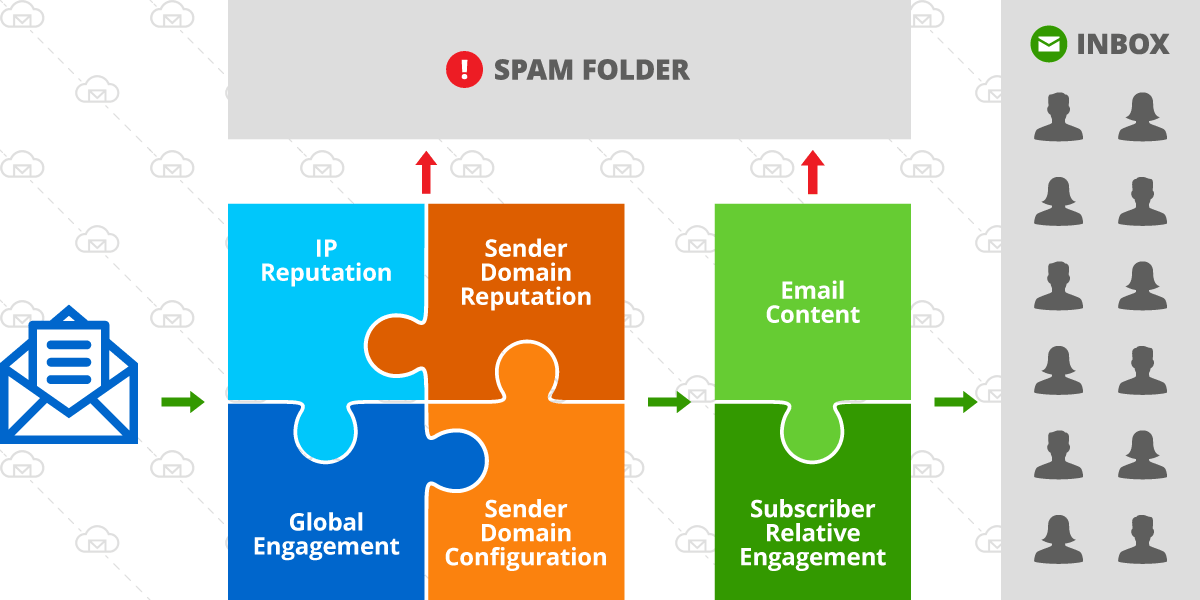
Even the best-designed emails won’t drive results if they land in the dreaded spam folder. That’s why ongoing deliverability management should be a core part of running email marketing at your agency.
Always maintain regular list hygiene. Even if a client’s list was clean at onboarding, it naturally decays over time. Set up automated list cleaning or run validation checks periodically to remove undeliverable or risky contacts.
Create a sunset policy to identify inactive subscribers and gradually remove them from your clients’ lists.
For example, you could segment inactive subscribers who haven’t opened or clicked in the last 90 days and email them less often. And if they don’t engage within 6 months, stop emailing them altogether.
Next, monitor sender reputation across domains. Use tools like Google Postmaster Tools or third-party monitors to track blacklist status and domain-level health.
Another must-have: suppression lists. These are lists of contacts who should never be emailed, unsubscribes, bounced emails, spam complaints, and invalid addresses.
Finally, keep a close eye on bounce and complaint rates. A bounce rate over 2% or a complaint rate above 0.1% means something’s off, typically related to list quality, content relevance, or send frequency. These numbers may seem small, but they’re massive red flags to Gmail, Yahoo, and other providers.
10. Report Results & Prove Value
Your campaigns might be crushing it, but if your clients don’t understand the results, they won’t stick around.
Clear, easy-to-digest reporting is one of the most powerful tools you have for proving value, retaining clients, and upselling additional services.
Keep reports simple, visual, and focused on what matters most. Prioritize metrics that contribute to long-term engagement or purchases, like open and click-through rates, conversions, and revenue.
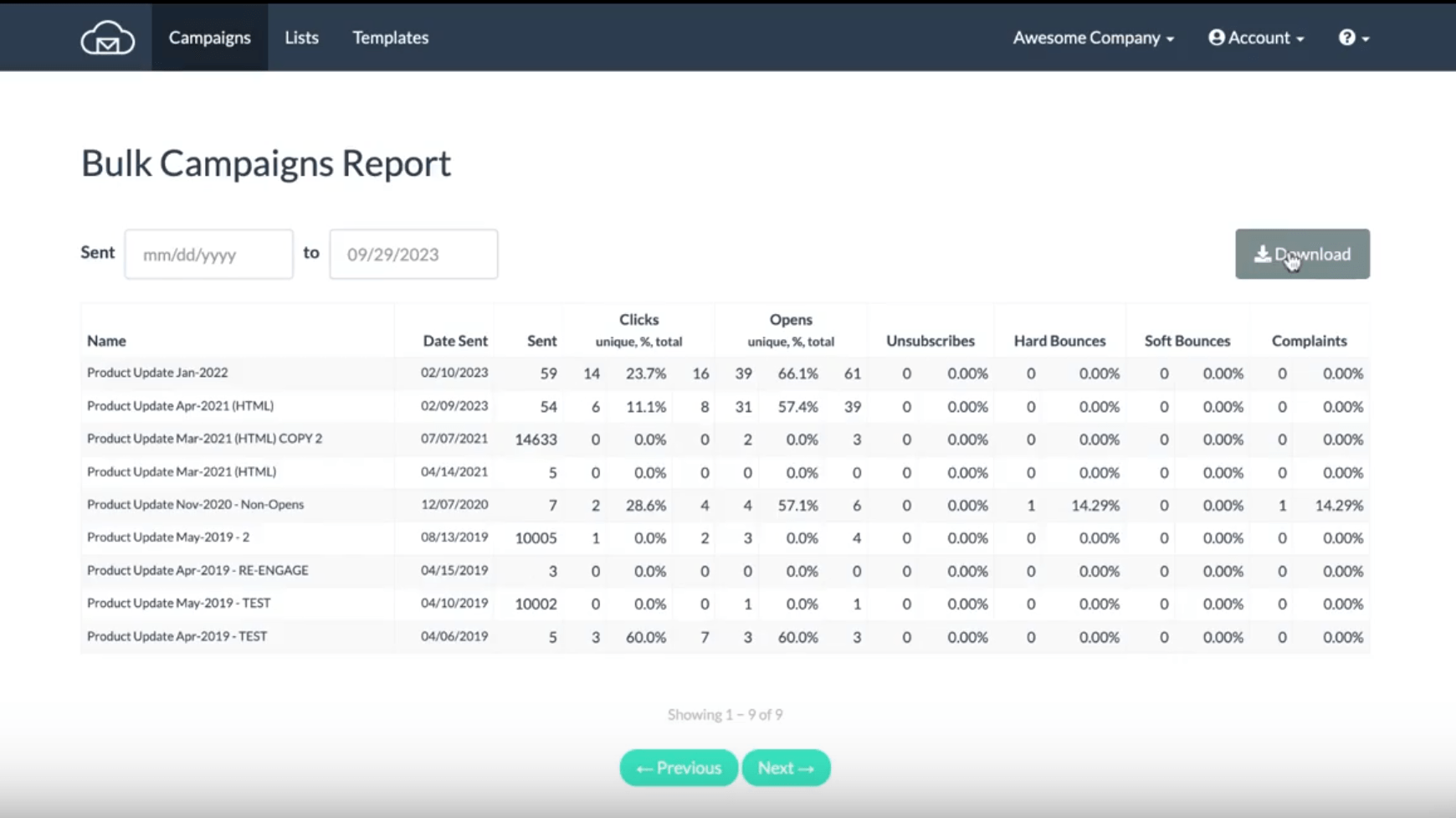
But don’t stop at numbers, add context. Highlight specific wins, like a spike in sign-ups from a nurture flow or high engagement from a cleverly timed holiday promo. Then, use those insights to recommend next steps, whether it’s testing new content, launching an automation, or refining list segmentation.
Great reporting connects the dots between strategy and results. It shows where the client is now, what’s working, and how you’re helping them get to the next level. When clients see that clearly, they stick around longer and are more likely to expand their scope.
How to Price & Package Your Services
Pricing your email marketing services should be simple for clients to understand and scalable for your team to deliver. The best models combine a core service fee with optional add-ons and a platform markup fee to maintain healthy margins without overcomplicating things.
Here’s an easy, proven pricing structure for most email marketing agencies:
Monthly Fee = Base Service + (Add-Ons) + (ESP Markup)
You don’t need 10 packages. You need 2-3 clear tiers, plus upgrade paths as clients grow.
Here are some example packages (for retainer-based clients):
Tier 1 – Essentials (Best for solopreneurs, early-stage eComm, or small nonprofits)
- Price: $500-$1,000/mo
- Up to 2 campaigns/month
- 1 landing page
- Basic list management
- Monthly performance report
- Access to shared templates
Tier 2 – Growth (For brands actively monetizing their list)
- Price: $1,200-$2,500/mo
- 4-6 campaigns/month
- 3 landing pages
- Basic automations (welcome, abandon cart, etc.)
- Branded templates
- Biweekly reporting with insights
- ESP cost included (e.g., +$50-100/month)
Tier 3 – Lifecycle+ (Ideal for SaaS, high-volume eComm, and info products)
- Price: $3,500-$10,000+/mo
- Unlimited campaigns & landing pages
- Advanced flows (re-engagement, onboarding, upsells)
- Full creative (copy + design)
- A/B testing + segmentation strategy
- Custom dashboards
For projects or high-impact campaigns, you could upsell add-ons like:
- Campaign launch fee – $300-$3,000 for seasonal promos, product launches
- Automation buildout – flat fee per flow ($800-$5,000 based on complexity)
- Strategy sprints – quarterly or one-time roadmap planning ($750-$3,000)
- Copywriting packages – standalone email copy, billed per asset or bundle
If you’re using a white-label email marketing platform like BigMailer, you could build in a modest markup to cover administrative and tool overhead. For example:
- If you pay $100/mo for 40k contacts
- You could charge $150-$200
Remember: You’re not selling access to software. You’re selling growth, strategy, and execution. So keep that front and center.
The more services your clients buy, the stronger your results, and the harder it is for clients to leave.
Now’s the Time to Elevate Your Agency’s Email Services
Email marketing is one of the most high-impact services agencies can offer, but only if it’s built on a scalable foundation.
That’s why agencies choose BigMailer. With built-in multi-brand management, white label options, and no extra fees per sub-account or user, it’s purpose-built to help agencies grow their email service offerings without increasing overhead.
If your current tools are clunky, costly, or holding you back, now’s the time to make a change. Clients expect polished, data-driven email services, and the longer you delay upgrading your systems, the more you risk deliverability issues, rising costs, and client churn.
Got questions about how BigMailer makes email marketing more efficient and more profitable for agencies? We’ve got answers. Schedule a free demo today.
Author: Jacob Statler
